Hi,
we recently migrated our Windows Server environment to a new Proxmox VE host and are seeing lower-than-expected responsiveness in some of the Windows VMs. Before investigating the application side any further, we would like to make sure that our Proxmox/VM configuration is appropriate for the hardware.
Host hardware:
The host has two physical NUMA nodes, one per CPU socket.
Relevant VMs:
VM 104 originally had 4 vCPUs. We increased this to 8 for testing, but this did not resolve the general performance concerns.
All VMs currently use:
The Windows guests are running Windows Server 2025 Standard with VirtIO drivers installed.
Problem:
The main issue was initially noticed with the WinSped application, where performance is worse than expected despite the new hardware and no obvious CPU, memory or storage saturation.
However, we also noticed that the Windows Terminal Server itself feels somewhat less responsive than expected for this hardware, independently of WinSped. Therefore we would first like to rule out a suboptimal Proxmox/VM configuration before continuing to investigate the application.
The host currently has around 36 vCPUs assigned across all VMs, compared with 64 physical CPU cores / 128 threads.
We would especially appreciate feedback on:
we recently migrated our Windows Server environment to a new Proxmox VE host and are seeing lower-than-expected responsiveness in some of the Windows VMs. Before investigating the application side any further, we would like to make sure that our Proxmox/VM configuration is appropriate for the hardware.
Host hardware:
- Lenovo ThinkSystem ST650 V3
- 2x Intel Xeon Gold 6548N
- 32 physical cores per CPU / 64 physical cores total / 128 threads
- 128 GB DDR5 ECC RAM
- 4x 1.92 TB Enterprise SATA SSD
- Broadcom 9540-8i RAID controller
- Storage is presented to Proxmox as one ~3.5 TB logical volume and used as LVM-thin
- Proxmox VE 9.0.11
- Kernel 6.14.11-4-pve
The host has two physical NUMA nodes, one per CPU socket.
Relevant VMs:
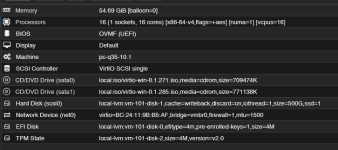
- VM 101 – Windows Server 2025 Standard Terminal Server: 16 vCPU, 56 GB RAM
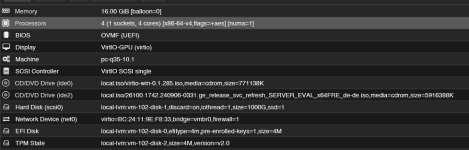
- VM 102 – Windows Server 2025 Standard FSLogix profile server: 4 vCPU, 16 GB RAM
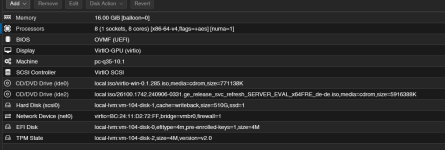
- VM 104 – Windows Server 2025 Standard WinSped/application/database server: currently 8 vCPU, 16 GB RAM
VM 104 originally had 4 vCPUs. We increased this to 8 for testing, but this did not resolve the general performance concerns.
All VMs currently use:
- 1 virtual CPU socket
- CPU type x86-64-v4
- NUMA enabled
- OVMF/UEFI
- VirtIO network adapters
- VirtIO storage
- Ballooning disabled
The Windows guests are running Windows Server 2025 Standard with VirtIO drivers installed.
Problem:
The main issue was initially noticed with the WinSped application, where performance is worse than expected despite the new hardware and no obvious CPU, memory or storage saturation.
However, we also noticed that the Windows Terminal Server itself feels somewhat less responsive than expected for this hardware, independently of WinSped. Therefore we would first like to rule out a suboptimal Proxmox/VM configuration before continuing to investigate the application.
The host currently has around 36 vCPUs assigned across all VMs, compared with 64 physical CPU cores / 128 threads.
We would especially appreciate feedback on:
- Is x86-64-v4 a sensible CPU model for this host, or would host be preferable for maximum Windows Server 2025 performance?
- Does enabling NUMA make sense for VMs of these sizes on this dual-socket host, or could this be counterproductive?
- Are our VirtIO SCSI/controller and cache settings appropriate, especially for the application/database VM?
- Are there any known considerations regarding Windows Server 2025 on current Proxmox/QEMU versions that could affect general responsiveness?
- Is there anything else in the attached host/VM configuration that looks suboptimal?