


Hi,
I'm trying out the automated install feature with PBS for the first time and having some trouble with the token authentication. I'll post plain IPs and tokens here because everything is in LAN anways.
I've gotten to the point where the installer downloads the ISO via http and successfully boots and get's to the point where it requests the answer file - but that fails.
I've confirmed that the token is baked into the iso:
Command used to bake:
I only have one prepared config:
and the tokens - one auto-generated and one manually, neither work.
I'm testing with the latest PBS ISO 4.2-1 and PDM is on 1.1.1 with:
The error looks like this:
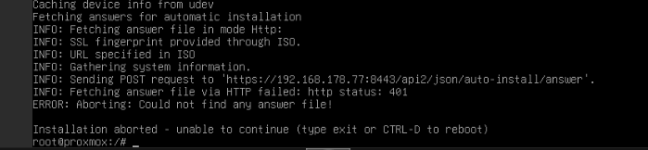
And on the PDM side I see:
When running with curl manually:
which makes me think the authentication worked but then obviously validation fails.
Any help is much appreciated.
I'm trying out the automated install feature with PBS for the first time and having some trouble with the token authentication. I'll post plain IPs and tokens here because everything is in LAN anways.
I've gotten to the point where the installer downloads the ISO via http and successfully boots and get's to the point where it requests the answer file - but that fails.
I've confirmed that the token is baked into the iso:
Code:
root@prox-mini:~# strings /var/www/pxe/proxmox-backup-server-4-2-auto-from-http-url-fp.iso  | grep "pbs-test-1-c3a187b6:9a986c51-2f59-4c34-a"
token = "pbs-test-1-c3a187b6:9a986c51-2f59-4c34-ae6d-b216b0109a31"
Command used to bake:
proxmox-auto-install-assistant prepare-iso /root/proxmox-backup-server-4-2.iso --fetch-from http --url "https://192.168.178.77:8443/api2/json/auto-install/answer" --cert-fingerprint <fingerprint> --answer-auth-token pbs-test-1-c3a187b6:9a986c51-2f59-4c34-ae6d-b216b0109a31 --pxe-loader ipxe --output /var/www/pxe/I only have one prepared config:
Code:
root@prox-mini:~# cat /etc/proxmox-datacenter-manager/autoinst/prepared.cfg
prepared-config: pbs-test-1
    authorized-tokens pbs-test-1-c3a187b6
    country de
    disk-list sda
    disk-list sdb
    disk-mode fixed
    filesystem filesystem=zfs,raid=RAID1
    fqdn pbs-test.pbs-host.de
    is-default true
    keyboard en-us
    mailto bennet@intern
    netif-name-pinning-enabled true
    post-hook-base-url https://192.168.178.77:8443
    post-hook-cert-fp 0a:32:31:9a:68:40:51:db:23:ca:71:d9:b2:36:82:01:2b:0f:76:b8:e7:9d:73:21:e5:3e:ac:13:f3:7e:31:68
    reboot-mode reboot
    reboot-on-error false
    root-password-hashed $y$j9T$M0s2dzUQLWyspZCzkx5CaDlpfRXqN1Qk8LNa9LTFf24$aDmOZbE5CVZ6KXR.AuSEVsaDsgaejm1wBPmp1KPVBG.
    root-ssh-keys ssh-ed25519 AAAAC3NzaC1lZDI1NTE5AAAAILy57aS5kkWzMPxy8htb701NTE/9ljj17Rf/nGB6Ih4c me@bennetgallein.de
    template-counters installation_nr=0
    timezone Europe/Berlin
    use-dhcp-fqdn false
    use-dhcp-network true
and the tokens - one auto-generated and one manually, neither work.
Code:
root@prox-mini:~# cat /etc/proxmox-datacenter-manager/autoinst/tokens.cfg
token: pbs-test-1-c3a187b6
    comment Automatically generated.
    created-by root@pam
    enabled true

token: automated
    comment
    created-by root@pam
    enabled true
    expire-at 0
I'm testing with the latest PBS ISO 4.2-1 and PDM is on 1.1.1 with:
Code:
proxmox-datacenter-manager-meta: 1.1.0 (running kernel: 7.0.2-7-pve)
proxmox-datacenter-manager: 1.1.1 (running version: 1.1.1)
proxmox-kernel-helper: 9.2.0
proxmox-kernel-7.0: 7.0.2-7
proxmox-kernel-7.0.2-7-pve-signed: 7.0.2-7
proxmox-kernel-6.14: 6.14.11-9
proxmox-kernel-6.14.11-9-pve-signed: 6.14.11-9
proxmox-kernel-6.14.11-3-pve-signed: 6.14.11-3
proxmox-kernel-6.14.11-1-pve-signed: 6.14.11-1
proxmox-kernel-6.14.8-2-pve-signed: 6.14.8-2
proxmox-kernel-6.14.8-1-pve-signed: 6.14.8-1
proxmox-kernel-6.8.12-12-pve-signed: 6.8.12-12
proxmox-kernel-6.8: 6.8.12-12
proxmox-kernel-6.8.12-9-pve-signed: 6.8.12-9
ifupdown2: 3.3.0-1+pmx12
proxmox-mail-forward: 1.0.3
proxmox-mini-journalreader: 1.6
proxmox-offline-mirror-helper: 0.7.4
pve-xtermjs: 6.0.0-1
zfsutils-linux: 2.4.2-pve1
The error looks like this:
And on the PDM side I see:
POST /api2/json/auto-install/answer: 401 Unauthorized: [client [::ffff:192.168.178.138]:45672] request failedin the log.When running with curl manually:
Code:
curl -sk -X POST https://192.168.178.77:8443/api2/json/auto-install/answer     -H "Authorization: Bearer pbs-test-1-c3a187b6:9a986c51-2f59-4c34-ae6d-b216b0109a31"     -H "Content-Type: application/json"     -d '{}'     -w "\nHTTP %{http_code}\n"
parameter verification failed:
- '$schema': property is missing and it is not optional
- 'dmi': property is missing and it is not optional
- 'iso': property is missing and it is not optional
- 'network_interfaces': property is missing and it is not optional
- 'product': property is missing and it is not optional
HTTP 400Any help is much appreciated.
Last edited:


