

Hi,
I am trying to migrate VMs from esxi which were installed in uefi mode. I have created proxmox vm, imported disks. Then set boot mode to OVMF and added EFI disk, as doc says. Using EFI shell I am able to boot OS. But automatic boot is not working. I can add boot entry using steps in wiki https://pve.proxmox.com/wiki/OVMF/UEFI_Boot_Entries I do save&commit settings.u
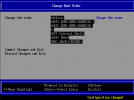
but after reboot there are just default settings - boot order is just gone.
VM config:
I am trying to migrate VMs from esxi which were installed in uefi mode. I have created proxmox vm, imported disks. Then set boot mode to OVMF and added EFI disk, as doc says. Using EFI shell I am able to boot OS. But automatic boot is not working. I can add boot entry using steps in wiki https://pve.proxmox.com/wiki/OVMF/UEFI_Boot_Entries I do save&commit settings.u
but after reboot there are just default settings - boot order is just gone.
VM config:
Code:
agent: 1
bios: ovmf
boot: order=scsi0
cores: 1
cpu: host
efidisk0: local-zfs:vm-100-disk-2,size=1M
machine: q35
memory: 2048
name: zabbix
net0: virtio=2A:64:11:1E:B3:DD,bridge=vmbr0,firewall=1,link_down=1
numa: 0
ostype: l26
scsi0: local-zfs:vm-100-disk-0,size=30G
scsi1: local-zfs:vm-100-disk-1,size=20G
scsihw: virtio-scsi-pci
smbios1: uuid=62c72ece-c8b6-4be5-9a7b-bb537d18e3e3
sockets: 1
vmgenid: adde73a7-2545-470f-a1f1-e3155fe64513
Code:
pve-manager/7.0-11/63d82f4e (running kernel: 5.11.22-4-pve)