[SOLVED] Over 100% CPU Usage with one idle VM running in Proxmox 9.1.5

mokrunka

Member
Jan 25, 2024
6
0
6
Hi there,

I have 2 servers hosting proxmox 9.1.5. They are independent. One is an older R730 with spinning HDDs, and the other is a newer R740 with SSDs. Config info below. I am doing some testing as I've just installed the R740, and I am running a single debian plasma VM on each. The R730 performs 'fine' a bit sluggish but definitely workable. The R740 is very slow. Dragging a window around takes several seconds before it moves.

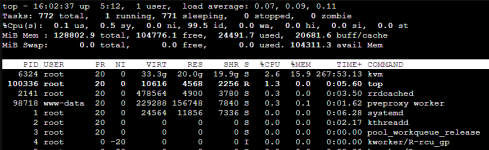
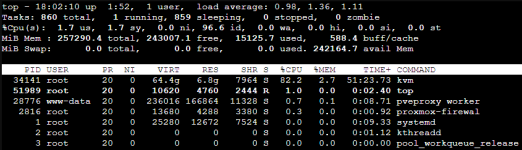
I ran 'top', and noticed that the R740 has the 'kvm' process using somewhere between 80-150% of CPU, whereas the R730 is around <5%.
top command on R740:
1771552942729.png

top command on R730:
1771552991354.png

Code:
root@R740:~# qm config 101
boot: order=scsi0;net0
cores: 10
cpu: x86-64-v2-AES
memory: 64000
meta: creation-qemu=10.1.2,ctime=1771546753
name: DebianPlasma2
net0: virtio=BC:24:11:64:B8:82,bridge=vmbr0,firewall=1
numa: 0
ostype: l26
scsi0: VM_Storage:101/vm-101-disk-0.qcow2,iothread=1,size=500G,ssd=1
scsihw: virtio-scsi-single
smbios1: uuid=2288a108-a4cf-4565-8e2e-07b13fa2c2ab
sockets: 1
vga: std,memory=512
vmgenid: 5e5ee4ff-2c24-4893-8322-5c4b35b7bc4d

Code:
root@proxmox:~# qm config 102
boot: order=scsi0;scsi2
cores: 10
cpu: x86-64-v2-AES
memory: 32000
meta: creation-qemu=9.2.0,ctime=1764540148
name: debianplasma
net0: virtio=BC:24:11:4E:53:4F,bridge=vmbr0,firewall=1
numa: 0
ostype: l26
scsi0: VM_Storage:102/vm-102-disk-0.qcow2,iothread=1,size=500G,ssd=1
scsi2: VM_Storage:102/vm-102-disk-1.qcow2,iothread=1,size=500G,ssd=1
scsihw: virtio-scsi-single
smbios1: uuid=94bd9b00-1668-434b-9131-505964c38ed2
sockets: 1
unused0: Main_Storage_Pool:vm-102-disk-0
vga: std,memory=512
virtiofs0: testmap
vmgenid: 2b7ebf06-22a1-4fe2-995b-2c2ea9abb552

I suspect there is some software issue that's causing this, but I'm not sure where to start. The proxmox hosts are configured similarly (same proxmox version at least). The R740 should be at least as performant as the R730 given the CPUs I have in each machine. RAM is similar in both hosts. Both hosts are using HBA330 HBAs, but the R740 is using SSDs.
 
If you press c or run it like top -co%CPU you can see the command arguments. Have you also tried this inside the VM?
 
Thanks for that. I didn't know of that option. output from your suggested commands both within the VM and the host is below.

Both VMs actually show really high CPU usage of kvm inside the VMs. However, the host for the R740 also shows CPU usage of >100% for the kvm process, whereas for my R730 (which again, is working fine), it's only around 50% or so. I tested it by dragging a window around in the VM while watching top, and it is VERY slow in the R740, whereas in the R730, it works as expected (not fast, since I have no GPU, but it's tolerable - and this is the level of performance I'd expect to get at minimum from the R740).

on the R740 (the one with the problem):
proxmox host:
Code:
34141 root      20   0   64.4g   7.0g   7964 S  77.9   2.8  68:17.35 /usr/bin/kvm -id 101 -name DebianPlasma2,debug-threads=on -no-s+
  61
debian VM:
Code:
1075 root -2 0 3028688 449444 257904 S 62.9 0.7 28:37.72 /usr/bin/kwin_wayland --wayland-fd 7 --socket wayland-0 --xwayland-fd 8 -xwayland-fd 9 --xwayland-display :1 --xwayland-xauthority /run/usr/1000/xauth_qiVqHi --xwayland

on the machine that runs fine:
proxmox host:
Code:
6324 root      20   0   33.3g  20.0g  19.9g S   3.3  15.9 268:52.11 /usr/bin/kvm -id 102 -name debianplasma,debug-threads=on +

debian VM:

Code:
1075 root -2 0 3028688 449444 257904 S 62.9 0.7 28:37.72 /usr/bin/kwin_wayland --wayland-fd 7 --socket wayland-0 --xwayland-fd 8 -xwayland-fd 9 --xwayland-display :1 --xwayland-xauthority /run/usr/1000/xauth_WvkQiB --xwayland
 
Last edited:
What CPUs are in these servers? Have you compared the base performance on the node and inside the VMs with something like geekbench/7z/sysbench?
Also check the CPU governor with cpupower frequency-info. Unfortunately I don't have a lot of experience running GUI based VMs.
 
What CPUs are in these servers? Have you compared the base performance on the node and inside the VMs with something like geekbench/7z/sysbench?
Also check the CPU governor with cpupower frequency-info. Unfortunately I don't have a lot of experience running GUI based VMs.
Hi there, in the R730, I have dual Xeon E5 2630 v4 20 core CPUs, and in the R740, I have dual Xeon Silver 4214 28 core CPUs.

I have not benchmarked them within the VM against each other. On paper, the newer CPUs (in the newer R740 - the one that’s running slow), should be a good bit faster in multithreaded applications. I’m not doing anything super CPU intensive - these are lab machines so beyond confirming it should be somewhat faster when I bought it, I don’t really care about the performance too much (beyond of course wanting it to work at least as well as my other server in a VM).

What should I be looking for in the cpupower command? I’m not familiar with the term CPU governor.

There are some other threads a couple years old I’ve found on here that have other users with similar issues with the kvm process using very high CPU. In those cases, the devs responded and after some troubleshooting confirmed that there was a big in the kvm application and recommended a downgrade to another version as a fix. My hope is that it’s something like this and this will get the attention of a dev/team member that can help.
 
The benchmark and governor test is to see if the node performance is different for some reason. Just share the outputs.
In your specific case I'd also look into NUMA and test host CPU.
 
  • Like
Reactions: mokrunka
Server running normally:
Code:
root@proxmox:~# cpupower frequency-info
analyzing CPU 33:
  driver: intel_cpufreq
  CPUs which run at the same hardware frequency: 33
  CPUs which need to have their frequency coordinated by software: 33
  maximum transition latency: 20.0 us
  hardware limits: 1.20 GHz - 3.10 GHz
  available cpufreq governors: conservative ondemand userspace powersave performance schedutil
  current policy: frequency should be within 1.20 GHz and 3.10 GHz.
                  The governor "performance" may decide which speed to use
                  within this range.
  current CPU frequency: Unable to call hardware
  current CPU frequency: 1.20 GHz (asserted by call to kernel)
  boost state support:
    Supported: yes
    Active: yes

Slow R740:
Code:
root@R740:~# cpupower frequency-info
analyzing CPU 16:
  no or unknown cpufreq driver is active on this CPU
  CPUs which run at the same hardware frequency: Not Available
  CPUs which need to have their frequency coordinated by software: Not Available
  maximum transition latency:  Cannot determine or is not supported.
Not Available
  available cpufreq governors: Not Available
  Unable to determine current policy
  current CPU frequency: Unable to call hardware
  current CPU frequency:  Unable to call to kernel
  boost state support:
    Supported: yes
    Active: yes

I'm not sure what to do with this information, but I see that proxmox seems to know nothing about my new CPUs, which can't be good...
 
Also, maybe I should have added, this service was not installed on either host, I had to install it. And the command was run in the host, not within the VMs.
 
Your cpupower frequency-info output on the R740 is the key here:

no or unknown cpufreq driver is active on this CPU

Your working R730 has intel_cpufreq with the performance governor. The R740 has no frequency scaling driver at all. So the Xeon Silver 4214s are probably stuck at base clock (2.2 GHz) or sitting in some weird conservative power state. That would explain both things you're seeing. The sluggish VM and the high KVM CPU usage on the host. The CPU is clocked low, so everything takes longer and burns more relative CPU time to get the same work done.

I'd bet this is your Dell BIOS System Profile setting. Check iDRAC > BIOS Settings > System Profile Settings. If "System Profile" is set to "Performance", Dell handles frequency management itself and doesn't give Linux a cpufreq interface to work with. Change it to either:
- Performance Per Watt (OS). This hands control to Linux
- Or Custom with CPU Power Management = OS DBPM, C-States = Enabled, Turbo Boost = Enabled
After the BIOS change and reboot, check that the driver loaded:

cat /sys/devices/system/cpu/cpu0/cpufreq/scaling_driver # should now show "intel pstate" or "intel cpufreq"

cpupower frequency-set -g performance
cpupower frequency-info

If the driver still isn't there after the BIOS change, check your kernel command line for anything blocking it:

cat /proc/cmdline

Look for intel_pstate=disable or noacpi and remove if present.

Two other things worth checking on VM 101 while you're at it:

CPU type. Run qm config 101 | grep cpu. If it's set to kvm64 or qemu64, the VM gets a barebones emulated CPU with none of the modern instruction extensions. That kills desktop compositing performance (kwin especially). Set it to host if it isn't already:

qm set 101 --cpu host

NUMA. Dual socket means 2 NUMA nodes. If your VM has more vCPUs than one socket's worth of cores (12c/24t per 4214) and NUMA isn't configured, cross-node memory access adds real latency. Check with qm config 101 | grep numa and enable if needed:

qm set 101 --numa 1

Fix the cpufreq driver first though. That's almost certainly the main issue here.
 
Thank you!! Yes, indeed it was the setting in the system profile! I changed it to Performance Per Watt (OS), and now it is much smoother.

By the way, I did run the benchmark (geekbench) tool that you recommended. The new system scores 2X points as the old one, which is what I'd expect. Very much appreciate your help. Now I'm on to figure out how to get my 1080Ti passed thru.