

Opt-in Linux 7.0 Kernel for Proxmox VE 9 available on test and no-subscription
- Thread starter t.lamprecht
- Start date
You are using an out of date browser. It may not display this or other websites correctly.
You should upgrade or use an alternative browser.
You should upgrade or use an alternative browser.
Kernel 7.0.0-2-pve will freeze the host if total free RAM becomes low (< 5 to 10% free). Any one seeing this issue? I just have to back off the RAM requirements for my VMs a little (now around 87% usage) and everything works again.
Host do not freeze when on `6.17.13-4-pve` though.
FYI. Been meaning to tidy up this host anyway , but now problem solved.
---
AMD Ryzen 5 5600G, 64 GB RAM
Host do not freeze when on `6.17.13-4-pve` though.
FYI. Been meaning to tidy up this host anyway
, but now problem solved. ---
AMD Ryzen 5 5600G, 64 GB RAM

Testing since 2026-04-11 on four hosts.
So far so good overall — io_wait accounting issue still present / data unreliable, but aside from that stable (no crashes) on 3/4 hosts.
The fourth host (used for game streaming to a client via Moonlight/Sunshine, with a Windows 11 VM and an AMD RX 6900 XT passed through) shows a clear regression on kernel 7.x: the Moonlight client connects, negotiates the session, and initializes the Vulkan decoder successfully, but then video frames never fully arrive. Client log:
The "0+1=1 received < 77 needed" pattern indicates massive packet loss on the video stream (1 of 77 expected FEC/data packets per frame arriving) — so this is almost certainly a networking regression rather than a GPU passthrough issue. Control/audio/session traffic works, only the high-pps UDP video payload is affected.
Most likely related to the networking changes in kernel 7.x interacting with our specific setup:
So far so good overall — io_wait accounting issue still present / data unreliable, but aside from that stable (no crashes) on 3/4 hosts.
The fourth host (used for game streaming to a client via Moonlight/Sunshine, with a Windows 11 VM and an AMD RX 6900 XT passed through) shows a clear regression on kernel 7.x: the Moonlight client connects, negotiates the session, and initializes the Vulkan decoder successfully, but then video frames never fully arrive. Client log:
Code:
[...]
00:00:47 - SDL Info (0): Frame pacing disabled: target 240 Hz with 240 FPS stream
00:00:47 - SDL Info (0): Using Vulkan video decoding
00:00:47 - SDL Info (0): FFmpeg-based video decoder chosen
00:00:47 - SDL Info (0): Dropping window event during flush: 6 (3840 2160)
00:00:47 - SDL Info (0): IDR frame request sent
00:00:50 - SDL Info (0): Received first video packet after 2500 ms
00:00:50 - SDL Info (0): Unrecoverable frame 268: 0+1=1 received < 77 needed
00:00:50 - SDL Info (0): Unrecoverable frame 271: 0+1=1 received < 77 needed
00:00:50 - SDL Info (0): Unrecoverable frame 274: 0+1=1 received < 77 needed
00:00:50 - SDL Info (0): Unrecoverable frame 277: 0+1=1 received < 77 needed
00:00:50 - SDL Info (0): Unrecoverable frame 279: 0+1=1 received < 77 needed
00:00:50 - SDL Info (0): Unrecoverable frame 283: 0+1=1 received < 77 needed
00:00:50 - SDL Info (0): Unrecoverable frame 285: 0+1=1 received < 77 needed
[...]
The "0+1=1 received < 77 needed" pattern indicates massive packet loss on the video stream (1 of 77 expected FEC/data packets per frame arriving) — so this is almost certainly a networking regression rather than a GPU passthrough issue. Control/audio/session traffic works, only the high-pps UDP video payload is affected.
Most likely related to the networking changes in kernel 7.x interacting with our specific setup:
- Mellanox ConnectX-5 (MCX512A-ACAT-ML), mlx5_core driver
- OVS bridge (vmbr0)
- OVS bond over both NIC ports, bond_mode=balance-tcp, LACP active
- virtio-net in the VM with queues=8
Well... not so much freezing but I have something - non-issue I am proper pushing that box to its limits, its only a dev box. There is no bug or no reason why other than I have, purposely, crammed that box full. This is not on Debian, Proxmox or anything except my empty wallet to add another host. For shame.Kernel 7.0.0-2-pve will freeze the host if total free RAM becomes low (< 5 to 10% free). Any one seeing this issue? I just have to back off the RAM requirements for my VMs a little (now around 87% usage) and everything works again.
Host do not freeze when on `6.17.13-4-pve` though.
FYI. Been meaning to tidy up this host anyway
---
AMD Ryzen 5 5600G, 64 GB RAM
I see much better KSM occuring when all kernel types of linux hosts and all Windows versions are same patch level. During patching this month with kernel version 7, I saw a huge decrease in overall KSM whilst machines were differing versions. Once all patching completed and Windows in particular same patch level, KSM kicks back in again and memory availabilty increases once again.
I guess, the clue is in the name "Same Page Merging"...
This month that really overloaded box struggled. Must find a better paying job to afford another machine!
Try use the sriov DKMS driver. They have build for Kernel 7.00Doesnt work on my 245K
Code:[ 4.241268] i915 0000:00:02.0: driver does not support SR-IOV configuration via sysfs<br>
Even when lspci is showing it is supported
Code:Capabilities: [320 v1] Single Root I/O Virtualization (SR-IOV) IOVCap: Migration- 10BitTagReq+ IntMsgNum 0 IOVCtl: Enable- Migration- Interrupt- MSE- ARIHierarchy- 10BitTagReq- IOVSta: Migration- Initial VFs: 7, Total VFs: 7, Number of VFs: 0, Function Dependency Link: 00 VF offset: 1, stride: 1, Device ID: 7d67 Supported Page Size: 00000553, System Page Size: 00000001 Region 0: Memory at 000000b010000000 (64-bit, prefetchable) VF Migration: offset: 00000000, BIR: 0
But intel website states its unsupported on Meteor Lake
https://www.intel.com/content/www/us/en/support/articles/000093216/graphics/processor-graphics.html
https://github.com/strongtz/i915-sriov-dkms/actions/runs/24812325328/artifacts/6592469285
Never mind this post - as it turned out, it was a glitch of one container that caused this.
I have tried kernel 7.0.0-2-pve now and it works - with a big caveat; I found my machine to hover at 8.5% load instead of 5.8% with 6.17.13-3-pve, which in turn uses ~40W more (i.e. 230W instead of 190W) for the whole machine:
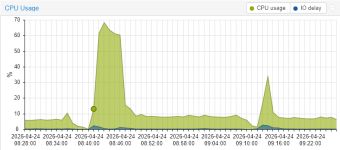
(in this picture, the first period is with 6.17.3, then 7.0, then 6.17.3 again)
The machine is an i5-14600K with 128 GByte DDR4 and two 2TB NVME disks with 8x18 TByte SATA disks in raidz2 running 10 VMs and 5 LXCs.
What was most surprising is the fact that most VMs and LXCs had a lower load with 7.0:
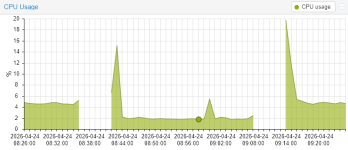
with only the Docker VM (Ubuntu 24.04) with ~20 containers being the outlier:
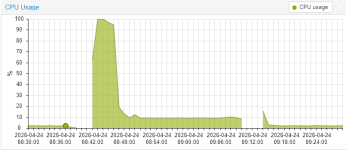
I find that strange, because it is a VM with its own kernel (6.8.0-110-generic) that has not changed between runs.
Also, I have another docker VM that showed less load with 7.0...
I have tried kernel 7.0.0-2-pve now and it works - with a big caveat; I found my machine to hover at 8.5% load instead of 5.8% with 6.17.13-3-pve, which in turn uses ~40W more (i.e. 230W instead of 190W) for the whole machine:
(in this picture, the first period is with 6.17.3, then 7.0, then 6.17.3 again)
The machine is an i5-14600K with 128 GByte DDR4 and two 2TB NVME disks with 8x18 TByte SATA disks in raidz2 running 10 VMs and 5 LXCs.
What was most surprising is the fact that most VMs and LXCs had a lower load with 7.0:
with only the Docker VM (Ubuntu 24.04) with ~20 containers being the outlier:
I find that strange, because it is a VM with its own kernel (6.8.0-110-generic) that has not changed between runs.
Also, I have another docker VM that showed less load with 7.0...
Last edited:
that gives me a 404. doesnt seem that version still exists.Try use the sriov DKMS driver. They have build for Kernel 7.00
https://github.com/strongtz/i915-sriov-dkms/actions/runs/24812325328/artifacts/6592469285
so no intel sriov for 7.0 right now.
that gives me a 404. doesnt seem that version still exists.
so no intel sriov for 7.0 right now.
It does exist, but the version remains the same as the existing plugin.
https://github.com/strongtz/i915-sriov-dkms/issues/429#issuecomment-4301255005
the artifacts still lead to a 404, so how am i supposed to get the version that builds the module on 7.0?It does exist, but the version remains the same as the existing plugin.
https://github.com/strongtz/i915-sriov-dkms/issues/429#issuecomment-4301255005
edit: after signing in i can download the artifacts.
edit2: dkms modules compiled fine on 7.0.0-3 and work fine on both pentium 8505 and i5 1340p. looks like sr-iov is back on the menu boys

Last edited:
@t.lamprecht
I saw this commit:
https://git.proxmox.com/?p=pve-kernel.git;a=commit;h=1e810d779b50dd5e7395fa65ad7b3cbf89b910c1
Which is great. Also saw some testing from David Riley here:
https://lore.kernel.org/all/c91391f4-57b8-4bad-aba8-2c47c285ab27@proxmox.com/
But to take full advantage of MBEC/GMET, doesn't all this require QEMU support, which is not yet implemented?
https://gitlab.com/qemu-project/qemu/-/work_items/3099
David Riley mentioned that Proxmox has a version of QEMU with Jon Kohler's patches:
https://lore.kernel.org/lkml/c91391f4-57b8-4bad-aba8-2c47c285ab27@proxmox.com/
But is that actually available in no-subscription to use? I went through the commit history and did not see it.
I can see it's pushed upstream to qemu 11:
https://lore.kernel.org/qemu-devel/pw53f3hacd2a3c54p2oepee5je4gfousuxiquzyd7mdroqmujo@6drz7tyr4eff/
But I was curious if this was already backported to pve's qemu or if we have to wait until 11
I saw this commit:
https://git.proxmox.com/?p=pve-kernel.git;a=commit;h=1e810d779b50dd5e7395fa65ad7b3cbf89b910c1
Which is great. Also saw some testing from David Riley here:
https://lore.kernel.org/all/c91391f4-57b8-4bad-aba8-2c47c285ab27@proxmox.com/
But to take full advantage of MBEC/GMET, doesn't all this require QEMU support, which is not yet implemented?
https://gitlab.com/qemu-project/qemu/-/work_items/3099
David Riley mentioned that Proxmox has a version of QEMU with Jon Kohler's patches:
https://lore.kernel.org/lkml/c91391f4-57b8-4bad-aba8-2c47c285ab27@proxmox.com/
But is that actually available in no-subscription to use? I went through the commit history and did not see it.
I can see it's pushed upstream to qemu 11:
https://lore.kernel.org/qemu-devel/pw53f3hacd2a3c54p2oepee5je4gfousuxiquzyd7mdroqmujo@6drz7tyr4eff/
But I was curious if this was already backported to pve's qemu or if we have to wait until 11
Last edited:
Now we can test GNOME 50 on linux kernet 7We recently uploaded the 7.0 (rc6) kernel to our repositories. The current default kernel for the Proxmox VE 9 series is still 6.17, but 7.0 is now an option.
We plan to use the 7.0 kernel as the new default for the upcoming Proxmox VE 9.2 and Proxmox Backup Server 4.2 releases planned later in Q2.
This follows our tradition of upgrading the Proxmox VE kernel to match the current Ubuntu version until we reach an Ubuntu LTS release, at which point we will only provide newer kernels as an opt-in option. The 7.0 kernel is based on the upcoming Ubuntu 26.04 Resolute release.
We have run this kernel on some of our test setups over the last few days without encountering any significant issues. However, for production setups, we strongly recommend either using the 6.17-based kernel or testing on similar hardware/setups before upgrading any production nodes to 7.0.
How to install:
Future updates to the 7.0 kernel will now be installed automatically when upgrading a node.
- Ensure that you either have the pve-test repository (or pbs-test for Proxmox Backup Server) or the respective no-subscription repositories set up correctly.
You can do so via CLI text editor or using the web UI under Node -> Repositories.- Open a shell as root, e.g., through SSH or using the integrated shell on the web UI.
- apt update
- apt install proxmox-kernel-7.0
- reboot
Please note:
- The current 6.17 kernel is still supported and will stay the default kernel until further notice.
- There were many changes for improved hardware support and performance improvements across the board.
For a good overview of prominent changes, we recommend checking out the kernel-newbies site for 6.18, 6.19, and 7.0.- The kernel is also available on the test and no-subscription repositories of Proxmox Backup Server and Proxmox Mail Gateway, and in the test repo of Proxmox Datacenter Manager.
- The new 7.0-based opt-in kernel will not be made available for the previous Proxmox VE 8 release series.
- If you're unsure, we recommend continuing to use the 6.17-based kernel for now.
Feedback about how the new kernel performs in any of your setups is welcome!
Please provide basic details like CPU model, storage types used, ZFS as root file system, and the like, for both positive feedback or if you ran into issues where using the opt-in 7.0 kernel seems to be the likely cause.
Known Issues:
None at the time of writing.
Edit 2026-04-20: the kernel is now also available on the no-subscription repository.

After updating my test-installation of PBS to the new 7.0 kernel, I see the following error from time to time:
I see currently no negative effects from this error; it appears only on the console and dmesg.
uname:
Used system: PBS VM running on PVE
Mounted file systems:
Code:
[ 6741.128241] ------------[ cut here ]------------
[ 6741.128252] [CRTC:36:crtc-0] vblank wait timed out
[ 6741.128258] WARNING: drivers/gpu/drm/drm_atomic_helper.c:1921 at drm_atomic_helper_wait_for_vblanks.part.0+0x240/0x260, CPU#0: kworker/0:0/6947
[ 6741.128281] Modules linked in: nfsv3 nfs_acl rpcsec_gss_krb5 auth_rpcgss nfsv4 nfs lockd grace netfs bonding tls sunrpc binfmt_misc aesni_intel pcspkr vmgenid bochs input_leds joydev mac_hid sch_fq_codel efi_pstore nfnetlink vsock_loopback vmw_vsock_virtio_transport_common vmw_vsock_vmci_transport vsock vmw_vmci dmi_sysfs qemu_fw_cfg ip_tables x_tables autofs4 hid_generic usbhid hid zfs(PO) spl(O) btrfs libblake2b xor raid6_pq psmouse serio_raw i2c_piix4 i2c_smbus uhci_hcd ehci_pci ehci_hcd pata_acpi floppy
[ 6741.128340] CPU: 0 UID: 0 PID: 6947 Comm: kworker/0:0 Tainted: P           O        7.0.0-3-pve #1 PREEMPT(lazy)
[ 6741.128350] Tainted: [P]=PROPRIETARY_MODULE, [O]=OOT_MODULE
[ 6741.128355] Hardware name: QEMU Standard PC (i440FX + PIIX, 1996), BIOS 4.2025.05-2 11/13/2025
[ 6741.128363] Workqueue: events drm_fb_helper_damage_work
[ 6741.128370] RIP: 0010:drm_atomic_helper_wait_for_vblanks.part.0+0x247/0x260
[ 6741.128377] Code: ff 84 c0 74 86 48 8d 75 a8 4c 89 f7 e8 c2 1e 3f ff 8b 45 98 85 c0 0f 85 f7 fe ff ff 48 8d 3d c0 6a 97 01 48 8b 53 20 8b 73 60 <67> 48 0f b9 3a e9 df fe ff ff e8 ba 83 51 00 66 2e 0f 1f 84 00 00
[ 6741.128391] RSP: 0018:ffffd51c4005fbd0 EFLAGS: 00010246
[ 6741.128396] RAX: 0000000000000000 RBX: ffff8e1c450c6bd0 RCX: 0000000000000000
[ 6741.128403] RDX: ffff8e1cbfbfb7e0 RSI: 0000000000000024 RDI: ffffffffa4623b50
[ 6741.128409] RBP: ffffd51c4005fc40 R08: 0000000000000000 R09: 0000000000000000
[ 6741.128415] R10: 0000000000000000 R11: 0000000000000000 R12: 0000000000000000
[ 6741.128422] R13: 0000000000000000 R14: ffff8e1c5eea4c30 R15: ffff8e1c46589c80
[ 6741.128430] FS:  0000000000000000(0000) GS:ffff8e1d18b0f000(0000) knlGS:0000000000000000
[ 6741.128438] CS:  0010 DS: 0000 ES: 0000 CR0: 0000000080050033
[ 6741.128444] CR2: 00007ad53800f228 CR3: 000000001bffd000 CR4: 00000000000006f0
[ 6741.128452] Call Trace:
[ 6741.128456]  <TASK>
[ 6741.128461]  ? __pfx_autoremove_wake_function+0x10/0x10
[ 6741.128469]  drm_atomic_helper_commit_tail+0xa9/0xd0
[ 6741.128475]  commit_tail+0x11f/0x1b0
[ 6741.128480]  drm_atomic_helper_commit+0x132/0x160
[ 6741.128486]  drm_atomic_commit+0xad/0xf0
[ 6741.128492]  ? __pfx___drm_printfn_info+0x10/0x10
[ 6741.128498]  drm_atomic_helper_dirtyfb+0x1d5/0x2c0
[ 6741.128505]  drm_fbdev_shmem_helper_fb_dirty+0x4d/0xb0
[ 6741.128510]  drm_fb_helper_damage_work+0xf2/0x1a0
[ 6741.128516]  process_one_work+0x1a9/0x3c0
[ 6741.128522]  worker_thread+0x1b8/0x360
[ 6741.128527]  ? _raw_spin_unlock_irqrestore+0x11/0x60
[ 6741.128534]  ? __pfx_worker_thread+0x10/0x10
[ 6741.128539]  kthread+0xf7/0x130
[ 6741.128707]  ? __pfx_kthread+0x10/0x10
[ 6741.128859]  ret_from_fork+0x2dc/0x3a0
[ 6741.129002]  ? __pfx_kthread+0x10/0x10
[ 6741.129141]  ret_from_fork_asm+0x1a/0x30
[ 6741.129280]  </TASK>
[ 6741.129428] ---[ end trace 0000000000000000 ]---
I see currently no negative effects from this error; it appears only on the console and dmesg.
uname:
Linux pbs 7.0.0-3-pve #1 SMP PREEMPT_DYNAMIC PMX 7.0.0-3 (2026-04-21T22:56Z) x86_64 GNU/LinuxUsed system: PBS VM running on PVE
Mounted file systems:
- root on ZFS
- S3 Cache Disk on ext4
- Backup storage (beside S3 off-site backup) on NFS
I am using arrow lake and it also work fine and seem much more stable compare to 6.17, but still need to wait a little bit longer to catch any unforeseen issues.the artifacts still lead to a 404, so how am i supposed to get the version that builds the module on 7.0?
edit: after signing in i can download the artifacts.
edit2: dkms modules compiled fine on 7.0.0-3 and work fine on both pentium 8505 and i5 1340p. looks like sr-iov is back on the menu boys
My uptime now is still less than a month
After searching the error online, IT seems that the emulated VGA adapter is not giving the kernel the proper vblanks responce it is looking for.. IT is a harmless warning. But if you want to fix it, change the display for the VM to VirtIO-GPU. That should also use less resources, as it isn't emulating a VGA card.After updating my test-installation of PBS to the new 7.0 kernel, I see the following error from time to time:
Code:[ 6741.128241] ------------[ cut here ]------------ [ 6741.128252] [CRTC:36:crtc-0] vblank wait timed out [ 6741.128258] WARNING: drivers/gpu/drm/drm_atomic_helper.c:1921 at drm_atomic_helper_wait_for_vblanks.part.0+0x240/0x260, CPU#0: kworker/0:0/6947 [ 6741.128281] Modules linked in: nfsv3 nfs_acl rpcsec_gss_krb5 auth_rpcgss nfsv4 nfs lockd grace netfs bonding tls sunrpc binfmt_misc aesni_intel pcspkr vmgenid bochs input_leds joydev mac_hid sch_fq_codel efi_pstore nfnetlink vsock_loopback vmw_vsock_virtio_transport_common vmw_vsock_vmci_transport vsock vmw_vmci dmi_sysfs qemu_fw_cfg ip_tables x_tables autofs4 hid_generic usbhid hid zfs(PO) spl(O) btrfs libblake2b xor raid6_pq psmouse serio_raw i2c_piix4 i2c_smbus uhci_hcd ehci_pci ehci_hcd pata_acpi floppy [ 6741.128340] CPU: 0 UID: 0 PID: 6947 Comm: kworker/0:0 Tainted: P O 7.0.0-3-pve #1 PREEMPT(lazy) [ 6741.128350] Tainted: [P]=PROPRIETARY_MODULE, [O]=OOT_MODULE [ 6741.128355] Hardware name: QEMU Standard PC (i440FX + PIIX, 1996), BIOS 4.2025.05-2 11/13/2025 [ 6741.128363] Workqueue: events drm_fb_helper_damage_work [ 6741.128370] RIP: 0010:drm_atomic_helper_wait_for_vblanks.part.0+0x247/0x260 [ 6741.128377] Code: ff 84 c0 74 86 48 8d 75 a8 4c 89 f7 e8 c2 1e 3f ff 8b 45 98 85 c0 0f 85 f7 fe ff ff 48 8d 3d c0 6a 97 01 48 8b 53 20 8b 73 60 <67> 48 0f b9 3a e9 df fe ff ff e8 ba 83 51 00 66 2e 0f 1f 84 00 00 [ 6741.128391] RSP: 0018:ffffd51c4005fbd0 EFLAGS: 00010246 [ 6741.128396] RAX: 0000000000000000 RBX: ffff8e1c450c6bd0 RCX: 0000000000000000 [ 6741.128403] RDX: ffff8e1cbfbfb7e0 RSI: 0000000000000024 RDI: ffffffffa4623b50 [ 6741.128409] RBP: ffffd51c4005fc40 R08: 0000000000000000 R09: 0000000000000000 [ 6741.128415] R10: 0000000000000000 R11: 0000000000000000 R12: 0000000000000000 [ 6741.128422] R13: 0000000000000000 R14: ffff8e1c5eea4c30 R15: ffff8e1c46589c80 [ 6741.128430] FS: 0000000000000000(0000) GS:ffff8e1d18b0f000(0000) knlGS:0000000000000000 [ 6741.128438] CS: 0010 DS: 0000 ES: 0000 CR0: 0000000080050033 [ 6741.128444] CR2: 00007ad53800f228 CR3: 000000001bffd000 CR4: 00000000000006f0 [ 6741.128452] Call Trace: [ 6741.128456] <TASK> [ 6741.128461] ? __pfx_autoremove_wake_function+0x10/0x10 [ 6741.128469] drm_atomic_helper_commit_tail+0xa9/0xd0 [ 6741.128475] commit_tail+0x11f/0x1b0 [ 6741.128480] drm_atomic_helper_commit+0x132/0x160 [ 6741.128486] drm_atomic_commit+0xad/0xf0 [ 6741.128492] ? __pfx___drm_printfn_info+0x10/0x10 [ 6741.128498] drm_atomic_helper_dirtyfb+0x1d5/0x2c0 [ 6741.128505] drm_fbdev_shmem_helper_fb_dirty+0x4d/0xb0 [ 6741.128510] drm_fb_helper_damage_work+0xf2/0x1a0 [ 6741.128516] process_one_work+0x1a9/0x3c0 [ 6741.128522] worker_thread+0x1b8/0x360 [ 6741.128527] ? _raw_spin_unlock_irqrestore+0x11/0x60 [ 6741.128534] ? __pfx_worker_thread+0x10/0x10 [ 6741.128539] kthread+0xf7/0x130 [ 6741.128707] ? __pfx_kthread+0x10/0x10 [ 6741.128859] ret_from_fork+0x2dc/0x3a0 [ 6741.129002] ? __pfx_kthread+0x10/0x10 [ 6741.129141] ret_from_fork_asm+0x1a/0x30 [ 6741.129280] </TASK> [ 6741.129428] ---[ end trace 0000000000000000 ]---
I see currently no negative effects from this error; it appears only on the console and dmesg.
uname:Linux pbs 7.0.0-3-pve #1 SMP PREEMPT_DYNAMIC PMX 7.0.0-3 (2026-04-21T22:56Z) x86_64 GNU/Linux
Used system: PBS VM running on PVE
Mounted file systems:
- root on ZFS
- S3 Cache Disk on ext4
- Backup storage (beside S3 off-site backup) on NFS
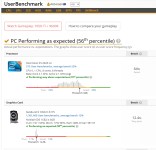
That's a cool benchmark, but how does it compair with other kernel versions?
Although it seems that today, I'm on Proxmox VE 9.19 & the 7.0.0-3 kernel is available as the "default" on the non-enterprise repo.We plan to use the 7.0 kernel as the new default for the upcoming Proxmox VE 9.2
I guess your statement only applies to the enterprise repo?
This is problematic - 7.0.0-3 is now a recommended update, and yet it breaks the networking on Ubuntu 25.10 VM. 24.04 LTS is not effected. I haven't done extensive testing, but the Network Manager is failing to start on boot (will start up manually).Although it seems that today, I'm on Proxmox VE 9.19 & the 7.0.0-3 kernel is available as the "default" on the non-enterprise repo.
6.17.13-4-pve - is now pinned.