OPNsense as VM inside Proxmox - no WAN access to OPNsense (Hetzner)

Antijurist

New Member
Jun 8, 2026
4
0
1
Hello,

I have a Proxmox running on a dedicated server at Hetzner. I also have an additional IP with an own MAC address.

I want to achieve that I can reach the OPNsense from the WAN (later only via VPN, for the moment via web to configure). I'd like to reach the OPNsense web GUI via http(s)://45.100.45.98.
Unfortunately I could't manage that, so far.

The IPs are the following (edited, of course)

Hetzner main IP: 45.100.45.110
Hetzner additional IP: 45.100.45.98
Hetzner gateway (same for both IPs): 45.100.45.65

What I did:

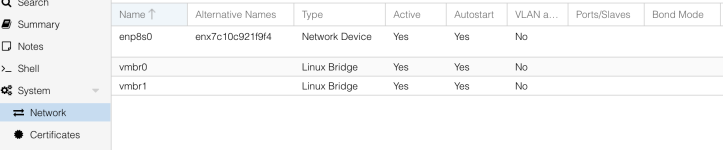
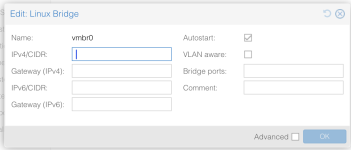
  • Create a bridge (at the moment with no settings (see screenshot). Here I am unsure if I have to specify something for IP, gateway and ports (which is not working).
  • Enable IP forwarding
  • In the VM have two (virtual) NICs, where
  • Specify the MAC address of Hetztner's additional IP there
  • Assign Interfaces and IPs at OPNsense (screenshots) - IP is Hetzner additional IP, gateway is Hetzner gateway
What might I have done wrong? How could I start troubleshooting?
 

Attachments

  • enp8s0.png
    enp8s0.png
    61.6 KB · Views: 3
  • Network_Hardware_VM.png
    Network_Hardware_VM.png
    24.3 KB · Views: 3
  • Network_Overview.png
    Network_Overview.png
    67.9 KB · Views: 2
  • opnsense_interfaces.png
    opnsense_interfaces.png
    23.5 KB · Views: 2
  • vmbnr0.png
    vmbnr0.png
    59.1 KB · Views: 3
Hi @Antijurist

thanks for posting in the forum!

Enable IP forwarding
For this setup you don't need IP forwarding.

First things first, i recommend pinning the network interface names with pve-network-interface-pinning see [1].

Secondly please confirm that the assigned interfaces inside the opnsense VM match the interfaces in Proxmox, since i had cases where the ordering of interfaces didn't match.

Thirdly you have to configure vmbr0 to have the physical Ethernet port (currently enp8s0) as bridge port and the hosts public IP address as address and gateway.
The physical interface doesn't need any configuration in this scenario.

Please feel free to ask if something is unclear!

Yours sincerely
Jonas

[1] https://pve.proxmox.com/wiki/Networ...=Using the pve-network-interface-pinning Tool
 
Hi,

thanks for replying.
I'll check the first two thing you mentioned as soon as I can.

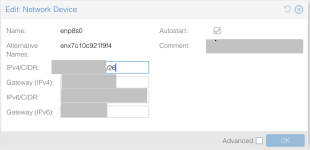
About the brdige port: This is what I tried but it resulted in an error message:

Code:
 iface enp8s0 - ip address can't be set on interface if bridged in vmbr0 (500)

But I need that my Proxmox would become unreachable otherwise. Or what is meant by that?
 
But I need that my Proxmox would become unreachable otherwise. Or what is meant by that?
Yes and no.
The IP configuration needs to be removed from the physical interface and re-added to the VM bridge.
The host will still be accessible through this IP address, but it is then assigned to the bridge interface instead of the physical one.
Since you can prepare the whole configuration via the Web GUI without applying it immediately this should work just fine.

In case something goes terribly wrong, remember you can always order a KVM from Hetzner free of charge via their management portal.

Yours sincerely
Jonas
 
So, to be clear: I'll have to put the configuration which is now at the interface to the vmbr0 bridge (IP (main or additional? - currently main at interface) and gateway? Also the contents of comment (there is a route specified which I don't know why)? Plus enp8s0 at "bridge ports"?

I will then still be able to reach Proxmox web GUI via mainIP/additionalIP:8006?

I know I can order a KVM console, though this would lead to more work as I am not that familiar with terminal and file editing there.
Best of all, I don't want to fix it this way several times.

In my understanding I have to use the mainIP as entering the additional IP should always lead to the OPNsense VM and how else could the server know whether to link to the host or the VM when entering IP:8006, if I used the addiitonal IP whose MAC address is specified at the VM config?
 
Yes, put the main IP and gateway which are currently configured on the physical interface into the configuration on vmbr0.
The PVE host doesn't need to know about the additional VM IP per se.
Since you have an additional interface with a separate MAC address, the VM will make itself known via ARP to the infrastructure of Hetzner and communicate through the vmbr0 interface.
 
Last edited:
Edit: Great, it works now. I also hat to disable the firewall via shell, then I could reach the web GUI. Will turn it off again and configure through another VM and LAN if I can manage that. ;)

Thank you.
 
Last edited: