

NTFS driver issues with restores

PwrBank

Active Member
Nov 12, 2024
235
119
43
We are having an issue where some Windows Server backups will not show the File Restore correctly on some partitions
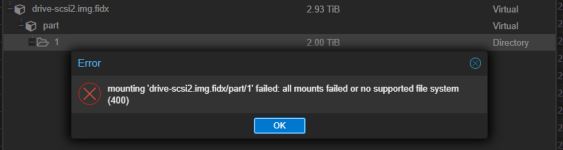
1774271405741.png

This seems to be related to using the ntfs3 driver, as sometimes the partition will mount if you manually mount the backup using the ntfs driver explicitly you are able to browse and get the files you need restored.
Bash:
mount -t ntfs /dev/loop0p1 /tmp/restore1/

However, sometimes the backup files are NULL when reading them.

When using the default mount option without the ntfs explicitly listed

1774276457984.png
File has NULL contents

When using the ntfs driver explicitly, file is null as well

When using ntfs-3g to mount it shows 'unsupported reparse tag 0x80000013' on some of the files
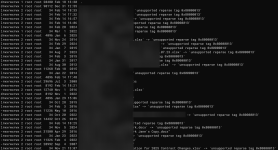
1774278946175.png

The ones that don't show unsupported do have valid contents.

Hoping the VM backup wasn't completely corrupted, I did a live restore of the VM, logged into it with the console as was able to open the files that were showing as NULL in the backups without issue. So at the very least, the backups aren't corrupted, there's just an issue with the NTFS drivers when mounting the partitions.

I've seen similar reports by other users, but just want to see if any one else has had a similar issue and has a work around. Right now we know the backups are valid, it's just really inconvenient to get a file restored. Luckily it doesn't happen often.

This particular disk is a MBR drive

1774279557331.png
The first two disk/partitions load their contents no problem in PVE though
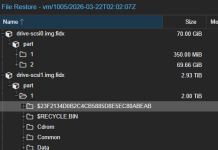
1774279627633.png

So not exactly sure what the pattern is for when this happens or not. We've already ran chkdsk on this disk in the past, still had the same issue in the backup following the chkdsk.

Some other VMs have the same problem, and some do not. Again, not sure of the correlation.
 
Did some more digging.

Assumptions:
- Proxmox is using the ntfs3 driver to mount by default, gets upset when there's a messed up NTFS journal and doesn't mount
- The reparse tags are symlinks due to dedupe

I'll see if I can replicate the issue with a smaller VM.
 
Confirmed deduplicated volumes mount and restore perfectly fine with the File Restore option in Proxmox.

So far it looks like it might be possibly a bad NTFS journal. Issue is the proxmox-backup-client map ... command mounts it as RO, so using tools like ntfsfix doesn't help much.
 
Little more info:
Code:
root@der-pve1:~# ntfsinfo -i 9 /dev/loop0p1 2>&1
Dumping Inode 9 (0x9)
Upd. Seq. Array Off.:    48 (0x30)
Upd. Seq. Array Count:   3 (0x3)
Upd. Seq. Number:        83 (0x53)
LogFile Seq. Number:     0x65ef6d7c09
MFT Record Seq. Numb.:   9 (0x9)
Number of Hard Links:    1 (0x1)
Attribute Offset:        56 (0x38)
MFT Record Flags:        IN_USE VIEW_INDEX
Bytes Used:              512 (0x200) bytes
Bytes Allocated:         1024 (0x400) bytes
Next Attribute Instance: 21 (0x15)
MFT Padding:    00 00
Dumping attribute $STANDARD_INFORMATION (0x10) from mft record 9 (0x9)
        Resident:                Yes
        Attribute flags:         0x0000
        Attribute instance:      0 (0x0)
        Data size:               72 (0x48)
        Resident flags:          0x00
        File Creation Time:      Mon Aug 23 21:05:36 2010 UTC
        File Altered Time:       Mon Aug 23 21:05:36 2010 UTC
        MFT Changed Time:        Mon Aug 23 21:05:36 2010 UTC
        Last Accessed Time:      Mon Aug 23 21:05:36 2010 UTC
        File attributes:         HIDDEN SYSTEM VIEW_INDEX (0x20000006)
        Maximum versions:        0
        Version number:          0
        Class ID:                0
        User ID:                 0 (0x0)
        Security ID:             257 (0x101)
        Quota charged:           0 (0x0)
        Update Sequence Number:  0 (0x0)
Dumping attribute $ATTRIBUTE_LIST (0x20) from mft record 9 (0x9)
        Resident:                No
        Attribute flags:         0x0000
        Attribute instance:      18 (0x12)
        Compression unit:        0 (0x0)
        Data size:               1744 (0x6d0)
        Allocated size:          4096 (0x1000)
        Initialized size:        1744 (0x6d0)
Dumping attribute $FILE_NAME (0x30) from mft record 9 (0x9)
        Resident:                Yes
        Attribute flags:         0x0000
        Attribute instance:      7 (0x7)
        Data size:               80 (0x50)
        Resident flags:          0x01
        Parent directory:        5 (0x5)
        File Creation Time:      Mon Aug 23 21:05:36 2010 UTC
        File Altered Time:       Mon Aug 23 21:05:36 2010 UTC
        MFT Changed Time:        Mon Aug 23 21:05:36 2010 UTC
        Last Accessed Time:      Mon Aug 23 21:05:36 2010 UTC
        Allocated Size:          0 (0x0)
        Data Size:               0 (0x0)
        Filename Length:         7 (0x7)
        File attributes:         HIDDEN SYSTEM VIEW_INDEX (0x20000006)
        Namespace:               Win32 & DOS
        Filename:                '$Secure'
Dumping attribute $DATA (0x80) from mft record 106694 (0x1a0c6)
        Resident:                No
        Attribute name:          '$SDS'
        Attribute flags:         0x0000
        Attribute instance:      0 (0x0)
        Compression unit:        0 (0x0)
        Data size:               69561764 (0x4256da4)
        Allocated size:          69562368 (0x4257000)
        Initialized size:        69561764 (0x4256da4)
Dumping attribute $DATA (0x80) from mft record 562935 (0x896f7)
        Resident:                No
        Attribute name:          '$SDS'
        Attribute flags:         0x0000
        Attribute instance:      0 (0x0)
        Compression unit:        0 (0x0)
Dumping attribute $DATA (0x80) from mft record 815537 (0xc71b1)
        Resident:                No
        Attribute name:          '$SDS'
        Attribute flags:         0x0000
        Attribute instance:      0 (0x0)
        Compression unit:        0 (0x0)
Dumping attribute $DATA (0x80) from mft record 80299 (0x139ab)
        Resident:                No
        Attribute name:          '$SDS'
        Attribute flags:         0x0000
        Attribute instance:      0 (0x0)
        Compression unit:        0 (0x0)
Dumping attribute $DATA (0x80) from mft record 603806 (0x9369e)
        Resident:                No
        Attribute name:          '$SDS'
        Attribute flags:         0x0000
        Attribute instance:      0 (0x0)
        Compression unit:        0 (0x0)
Dumping attribute $DATA (0x80) from mft record 450102 (0x6de36)
        Resident:                No
        Attribute name:          '$SDS'
        Attribute flags:         0x0000
        Attribute instance:      0 (0x0)
        Compression unit:        0 (0x0)
Dumping attribute $DATA (0x80) from mft record 665860 (0xa2904)
        Resident:                No
        Attribute name:          '$SDS'
        Attribute flags:         0x0000
        Attribute instance:      0 (0x0)
        Compression unit:        0 (0x0)
Dumping attribute $DATA (0x80) from mft record 201361 (0x31291)
        Resident:                No
        Attribute name:          '$SDS'
        Attribute flags:         0x0000
        Attribute instance:      0 (0x0)
        Compression unit:        0 (0x0)
Dumping attribute $DATA (0x80) from mft record 187938 (0x2de22)
        Resident:                No
        Attribute name:          '$SDS'
        Attribute flags:         0x0000
        Attribute instance:      0 (0x0)
        Compression unit:        0 (0x0)
Dumping attribute $DATA (0x80) from mft record 535056 (0x82a10)
        Resident:                No
        Attribute name:          '$SDS'
        Attribute flags:         0x0000
        Attribute instance:      0 (0x0)
        Compression unit:        0 (0x0)
Dumping attribute $DATA (0x80) from mft record 59504 (0xe870)
        Resident:                No
        Attribute name:          '$SDS'
        Attribute flags:         0x0000
        Attribute instance:      0 (0x0)
        Compression unit:        0 (0x0)
Dumping attribute $DATA (0x80) from mft record 1269336 (0x135e58)
        Resident:                No
        Attribute name:          '$SDS'
        Attribute flags:         0x0000
        Attribute instance:      0 (0x0)
        Compression unit:        0 (0x0)
Dumping attribute $DATA (0x80) from mft record 409188 (0x63e64)
        Resident:                No
        Attribute name:          '$SDS'
        Attribute flags:         0x0000
        Attribute instance:      0 (0x0)
        Compression unit:        0 (0x0)
Dumping attribute $DATA (0x80) from mft record 1025382 (0xfa566)
        Resident:                No
        Attribute name:          '$SDS'
        Attribute flags:         0x0000
        Attribute instance:      0 (0x0)
        Compression unit:        0 (0x0)
Dumping attribute $DATA (0x80) from mft record 581878 (0x8e0f6)
        Resident:                No
        Attribute name:          '$SDS'
        Attribute flags:         0x0000
        Attribute instance:      0 (0x0)
        Compression unit:        0 (0x0)
Dumping attribute $DATA (0x80) from mft record 1078492 (0x1074dc)
        Resident:                No
        Attribute name:          '$SDS'
        Attribute flags:         0x0000
        Attribute instance:      0 (0x0)
        Compression unit:        0 (0x0)
Dumping attribute $DATA (0x80) from mft record 1339690 (0x14712a)
        Resident:                No
        Attribute name:          '$SDS'
        Attribute flags:         0x0000
        Attribute instance:      0 (0x0)
        Compression unit:        0 (0x0)
Dumping attribute $DATA (0x80) from mft record 1075752 (0x106a28)
        Resident:                No
        Attribute name:          '$SDS'
        Attribute flags:         0x0000
        Attribute instance:      0 (0x0)
        Compression unit:        0 (0x0)
Dumping attribute $DATA (0x80) from mft record 691466 (0xa8d0a)
        Resident:                No
        Attribute name:          '$SDS'
        Attribute flags:         0x0000
        Attribute instance:      0 (0x0)
        Compression unit:        0 (0x0)
Dumping attribute $DATA (0x80) from mft record 1259650 (0x133882)
        Resident:                No
        Attribute name:          '$SDS'
        Attribute flags:         0x0000
        Attribute instance:      0 (0x0)
        Compression unit:        0 (0x0)
Dumping attribute $DATA (0x80) from mft record 2059078 (0x1f6b46)
        Resident:                No
        Attribute name:          '$SDS'
        Attribute flags:         0x0000
        Attribute instance:      0 (0x0)
        Compression unit:        0 (0x0)
Dumping attribute $DATA (0x80) from mft record 8016 (0x1f50)
        Resident:                No
        Attribute name:          '$SDS'
        Attribute flags:         0x0000
        Attribute instance:      0 (0x0)
        Compression unit:        0 (0x0)
Dumping attribute $DATA (0x80) from mft record 1614169 (0x18a159)
        Resident:                No
        Attribute name:          '$SDS'
        Attribute flags:         0x0000
        Attribute instance:      0 (0x0)
        Compression unit:        0 (0x0)
Dumping attribute $DATA (0x80) from mft record 1698105 (0x19e939)
        Resident:                No
        Attribute name:          '$SDS'
        Attribute flags:         0x0000
        Attribute instance:      0 (0x0)
        Compression unit:        0 (0x0)
Dumping attribute $DATA (0x80) from mft record 2087227 (0x1fd93b)
        Resident:                No
        Attribute name:          '$SDS'
        Attribute flags:         0x0000
        Attribute instance:      0 (0x0)
        Compression unit:        0 (0x0)
Dumping attribute $DATA (0x80) from mft record 2417145 (0x24e1f9)
        Resident:                No
        Attribute name:          '$SDS'
        Attribute flags:         0x0000
        Attribute instance:      0 (0x0)
        Compression unit:        0 (0x0)
Dumping attribute $DATA (0x80) from mft record 2279162 (0x22c6fa)
        Resident:                No
        Attribute name:          '$SDS'
        Attribute flags:         0x0000
        Attribute instance:      0 (0x0)
        Compression unit:        0 (0x0)
Dumping attribute $DATA (0x80) from mft record 2888753 (0x2c1431)
        Resident:                No
        Attribute name:          '$SDS'
        Attribute flags:         0x0000
        Attribute instance:      0 (0x0)
        Compression unit:        0 (0x0)
Dumping attribute $DATA (0x80) from mft record 2888655 (0x2c13cf)
        Resident:                No
        Attribute name:          '$SDS'
        Attribute flags:         0x0000
        Attribute instance:      0 (0x0)
        Compression unit:        0 (0x0)
Dumping attribute $DATA (0x80) from mft record 912416 (0xdec20)
        Resident:                No
        Attribute name:          '$SDS'
        Attribute flags:         0x0000
        Attribute instance:      0 (0x0)
        Compression unit:        0 (0x0)
Dumping attribute $DATA (0x80) from mft record 1900573 (0x1d001d)
        Resident:                No
        Attribute name:          '$SDS'
        Attribute flags:         0x0000
        Attribute instance:      0 (0x0)
        Compression unit:        0 (0x0)
Dumping attribute $DATA (0x80) from mft record 1887915 (0x1cceab)
        Resident:                No
        Attribute name:          '$SDS'
        Attribute flags:         0x0000
        Attribute instance:      0 (0x0)
        Compression unit:        0 (0x0)
Dumping attribute $DATA (0x80) from mft record 1428439 (0x15cbd7)
        Resident:                No
        Attribute name:          '$SDS'
        Attribute flags:         0x0000
        Attribute instance:      0 (0x0)
        Compression unit:        0 (0x0)
Dumping attribute $DATA (0x80) from mft record 3400613 (0x33e3a5)
        Resident:                No
        Attribute name:          '$SDS'
        Attribute flags:         0x0000
        Attribute instance:      0 (0x0)
        Compression unit:        0 (0x0)
Dumping attribute $INDEX_ROOT (0x90) from mft record 9 (0x9)
        Resident:                Yes
        Attribute name:          '$SDH'
        Attribute flags:         0x0000
        Attribute instance:      19 (0x13)
        Data size:               56 (0x38)
        Resident flags:          0x00
        Indexed Attr Type:       SECURE_SDH
        Collation Rule:          18 (0x12)
        Index Block Size:        4096 (0x1000)
        Clusters Per Block:      1 (0x1)
        Entries Offset:          16 (0x10)
        Index Size:              40 (0x28)
        Allocated Size:          40 (0x28)
        Index header flags:      0x01
        Index entries total:     1
Dumping attribute $INDEX_ROOT (0x90) from mft record 9 (0x9)
        Resident:                Yes
        Attribute name:          '$SII'
        Attribute flags:         0x0000
        Attribute instance:      20 (0x14)
        Data size:               56 (0x38)
        Resident flags:          0x00
        Indexed Attr Type:       SECURE_SII
        Collation Rule:          16 (0x10)
        Index Block Size:        4096 (0x1000)
        Clusters Per Block:      1 (0x1)
        Entries Offset:          16 (0x10)
        Index Size:              40 (0x28)
        Allocated Size:          40 (0x28)
        Index header flags:      0x01
        Index entries total:     1
Dumping attribute $INDEX_ALLOCATION (0xa0) from mft record 856695 (0xd1277)
        Resident:                No
        Attribute name:          '$SDH'
        Attribute flags:         0x0000
        Attribute instance:      0 (0x0)
        Compression unit:        0 (0x0)
        Data size:               3407872 (0x340000)
        Allocated size:          3407872 (0x340000)
        Initialized size:        3407872 (0x340000)
Corrupt attribute 0xa0 in inode 9
Failed to read $INDEX_ALLOCATION attribute: Value too large for defined data type
Dumping attribute $INDEX_ALLOCATION (0xa0) from mft record 1356989 (0x14b4bd)
        Resident:                No
        Attribute name:          '$SDH'
        Attribute flags:         0x0000
        Attribute instance:      0 (0x0)
        Compression unit:        0 (0x0)
Corrupt attribute 0xa0 in inode 9
Failed to read $INDEX_ALLOCATION attribute: Value too large for defined data type
Dumping attribute $INDEX_ALLOCATION (0xa0) from mft record 313489 (0x4c891)
        Resident:                No
        Attribute name:          '$SII'
        Attribute flags:         0x0000
        Attribute instance:      0 (0x0)
        Compression unit:        0 (0x0)
        Data size:               3932160 (0x3c0000)
        Allocated size:          3932160 (0x3c0000)
        Initialized size:        3932160 (0x3c0000)
Corrupt attribute 0xa0 in inode 9
Failed to read $INDEX_ALLOCATION attribute: Value too large for defined data type
Dumping attribute $INDEX_ALLOCATION (0xa0) from mft record 655264 (0x9ffa0)
        Resident:                No
        Attribute name:          '$SII'
        Attribute flags:         0x0000
        Attribute instance:      0 (0x0)
        Compression unit:        0 (0x0)
Corrupt attribute 0xa0 in inode 9
Failed to read $INDEX_ALLOCATION attribute: Value too large for defined data type
Dumping attribute $BITMAP (0xb0) from mft record 183218 (0x2cbb2)
        Resident:                Yes
        Attribute name:          '$SDH'
        Attribute flags:         0x0000
        Attribute instance:      3 (0x3)
        Data size:               104 (0x68)
        Resident flags:          0x00
Dumping attribute $BITMAP (0xb0) from mft record 183218 (0x2cbb2)
        Resident:                Yes
        Attribute name:          '$SII'
        Attribute flags:         0x0000
        Attribute instance:      4 (0x4)
        Data size:               120 (0x78)
        Resident flags:          0x00
End of inode reached

So certainly an index issue.
 
I noticed a while back that some of my backups worked fine if I restored the entire image, but the PBS server could not mount them to restores individual files. Running chkdsk on the VM fixed the problem on subsequent backups, leading me to think that there was some minor corruption of the on-disk data structures that Windows ignored, but that the Linux NTFS driver failed at.

I thought about attempting to write a script to detect VM drives in need of repair, but it doesn't happen to me very often, so I never got around to it.
 
Dealing with NTFS driver issues during restores can be such a headache, especially when you're just trying to get things back up and running quickly. It’s really helpful to see a clear workaround or fix for this, as it'll definitely save a lot of troubleshooting time for anyone else hitting the same wall. This definitely clarifies things.
 
Ran through the following test:
  1. Cloned the VM with the issue with all disks
  2. Started the VM
  3. Created a backup to the same backup destination
  4. Tried file restore -> Same results as the original VM
  5. Ran chkdsk /f f: on the VM and waited for the process to finish
  6. After finishing, took another backup
  7. Restarted the VM
  8. Took another backup
Both backups from before and after the reboot are now working as expected.

So I guess the questions now are:
  • How to mount partitions with corrupted journals
  • How to prevent partitions from getting corrupted in Windows (I'm kidding, good luck with that)
Maybe a work around would be to have Proxmox mount the backup in an ephemeral R/W mount. As in, mount the actual backup as R/O, but use something like FUSE to have a temporary directory to store changes made to the mounted backup like the journal once it's repaired (maybe automatically if detected when mounted) - Then mounting the FUSE'd mount.

Something like this:
Bash:
SECTORS=$(blockdev --getsz /dev/loop0p1)
dd if=/dev/null of=/tmp/ntfs_overlay.img bs=512 count=0 seek=$SECTORS
losetup /dev/loop1 /tmp/ntfs_overlay.img
dmsetup create ntfs-writable --table "0 $SECTORS snapshot /dev/loop0p1 /dev/loop1 N 8"
ntfsfix -d /dev/mapper/ntfs-writable
mount -t ntfs3 -o ro,noacsrules /dev/mapper/ntfs-writable /tmp/restore1

Since controlling the Windows environment isn't guaranteed, this would at least allow Proxmox to compensate for that.
 
Some more experimenting, you can get the journal repaired using ntfsck (partially) but still wont work deduped files.


Needed packages to build ntfsck

apt install build-essential autoconf automake libtool pkg-config uuid-dev libgcrypt20-dev ntfs-3g

Step 1 - Build ntfsprogs-plus

Bash:
cd ~
git clone https://github.com/ntfsprogs-plus/ntfsprogs-plus
cd ntfsprogs-plus
./autogen.sh
./configure
make

The binary will be at ~/ntfsprogs-plus/src/ntfsck.

Step 2 - Map the Backup

proxmox-backup-client map vm/<VMID>/<TIMESTAMP> <DISK>.img --repository '<USER>@<PBS-HOST>:<DATASTORE>' -ns <NAMESPACE>

Example:
proxmox-backup-client map vm/1005/2026-03-04T03:05:37Z drive-scsi2.img --repository 'root@pam!token@pbs-host:8007:datastore' -ns NAMESPACE

This creates /dev/loop0 with partitions /dev/loop0p1, p2, etc.

Step 3 - Identify the Target Partition

lsblk /dev/loop0

Note which partition number corresponds to the volume you need. The remainder of this guide uses /dev/loop0p1 - substitute your partition number as needed.

Step 4 - Check Partition (Read-Only, No Changes)

~/ntfsprogs-plus/src/ntfsck -n /dev/loop0p1

Review the output. If errors are found, proceed to the overlay steps below. If no errors, skip to Step 8 and try mounting directly.

Step 5 - Create Writable Overlay (Does Not Modify Backup)

Bash:
# Create tmpfs-backed COW store in RAM
mkdir -p /tmp/cow-tmpfs
mount -t tmpfs -o size=512M tmpfs /tmp/cow-tmpfs
truncate -s 512M /tmp/cow-tmpfs/cow.img

# Attach COW image as loop device
COWDEV=$(losetup --find --show /tmp/cow-tmpfs/cow.img)
echo "COW device: $COWDEV"

# Create writable snapshot overlay
SECTORS=$(blockdev --getsz /dev/loop0p1)
dmsetup create ntfs-writable --table "0 $SECTORS snapshot /dev/loop0p1 $COWDEV N 8"

All writes go to RAM - the original backup is never modified.

Step 6 - Repair Filesystem on Overlay

Bash:
# Auto-repair with ntfsck
~/ntfsprogs-plus/src/ntfsck -a /dev/mapper/ntfs-writable

# Clear dirty journal flag
ntfsfix -d /dev/mapper/ntfs-writable

Step 7 - Attempt Mount with ntfs3

Bash:
mkdir -p /tmp/restore1
mount -t ntfs3 -o ro /dev/mapper/ntfs-writable /tmp/restore1

Check dmesg | tail -10 if it fails.

- If mount succeeds - proceed to Step 9.
- If Failed to initialize $Secure (-2) appears - the volume has corrupt $Secure index allocations that Linux cannot repair. Proceed to Step 8.

Step 8 - Fallback: Mount with ntfs-3g

mount -t ntfs-3g -o ro /dev/mapper/ntfs-writable /tmp/restore1

Limitations with ntfs-3g:
- Non-deduplicated files are fully accessible
- Deduplicated files (Windows Server Dedup) appear as broken symlinks pointing to unsupported reparse tag 0x80000013 - these cannot be restored this way

For deduplicated files, a full live VM restore is required.

Step 9 - Access and Copy Files

Bash:
ls /tmp/restore1
cp -r /tmp/restore1/path/to/files /destination/

Step 10 - Cleanup

Bash:
umount /tmp/restore1
dmsetup remove ntfs-writable
losetup -d $COWDEV
umount /tmp/cow-tmpfs
rm -rf /tmp/cow-tmpfs
proxmox-backup-client unmap --repository '<USER>@<PBS-HOST>:<DATASTORE>'


So IDK if that could be integrated in the File Restore process automatically or what. So maybe the answer in our situation is go ahead and turn off dedupe (our storage appliance will do that anyway on the block level), so in the future we could atleast use this approach. While it's not as convenient as the GUI option - Atleast we can get stuff restored without live restoring the entire VM.