

We are having an issue where some Windows Server backups will not show the File Restore correctly on some partitions
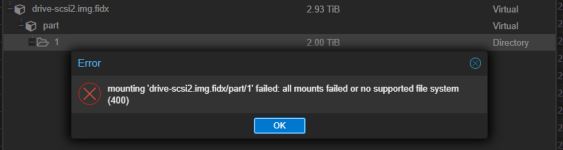
This seems to be related to using the ntfs3 driver, as sometimes the partition will mount if you manually mount the backup using the ntfs driver explicitly you are able to browse and get the files you need restored.
However, sometimes the backup files are NULL when reading them.
When using the default mount option without the ntfs explicitly listed

File has NULL contents
When using the ntfs driver explicitly, file is null as well
When using ntfs-3g to mount it shows 'unsupported reparse tag 0x80000013' on some of the files
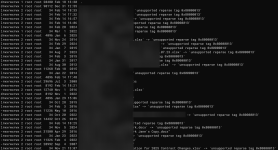
The ones that don't show unsupported do have valid contents.
Hoping the VM backup wasn't completely corrupted, I did a live restore of the VM, logged into it with the console as was able to open the files that were showing as NULL in the backups without issue. So at the very least, the backups aren't corrupted, there's just an issue with the NTFS drivers when mounting the partitions.
I've seen similar reports by other users, but just want to see if any one else has had a similar issue and has a work around. Right now we know the backups are valid, it's just really inconvenient to get a file restored. Luckily it doesn't happen often.
This particular disk is a MBR drive

The first two disk/partitions load their contents no problem in PVE though
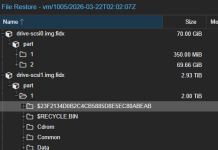
So not exactly sure what the pattern is for when this happens or not. We've already ran chkdsk on this disk in the past, still had the same issue in the backup following the chkdsk.
Some other VMs have the same problem, and some do not. Again, not sure of the correlation.
This seems to be related to using the ntfs3 driver, as sometimes the partition will mount if you manually mount the backup using the ntfs driver explicitly you are able to browse and get the files you need restored.
Bash:
mount -t ntfs /dev/loop0p1 /tmp/restore1/However, sometimes the backup files are NULL when reading them.
When using the default mount option without the ntfs explicitly listed
File has NULL contents
When using the ntfs driver explicitly, file is null as well
When using ntfs-3g to mount it shows 'unsupported reparse tag 0x80000013' on some of the files
The ones that don't show unsupported do have valid contents.
Hoping the VM backup wasn't completely corrupted, I did a live restore of the VM, logged into it with the console as was able to open the files that were showing as NULL in the backups without issue. So at the very least, the backups aren't corrupted, there's just an issue with the NTFS drivers when mounting the partitions.
I've seen similar reports by other users, but just want to see if any one else has had a similar issue and has a work around. Right now we know the backups are valid, it's just really inconvenient to get a file restored. Luckily it doesn't happen often.
This particular disk is a MBR drive
The first two disk/partitions load their contents no problem in PVE though
So not exactly sure what the pattern is for when this happens or not. We've already ran chkdsk on this disk in the past, still had the same issue in the backup following the chkdsk.
Some other VMs have the same problem, and some do not. Again, not sure of the correlation.