[SOLVED] Noteable I/O Delay after upgrade to 9.1.14

ProxGamingMox

New Member
Feb 21, 2025
11
1
3
Good morning everyone.

As the title states, at midnight I did a full upgrade from version 9.0.11 over to 9.1.14 including all packages.
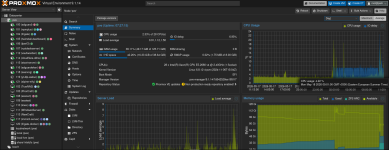
Since then I have noticed that I have got a somewhat stable I/O Delay of 7% and is apparently caused from 3 VMS that are running of which one is Truenas Scale, the second one being an Immich server and the third one a VM that hosts a k3s cluster for Matrix Ess Community.
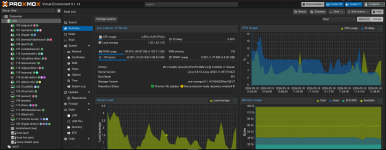
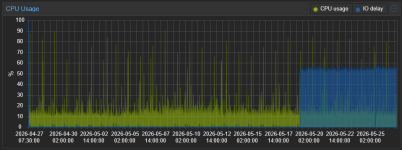
As you can see from the screenshot below in the CPU Usage graph, it was basically 0% before the update and started showing up afterwards.
I also appear to have 75-80% IO Pressure Stall since updating/upgrading.
I looked around and what it came down to was that it probably is just a new metric for disk iops which is quite weird to me. If said 3 VMs are turned off IO Delay drops to 0%.
Any ideas ?
1779091970797.png
 
Also worth noting that I am using kernel Linux 6.8.12-4-pve (2024-11-06T15:04Z) since my system kept freezing with anything pre 7.0.x kernel version, have not tried 7.0.x kernel version yet. Not sure if related.
 
After turning Discard and IO thread off on all 3 vms the issue appears to have gone away ? IO Pressure Stall is also taking a nose dive.
1779093763021.png
 
Maybe your VMs were trimming but with Discard disabled those trim commands won't reach the underlying (thin?) storage, which might be a problem later on. Or maybe the load went down just by restarting your VMs (which were doing some IO task).
I don't expect IO Thread to make much of a difference, except on a VM with multiple virtual disk and VirtIO SCSI single. By disabling IO Thread the VM can do less IO at the same time (with multiple disks) and the load might look lower but simply take longer. Or maybe the load went down just by restarting your VMs (which were doing some IO task).
 
Last edited:
Maybe your VMs were trimming but with Discard disabled those trim commands won't reach the underlying (thin?) storage, which might be a problem later on. Or maybe the load went down just by restarting your VMs (which were doing some IO task).
I don't expect IO Thread to make much of a difference, except on a VM with multiple virtual disk and VirtIO SCSI single. By disabling IO Thread the VM can do less IO at the same time (with multiple disks) and the load might look lower but simply take longer. Or maybe the load went down just by restarting your VMs (which were doing some IO task).
I have been at it since midnight, lots of restarts both on the host as well as the VMs, all 3 of them are on ZFS storage which could explain the discard race perhaps ? The host was left on overnight so about 7-8 hours and the delay was nailed at 7%.
 
Last edited:
The IO delay is not that high that I would be worried. Maybe the VMs were actually doing some useful idle/background IO like trimming or scrubbing/fsck.

EDIT: Maybe find out what your VMs that you maintain are doing before changing your Proxmox configuration away from best practices.
 
Last edited:
  • Like
Reactions: ProxGamingMox
Can you share this from the node and every guest that uses ZFS?
Bash:
zpool status -vtP
zpool get autotrim
I have some notes here on how to investiagte IO Delay that you might find unseful.
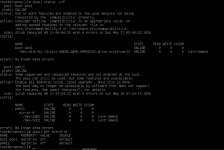
Host :
root@pve:~# zpool status -vtP
pool: share1ntelzfs
state: ONLINE
scan: scrub repaired 0B in 00:17:33 with 0 errors on Sun May 10 00:41:34 2026
config:

NAME STATE READ WRITE CKSUM
share1ntelzfs ONLINE 0 0 0
/dev/disk/by-id/ata-INTEL_SSDSC2KG960G8_BTYG90920CB0960CGN-part1 ONLINE 0 0 0 (untrimmed)

errors: No known data errors
root@pve:~# zpool get autotrim
NAME PROPERTY VALUE SOURCE
share1ntelzfs autotrim off default
root@pve:~#


Immich :
nick@immich-gaming:~$ zpool status -vtP
no pools available
nick@immich-gaming:~$ zpool get autotrim

K3s :
nick@esscert:~$ zpool status -vtP
no pools available
nick@esscert:~$ zpool get autotrim

Truenas:
1779096166249.png
 
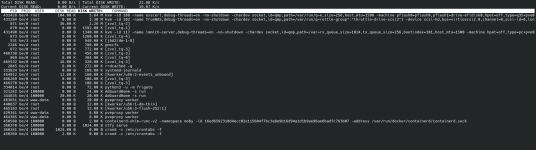
I ran iotop -oPa for about 3 minutes. It appears that the constant disk activity comes from the k3s cluster vm as well as zvol_tq2. As for Truenas it burts a 1-2mb of activity every once in a while it seems.
1779098583897.png
 
Switching to kernel Linux 7.0.2-4-pve (2026-05-15T07:32Z) seems to have fixed the problem.
Will report back if anything changes.
Thanks for your time.
 
A recent version of some Proxmox package(s) reported too high values according to another thread. Did you update more of your Proxmox besides just the kernel?
No not really, here is how it basically played out :

I was creating a new lxc when I was prompted to "update" the host for better compatibility/performance of the lxcs and I answered with Yes.
It took some time for the update and upgrade to complete and after it completed all web elements had <span> in front of them.
I then did a dist-full-upgrade and --fix-broken installs and it went back to normal. It was then that I noticed the IO Delay. Everything I tried since that moment made no difference apart from unchecking Discard and IO thread. It seemed like IO Thread was the main culprit until I switched over to the newest kernel and everything went back to normal.
Apart from all that I also changed the ARC size from the initial 8gb over to 32gb since my server has more RAM than it used to.
 
  • Like
Reactions: leesteken
If it is of any help here are my system specs :

CPU -> Intel Xeon e5-2680v4
RAM -> 128gb of DDR4 2400mhz
Host storage -> C400-MTFDDAC128M
Lxc/VM storage -> INTEL SSDSC2KG96

Running on a HP Z440.

EDIT: It is also possible that on newer packages metrics/load changed and/or became heavier and thus some consumer grade SSDs might be struggling more with the load.
 
Last edited: