Not getting good network throughput even with LACP bond

Jan 14, 2026
5
0
1
I'm seeing full line‑rate performance (around 945 Mbps up and down) from my non‑virtualized devices over a single 1 GbE NIC. My Proxmox host is configured with four NICs bonded in LACP, and the switch side is correctly set up. However, any guest VM tops out at roughly 486 Mbps. I wasn’t expecting reduced throughput with a multi‑NIC LACP bond, so this behavior seems off. For context, I recently migrated from ESXi using the same switch and network configuration, and I did not experience this issue before. It only started after moving to Proxmox. If anyone has suggestions for improving throughput or insights into what might be causing this bottleneck, I’d appreciate the guidance.
 
Last edited:
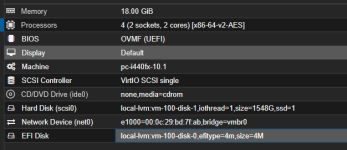
Thank you for your reply. I use speedtest.net as an internet throughput guide. Let's start with the core windows server 2022 server I have. Here is the vhardware configuration.
1768401194398.png
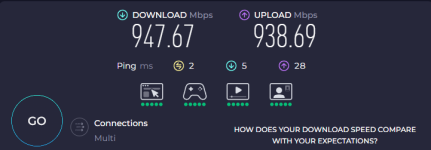
Here is throughput from a device on my net (non-virt)
1768401391268.png
So why is bonded NIC giving 1/2 the throughput. It's very odd to me.
 
Last edited:
The VM is configured to use the e1000 drivers. Please test again with the virtio network drivers. Please note that this requires the VirtIO drivers to be installed, since you already have VirtIO drivers for the scsi controller and the hard disk, this should just work.

See our docs for more details [1]. VirtIO network drivers can produce up to three times the bandwidth compared to e1000.

[1] https://pve.proxmox.com/pve-docs/pve-admin-guide.html#_emulated_devices_and_paravirtualized_devices
 
  • Like
Reactions: dimante
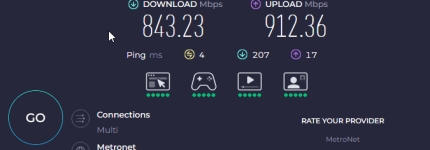
Ok, you win on that one. The change to virtio has improved it to an acceptable level now:
1768431812500.png
Though I am still losing a bit on download and upload this is much better. Thank you for the suggestion. I will need to go to the rest of the systems now and fix the network adapters. One question, are there virtio drivers for freebsd?
 
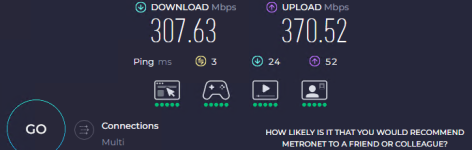
Ok so this server is 100% better but my other Windows server 2022 has the virtio adapter, same host here is the result there:
1768432162963.png
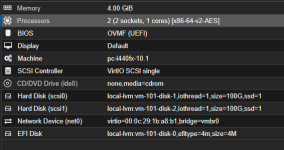
Here is the config for this server:
1768432196401.png
Any suggestions here would be greatly appreciated.
 
First: LACP doesn't give you X times the performance of your ports. 4x1Gbit != 4Gbit. LACP works frame based. One flow -> one link: one TCP stream runs over one link. It performs well when X clients simultaneously connect to your VM and initiate file transfers. Another thing is how the NIC is connected to your switch and which hashing methode is supported/configured. Without proper hash mode many flows use the same link.

Ookla multi tests on application layer, not link layer. That has nothing to do with your real LACP capacity. And there are many more factors which make a speedtest on Ookla more ore less "senseless": cdn limits, routing, tcp slow start, tls overhead, NAT etc.

Real world tests would be (for example):

Code:
iperf3 -c <IP-of-your-PVE> -P 8

Another thing: you're using "old" hardware for a relative modern OS: i440fx. Beside that, you are running vCPU on 2 sockets. That's another limiter when NUMA is not properly configured.
 
  • Like
Reactions: jtru
" you're using "old" hardware for a relative modern OS: i440fx" so, these machines all were migrated from ESXi so what platform would you recommend setting it to? I hear you on the true LACP and that under a multithreaded load it balances better. To put it out there. I am never expecting more than my current network capacity of 1 GB and my Internet speed of 1 GB BUT - When I use the same test method and server locations in that test, I would expect all VMs to perform the same. This last server I posted is getting 1/2 the throughput on the same host... That makes no sense to me. I am not new to IT I have 27 years of IT experience so I am not new necessarily, but I am brand new to ProxMox so looking for some guidance on how to configure each guest the proper way after a successful migration from ESXi is the real question here. I also have FreeBSD running here but that out of the box is working great with the virtio hardware.
 
" you're using "old" hardware for a relative modern OS: i440fx" so, these machines all were migrated from ESXi so what platform would you recommend setting it to? I hear you on the true LACP and that under a multithreaded load it balances better. To put it out there. I am never expecting more than my current network capacity of 1 GB and my Internet speed of 1 GB BUT - When I use the same test method and server locations in that test, I would expect all VMs to perform the same. This last server I posted is getting 1/2 the throughput on the same host... That makes no sense to me. I am not new to IT I have 27 years of IT experience so I am not new necessarily, but I am brand new to ProxMox so looking for some guidance on how to configure each guest the proper way after a successful migration from ESXi is the real question here. I also have FreeBSD running here but that out of the box is working great with the virtio hardware.
The issue you are seeing is not related to LACP and not caused by the physical network. What you are running into is a VM topology and platform problem that becomes visible after an ESXi to Proxmox migration.

The i440fx machine type is a legacy platform that mainly exists for compatibility. While it works, it is not a good fit for modern operating systems and high-performance virtio devices. It uses a legacy PCI layout instead of native PCIe, has less efficient interrupt routing and does not scale as well with modern kernels and drivers. For current Windows, Linux and BSD guests, q35 is the recommended machine type in Proxmox because it provides native PCIe, better MSI/MSI-X interrupt handling and generally better performance and stability for virtio-net and virtio-scsi. After migrations, switching from i440fx to q35 often fixes unexplained performance differences between otherwise identical VMs.

Another important factor is the vCPU topology and NUMA behavior. If a VM is configured with multiple sockets, Proxmox may schedule vCPUs across different NUMA nodes. If NUMA is not explicitly and correctly configured, this can lead to vCPUs running on one NUMA node while the virtio-net interrupts and memory allocations end up on another. That causes cross-NUMA memory access and increased latency, which can easily cut effective network throughput in half even though CPU usage looks normal. In many cases, this alone explains why one VM reaches close to 1 Gbps while another one on the same host tops out around 500 Mbps.

The fact that your FreeBSD VM performs well with virtio out of the box is an important hint. It shows that the host networking, bonding and switch configuration are fine. Virtio works best when combined with a modern machine type like q35, proper MSI-X interrupt support and a sane CPU layout. Using i440fx together with multi-socket VM configurations can result in virtio-net becoming interrupt-bound or NUMA-limited.

As a general baseline after an ESXi migration, VMs should be adjusted to use the q35 machine type, a single socket with multiple cores, NUMA disabled unless it is explicitly required and carefully configured, CPU type set to host and virtio for network devices. Once these changes are applied, retesting usually shows that the unexplained “half throughput” problem disappears.