

A
audunms
Guest
Hello, and sorry for what is probably a very newbie question.
I installed Proxmox 2.1 on a single server, whith 2 SATA hard drives installed.
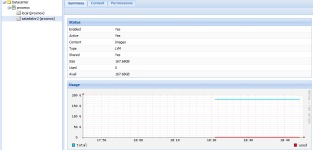
After installing, I added the second hard drive with "pvcreate /dev/sdb", "vgcreate satadisk2 /dev/sdb" and added a LVM Group in the web interface where I selected the "satadisk2" as Volume Group. This second hard drive displays all the space on the physical disc as available:
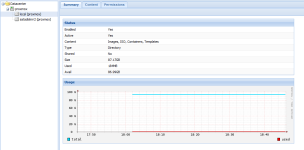
However, the first disk (local), which was selected under installation, displays only half of the disk's around 170GB as available:
In case this is of any help, here is the output when running fdisk -l via ssh:
Disk /dev/sda: 180.0 GB, 180045766656 bytes
255 heads, 63 sectors/track, 21889 cylinders
Units = cylinders of 16065 * 512 = 8225280 bytes
Sector size (logical/physical): 512 bytes / 512 bytes
I/O size (minimum/optimal): 512 bytes / 512 bytes
Disk identifier: 0x000268b6
Device Boot Start End Blocks Id System
/dev/sda1 * 1 66 523264 83 Linux
Partition 1 does not end on cylinder boundary.
/dev/sda2 66 21890 175301632 8e Linux LVM
Disk /dev/sdb: 180.0 GB, 180045766656 bytes
255 heads, 63 sectors/track, 21889 cylinders
Units = cylinders of 16065 * 512 = 8225280 bytes
Sector size (logical/physical): 512 bytes / 512 bytes
I/O size (minimum/optimal): 512 bytes / 512 bytes
Disk identifier: 0x00000000
Disk /dev/sdb doesn't contain a valid partition table
Disk /dev/dm-0: 44.8 GB, 44828721152 bytes
255 heads, 63 sectors/track, 5450 cylinders
Units = cylinders of 16065 * 512 = 8225280 bytes
Sector size (logical/physical): 512 bytes / 512 bytes
I/O size (minimum/optimal): 512 bytes / 512 bytes
Disk identifier: 0x00000000
Disk /dev/dm-0 doesn't contain a valid partition table
Disk /dev/dm-1: 22.4 GB, 22414360576 bytes
255 heads, 63 sectors/track, 2725 cylinders
Units = cylinders of 16065 * 512 = 8225280 bytes
Sector size (logical/physical): 512 bytes / 512 bytes
I/O size (minimum/optimal): 512 bytes / 512 bytes
Disk identifier: 0x00000000
Disk /dev/dm-1 doesn't contain a valid partition table
Disk /dev/dm-2: 95.1 GB, 95089065984 bytes
255 heads, 63 sectors/track, 11560 cylinders
Units = cylinders of 16065 * 512 = 8225280 bytes
Sector size (logical/physical): 512 bytes / 512 bytes
I/O size (minimum/optimal): 512 bytes / 512 bytes
Disk identifier: 0x00000000
Disk /dev/dm-2 doesn't contain a valid partition table
Greatly appreciate any help.
I installed Proxmox 2.1 on a single server, whith 2 SATA hard drives installed.
After installing, I added the second hard drive with "pvcreate /dev/sdb", "vgcreate satadisk2 /dev/sdb" and added a LVM Group in the web interface where I selected the "satadisk2" as Volume Group. This second hard drive displays all the space on the physical disc as available:
However, the first disk (local), which was selected under installation, displays only half of the disk's around 170GB as available:
In case this is of any help, here is the output when running fdisk -l via ssh:
Disk /dev/sda: 180.0 GB, 180045766656 bytes
255 heads, 63 sectors/track, 21889 cylinders
Units = cylinders of 16065 * 512 = 8225280 bytes
Sector size (logical/physical): 512 bytes / 512 bytes
I/O size (minimum/optimal): 512 bytes / 512 bytes
Disk identifier: 0x000268b6
Device Boot Start End Blocks Id System
/dev/sda1 * 1 66 523264 83 Linux
Partition 1 does not end on cylinder boundary.
/dev/sda2 66 21890 175301632 8e Linux LVM
Disk /dev/sdb: 180.0 GB, 180045766656 bytes
255 heads, 63 sectors/track, 21889 cylinders
Units = cylinders of 16065 * 512 = 8225280 bytes
Sector size (logical/physical): 512 bytes / 512 bytes
I/O size (minimum/optimal): 512 bytes / 512 bytes
Disk identifier: 0x00000000
Disk /dev/sdb doesn't contain a valid partition table
Disk /dev/dm-0: 44.8 GB, 44828721152 bytes
255 heads, 63 sectors/track, 5450 cylinders
Units = cylinders of 16065 * 512 = 8225280 bytes
Sector size (logical/physical): 512 bytes / 512 bytes
I/O size (minimum/optimal): 512 bytes / 512 bytes
Disk identifier: 0x00000000
Disk /dev/dm-0 doesn't contain a valid partition table
Disk /dev/dm-1: 22.4 GB, 22414360576 bytes
255 heads, 63 sectors/track, 2725 cylinders
Units = cylinders of 16065 * 512 = 8225280 bytes
Sector size (logical/physical): 512 bytes / 512 bytes
I/O size (minimum/optimal): 512 bytes / 512 bytes
Disk identifier: 0x00000000
Disk /dev/dm-1 doesn't contain a valid partition table
Disk /dev/dm-2: 95.1 GB, 95089065984 bytes
255 heads, 63 sectors/track, 11560 cylinders
Units = cylinders of 16065 * 512 = 8225280 bytes
Sector size (logical/physical): 512 bytes / 512 bytes
I/O size (minimum/optimal): 512 bytes / 512 bytes
Disk identifier: 0x00000000
Disk /dev/dm-2 doesn't contain a valid partition table
Greatly appreciate any help.
