No network in some VMs

Jan 12, 2026
11
0
1
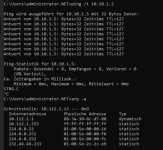
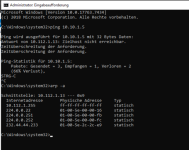
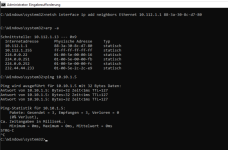
Currently migrating VMs from an ESX cluster. While Linux VMs have network connectivity, we are struggling with Windows Server 2019 VM. VirtIO Drivers are installed and network card shows up ok, ip is configured. Still no network access, even pinging the gateway fails.

/etc/network/interfaces:
Code:
# first physical link
auto ens6f0np0
iface ens6f0np0 inet manual

# second physical link
auto ens6f1np1
iface ens6f1np1 inet manual

# bond for vm network
auto bond0
iface bond0 inet manual
    bond-slaves ens6f0np0 ens6f1np1
    bond-miimon 100
    bond-mode 802.3ad
    bond-xmit-hash-policy layer2+3

# bridge for vm network
auto vmbr0
iface vmbr0 inet manual
    bridge-ports bond0
    bridge-stp off
    bridge-fd 0
    bridge-vlan-aware yes
    bridge-vids 2-4094

Linux VM, working network:
Bash:
root@pmx-01:~# qm config 105 --current
agent: 1
bios: seabios
boot: order=scsi0
cores: 1
cpu: host
ide0: none,media=cdrom
memory: 4096
meta: creation-qemu=10.0.2,ctime=1768134338
name: logging
net0: vmxnet3=00:50:56:a1:04:f3,bridge=vmbr0,tag=10
numa: 0
ostype: l26
scsi0: SSDPool:vm-105-disk-0,size=300G
scsihw: pvscsi
smbios1: uuid=4221b22b-8afc-2627-ea72-0ad1b985aba7
sockets: 1
vmgenid: da24311d-9b21-4e9a-857b-7752da7b056a

Windows VM, not working:
Bash:
root@pmx-01:~# qm config 103 --current
bios: ovmf
boot: order=sata1;sata2;sata3;sata4
cores: 2
cpu: x86-64-v2-AES
efidisk0: SSDPool:vm-103-disk-0,efitype=4m,size=1M
machine: pc-i440fx-10.0,viommu=virtio
memory: 16384
meta: creation-qemu=10.0.2,ctime=1768216130
name: pmachtest2019.net.adk.de
net0: virtio=00:50:56:ae:45:e9,bridge=vmbr0,tag=112
ostype: win10
parent: pre_first_start
sata0: cephfs:iso/virtio-win-0.1.285.iso,media=cdrom,size=771138K
sata1: SSDPool:vm-103-disk-1,size=100G
sata2: SSDPool:vm-103-disk-2,size=100G
sata3: SSDPool:vm-103-disk-3,size=100G
sata4: SSDPool:vm-103-disk-4,size=100G
scsihw: virtio-scsi-single
smbios1: uuid=422eb1b8-c86d-72fa-f5e0-c7e9fed6c77f
sockets: 1
vmgenid: d46052d5-b89c-480e-be64-e3782cf386c2
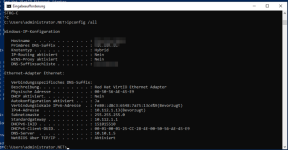
 
You can try using vmxnet3hardware, similar to your Linux machine. An output of your in-VM network configuration might shed some light: ipconfig /all
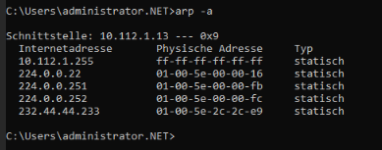
You can also check ARP table on windows - is there anything there? Another option is to get a network trace with either netsh/pktmon or Wireshark.

Cheers


Blockbridge : Ultra low latency all-NVME shared storage for Proxmox - https://www.blockbridge.com/proxmox
 
Some more info (I used debugging commands I found in other threads, would like to provide more info if needed):
Bash:
root@pmx-01:~# brctl show
bridge name    bridge id        STP enabled    interfaces
vmbr0        8000.8c847476be00    no        bond0
                            # windows, not working
                            tap103i0
                            # linux, working
                            tap105i0

Bash:
root@pmx-01:~# bridge fdb show vmbr0
00:50:56:a1:04:f3 dev tap105i0 vlan 10 master vmbr0
3a:bb:a7:d9:9d:24 dev tap105i0 vlan 10 master vmbr0 permanent
3a:bb:a7:d9:9d:24 dev tap105i0 master vmbr0 permanent
33:33:00:00:00:01 dev tap105i0 self permanent
01:00:5e:00:00:01 dev tap105i0 self permanent
00:50:56:ae:45:e9 dev tap103i0 vlan 112 master vmbr0
1a:b2:0a:11:61:85 dev tap103i0 vlan 112 master vmbr0 permanent
1a:b2:0a:11:61:85 dev tap103i0 master vmbr0 permanent
33:33:00:00:00:01 dev tap103i0 self permanent
01:00:5e:00:00:01 dev tap103i0 self permanent
 
I did a ping from inside the windows VM and tcpdump on the host.

Strange thing may be here, since I see no arp replies on tap103i0 (no network expert, though):

Bash:
root@pmx-01:~#  tcpdump -i vmbr0 -nn -e vlan 112
tcpdump: verbose output suppressed, use -v[v]... for full protocol decode
listening on vmbr0, link-type EN10MB (Ethernet), snapshot length 262144 bytes
21:25:39.382649 00:50:56:ae:45:e9 > ff:ff:ff:ff:ff:ff, ethertype 802.1Q (0x8100), length 46: vlan 112, p 0, ethertype ARP (0x0806), Request who-has 10.112.1.1 tell 10.112.1.13, length 28
21:25:39.382773 00:50:56:ae:45:e9 > ff:ff:ff:ff:ff:ff, ethertype 802.1Q (0x8100), length 60: vlan 112, p 0, ethertype ARP (0x0806), Request who-has 10.112.1.1 tell 10.112.1.13, length 42
21:25:39.382959 88:3a:30:8c:d7:80 > 00:50:56:ae:45:e9, ethertype 802.1Q (0x8100), length 64: vlan 112, p 1, ethertype ARP (0x0806), Reply 10.112.1.1 is-at 88:3a:30:8c:d7:80, length 46
21:25:40.372502 00:50:56:ae:45:e9 > ff:ff:ff:ff:ff:ff, ethertype 802.1Q (0x8100), length 46: vlan 112, p 0, ethertype ARP (0x0806), Request who-has 10.112.1.1 tell 10.112.1.13, length 28
21:25:40.372541 00:50:56:ae:45:e9 > ff:ff:ff:ff:ff:ff, ethertype 802.1Q (0x8100), length 60: vlan 112, p 0, ethertype ARP (0x0806), Request who-has 10.112.1.1 tell 10.112.1.13, length 42
21:25:40.372755 88:3a:30:8c:d7:80 > 00:50:56:ae:45:e9, ethertype 802.1Q (0x8100), length 64: vlan 112, p 1, ethertype ARP (0x0806), Reply 10.112.1.1 is-at 88:3a:30:8c:d7:80, length 46
21:25:42.601977 00:50:56:ae:45:e9 > ff:ff:ff:ff:ff:ff, ethertype 802.1Q (0x8100), length 46: vlan 112, p 0, ethertype ARP (0x0806), Request who-has 10.112.1.1 tell 10.112.1.13, length 28
21:25:42.602112 00:50:56:ae:45:e9 > ff:ff:ff:ff:ff:ff, ethertype 802.1Q (0x8100), length 60: vlan 112, p 0, ethertype ARP (0x0806), Request who-has 10.112.1.1 tell 10.112.1.13, length 42
21:25:42.602326 88:3a:30:8c:d7:80 > 00:50:56:ae:45:e9, ethertype 802.1Q (0x8100), length 64: vlan 112, p 1, ethertype ARP (0x0806), Reply 10.112.1.1 is-at 88:3a:30:8c:d7:80, length 46
21:25:43.373138 00:50:56:ae:45:e9 > ff:ff:ff:ff:ff:ff, ethertype 802.1Q (0x8100), length 46: vlan 112, p 0, ethertype ARP (0x0806), Request who-has 10.112.1.1 tell 10.112.1.13, length 28
21:25:43.373269 00:50:56:ae:45:e9 > ff:ff:ff:ff:ff:ff, ethertype 802.1Q (0x8100), length 60: vlan 112, p 0, ethertype ARP (0x0806), Request who-has 10.112.1.1 tell 10.112.1.13, length 42
21:25:43.373468 88:3a:30:8c:d7:80 > 00:50:56:ae:45:e9, ethertype 802.1Q (0x8100), length 64: vlan 112, p 1, ethertype ARP (0x0806), Reply 10.112.1.1 is-at 88:3a:30:8c:d7:80, length 46
^C
12 packets captured
12 packets received by filter
0 packets dropped by kernel
root@pmx-01:~#  tcpdump -i tap103i0 -nn -e
tcpdump: verbose output suppressed, use -v[v]... for full protocol decode
listening on tap103i0, link-type EN10MB (Ethernet), snapshot length 262144 bytes
21:26:15.881549 00:50:56:ae:45:e9 > ff:ff:ff:ff:ff:ff, ethertype ARP (0x0806), length 42: Request who-has 10.112.1.1 tell 10.112.1.13, length 28
21:26:15.881697 00:50:56:ae:45:e9 > ff:ff:ff:ff:ff:ff, ethertype ARP (0x0806), length 56: Request who-has 10.112.1.1 tell 10.112.1.13, length 42
21:26:16.889412 00:50:56:ae:45:e9 > ff:ff:ff:ff:ff:ff, ethertype ARP (0x0806), length 42: Request who-has 10.112.1.1 tell 10.112.1.13, length 28
21:26:16.889556 00:50:56:ae:45:e9 > ff:ff:ff:ff:ff:ff, ethertype ARP (0x0806), length 56: Request who-has 10.112.1.1 tell 10.112.1.13, length 42
21:26:17.875594 00:50:56:ae:45:e9 > ff:ff:ff:ff:ff:ff, ethertype ARP (0x0806), length 42: Request who-has 10.112.1.1 tell 10.112.1.13, length 28
21:26:17.875749 00:50:56:ae:45:e9 > ff:ff:ff:ff:ff:ff, ethertype ARP (0x0806), length 56: Request who-has 10.112.1.1 tell 10.112.1.13, length 42
21:26:18.880658 00:50:56:ae:45:e9 > ff:ff:ff:ff:ff:ff, ethertype ARP (0x0806), length 42: Request who-has 10.112.1.1 tell 10.112.1.13, length 28
21:26:18.880804 00:50:56:ae:45:e9 > ff:ff:ff:ff:ff:ff, ethertype ARP (0x0806), length 56: Request who-has 10.112.1.1 tell 10.112.1.13, length 42
^C
8 packets captured
8 packets received by filter
0 packets dropped by kernel

10.112.1.13 is IP of the Windows VM in question. 10.112.1.1 is gateway.
 
Last edited:
While Linux VMs have network connectivity
You've already established that the bridge and underlying network works correctly, at least partially. The two main differences are VLAN numbers and type of the NIC. Have you tried to move your Windows guest to the same VLAN as a known working Linux host?


Blockbridge : Ultra low latency all-NVME shared storage for Proxmox - https://www.blockbridge.com/proxmox
 
You've already established that the bridge and underlying network works correctly, at least partially. The two main differences are VLAN numbers and type of the NIC. Have you tried to move your Windows guest to the same VLAN as a known working Linux host?


Blockbridge : Ultra low latency all-NVME shared storage for Proxmox - https://www.blockbridge.com/proxmox
Not yet. But we tried different type of NIC (Realtek) with same behaviour.
 
You may be running into a MAC address conflict. Why are you manually assigning MAC addresses?

There are no widespread reports of similar failures in the forum, none, in fact, so this appears to be something specific to your environment.

The most reliable way to troubleshoot is to simplify. Do not force the MAC address. Deploy a clean Windows VM on the platform rather than a migrated image. You mentioned that you tested Linux, but the network stack behaves differently, and your issue manifests on Windows, so stay focused on that platform.

Capture a packet trace on the physical interface of the host:
- Do ARP requests leave the interface?
- Do ARP replies return?


Blockbridge : Ultra low latency all-NVME shared storage for Proxmox - https://www.blockbridge.com/proxmox