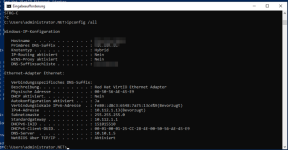
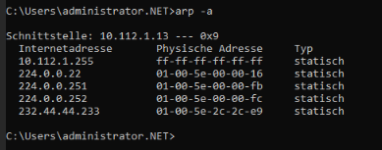
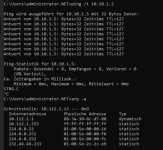
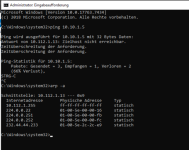
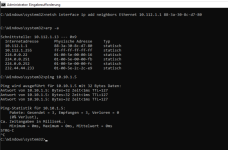
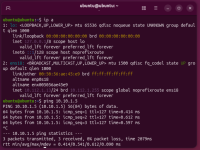
Currently migrating VMs from an ESX cluster. While Linux VMs have network connectivity, we are struggling with Windows Server 2019/2022 VM. VirtIO Drivers are installed and network card shows up ok, ip is configured. Still no network access, even pinging the gateway fails.
After some hours of vm running time, network starts working and is stable until next reboot.
ENVIRONMENT:
- Broadcom BCM57416
- Switch on bond0: HPE Aruba 8320, AOS-CX Version: TL.10.15.1040
SOLUTION:
Switching bond0 mode from 802.3ad to balance-alb resolved the issue. Unfortunately no time to investigate 802.ad options.
SYMPTOMS:
After starting the windows vm, virtual network card shows up on the the wrong vmbr port. You can check by looking for the MAC addresses of tap-Interface and virtual network interface:
1 is bond0
2 is tap0 -> virtual network interface
------------------------------------------------------------------------
Original content:
/etc/network/interfaces:
Linux VM, working network:
Windows VM, not working:
After some hours of vm running time, network starts working and is stable until next reboot.
ENVIRONMENT:
- Broadcom BCM57416
- Switch on bond0: HPE Aruba 8320, AOS-CX Version: TL.10.15.1040
SOLUTION:
Switching bond0 mode from 802.3ad to balance-alb resolved the issue. Unfortunately no time to investigate 802.ad options.
SYMPTOMS:
After starting the windows vm, virtual network card shows up on the the wrong vmbr port. You can check by looking for the MAC addresses of tap-Interface and virtual network interface:
Bash:
# 62:97:41:26:67:69 is MAC of tap-Interface
# bc:24:11:bc:ab:45 is MAC of VMs virtual network interface

root@pmx-03:~# brctl showmacs vmbr0 | grep -e "62:97:41:26:67:69" -e  "bc:24:11:bc:ab:45"
  2    62:97:41:26:67:69    yes           0.00
  2    62:97:41:26:67:69    yes           0.00
  1    bc:24:11:bc:ab:45    no           0.54
1 is bond0
2 is tap0 -> virtual network interface
------------------------------------------------------------------------
Original content:
/etc/network/interfaces:
Code:
# first physical link
auto ens6f0np0
iface ens6f0np0 inet manual

# second physical link
auto ens6f1np1
iface ens6f1np1 inet manual

# bond for vm network
auto bond0
iface bond0 inet manual
    bond-slaves ens6f0np0 ens6f1np1
    bond-miimon 100
    bond-mode 802.3ad
    bond-xmit-hash-policy layer2+3

# bridge for vm network
auto vmbr0
iface vmbr0 inet manual
    bridge-ports bond0
    bridge-stp off
    bridge-fd 0
    bridge-vlan-aware yes
    bridge-vids 2-4094
Linux VM, working network:
Bash:
root@pmx-01:~# qm config 105 --current
agent: 1
bios: seabios
boot: order=scsi0
cores: 1
cpu: host
ide0: none,media=cdrom
memory: 4096
meta: creation-qemu=10.0.2,ctime=1768134338
name: logging
net0: vmxnet3=00:50:56:a1:04:f3,bridge=vmbr0,tag=10
numa: 0
ostype: l26
scsi0: SSDPool:vm-105-disk-0,size=300G
scsihw: pvscsi
smbios1: uuid=4221b22b-8afc-2627-ea72-0ad1b985aba7
sockets: 1
vmgenid: da24311d-9b21-4e9a-857b-7752da7b056a
Windows VM, not working:
Bash:
root@pmx-01:~# qm config 103 --current
bios: ovmf
boot: order=sata1;sata2;sata3;sata4
cores: 2
cpu: x86-64-v2-AES
efidisk0: SSDPool:vm-103-disk-0,efitype=4m,size=1M
machine: pc-i440fx-10.0,viommu=virtio
memory: 16384
meta: creation-qemu=10.0.2,ctime=1768216130
name: pmachtest2019.net.adk.de
net0: virtio=00:50:56:ae:45:e9,bridge=vmbr0,tag=112
ostype: win10
parent: pre_first_start
sata0: cephfs:iso/virtio-win-0.1.285.iso,media=cdrom,size=771138K
sata1: SSDPool:vm-103-disk-1,size=100G
sata2: SSDPool:vm-103-disk-2,size=100G
sata3: SSDPool:vm-103-disk-3,size=100G
sata4: SSDPool:vm-103-disk-4,size=100G
scsihw: virtio-scsi-single
smbios1: uuid=422eb1b8-c86d-72fa-f5e0-c7e9fed6c77f
sockets: 1
vmgenid: d46052d5-b89c-480e-be64-e3782cf386c2
Last edited: