Hello,
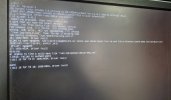
We are trying to install Proxmox 8.3 or 8.4, and it said, "No hard disk found! - The installer could not find the supported hard drive."
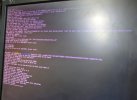
We are using Dell R620 server, the point is that, we have installed ESXi host in this server previously and after that we installed Proxmox 8.3 without any issues. But due to some reason we need to remove it and install another OS. I am now trying to install Proxmox 8.3 or 8.4 again - but it is stuck at No hard disk found! even after destroying the RAID. Sometimes it passes the initial steps but stuck at 'cleaning up the root disk' during the installation. It is happening with Proxmox 8.3 or 8.4 only - as I installed Proxmox 7.4 without any issues in the same server with same configuration.
The specs of the server (Dell R620) is given below
4 hard drives on RAID10, making up 1675 GB
BIOS Version: 2.5.2
RAID Controller: PERC H310 Mini
RAID Firmware Version: 20.13.3-0001
iDRAC Setting: 1.65.65.04
iDRAC Firmware: 2.21.21 (build 12)
BIOS Mode Set to 'BIOS'
Please suggest the solution as we are completely frustrated installing Proxmox again and again but there is no way!
We are trying to install Proxmox 8.3 or 8.4, and it said, "No hard disk found! - The installer could not find the supported hard drive."
We are using Dell R620 server, the point is that, we have installed ESXi host in this server previously and after that we installed Proxmox 8.3 without any issues. But due to some reason we need to remove it and install another OS. I am now trying to install Proxmox 8.3 or 8.4 again - but it is stuck at No hard disk found! even after destroying the RAID. Sometimes it passes the initial steps but stuck at 'cleaning up the root disk' during the installation. It is happening with Proxmox 8.3 or 8.4 only - as I installed Proxmox 7.4 without any issues in the same server with same configuration.
The specs of the server (Dell R620) is given below
4 hard drives on RAID10, making up 1675 GB
BIOS Version: 2.5.2
RAID Controller: PERC H310 Mini
RAID Firmware Version: 20.13.3-0001
iDRAC Setting: 1.65.65.04
iDRAC Firmware: 2.21.21 (build 12)
BIOS Mode Set to 'BIOS'
Please suggest the solution as we are completely frustrated installing Proxmox again and again but there is no way!