[SOLVED] NFS storage with snapshot-as-volume-chain feature failing backups with veeam and proxmox native backup

smoKeyY

New Member
Oct 14, 2026
7
2
3
We have proxmox 9.2.2 running and we created NFS storages with snapshot-as-volume-chain feature

The problem is that when I am trying to move the .raw or .qcow2 from one storage to the other its not working as expected its moving the disk as empty! rendering the VM's with no data at all...

Also Veeam backup is also backing up only sort of a "meta data" sample rather the whole disk... so a veeam restore is restoring EMPTY disks as well!

At this point im lost and I have hit a wall.

What I tried:
I have created a new NFS without snapshot-as-volume-chain feature
Move a storage to it same symptom it transfers only 10GB when the disk is actually full in windows 290GB odd
I have tried formatting from .raw to .qcow2 same result no data on disk it even loses the bootloader
 
We have proxmox 9.2.2 running and we created NFS storages with snapshot-as-volume-chain feature

The problem is that when I am trying to move the .raw or .qcow2 from one storage to the other its not working as expected its moving the disk as empty! rendering the VM's with no data at all...

Also Veeam backup is also backing up only sort of a "meta data" sample rather the whole disk... so a veeam restore is restoring EMPTY disks as well!

At this point im lost and I have hit a wall.

What I tried:
I have created a new NFS without snapshot-as-volume-chain feature
Move a storage to it same symptom it transfers only 10GB when the disk is actually full in windows 290GB odd
I have tried formatting from .raw to .qcow2 same result no data on disk it even loses the bootloader
the i ran into this:

Proxmox VE's snapshot-as-volume-chain feature (introduced as a technology preview for thick-provisioned LVM on shared storage like iSCSI/Fibre Channel) can break or render disks unbootable during storage migrations or when moving/exporting/importing volumes because of how CoW (Copy-on-Write) backing images and QCOW2/RAW format conversions are handled

which explains my issue...

Question is... how do i fix this?
 
Hi @smoKeyY , welcome to the forum.

We have proxmox 9.2.2 running and we created NFS storages with snapshot-as-volume-chain feature
The Snapshot-as-volume-chain is NOT for NFS storage, but for block storage (iSCSI, FC, etc) with LVM layer on it. I don't think the system allows you to enable SaVC on an NFS storage pool, if it did - thats is a bug/misconfiguration.
With that said, it would be best if you share your actual storage configuration , your VM configuration, actual data view of the disk sizing that indicate your issue.

Taking what you described at face value - you should scrap your configuration, VMs, and disks and start from scratch with a proper supported configuration.


Blockbridge : Ultra low latency all-NVME shared storage for Proxmox - https://www.blockbridge.com/proxmox
 
Last edited:
  • Like
Reactions: Johannes S
Hi @smoKeyY , welcome to the forum.


The Snapshot-as-volume-chain is NOT for NFS storage, but for block storage (iSCSI, FC, etc) with LVM layer on it. I don't think the system allows you to enable SaVC on an NFS storage pool, if it did - thats is a bug/misconfiguration.
With that said, it would be best if you share your actual storage configuration , your VM configuration, actual data view of the disk sizing that indicate your issue.

Taking what you described at face value - you should scrap your configuration, VMs, and disks and start from scratch with a proper supported configuration.


Blockbridge : Ultra low latency all-NVME shared storage for Proxmox - https://www.blockbridge.com/proxmox
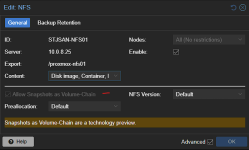
I can enable it on NFS..... yes there is a check mark on the GUI......
Hi @smoKeyY , welcome to the forum.


The Snapshot-as-volume-chain is NOT for NFS storage, but for block storage (iSCSI, FC, etc) with LVM layer on it. I don't think the system allows you to enable SaVC on an NFS storage pool, if it did - thats is a bug/misconfiguration.
With that said, it would be best if you share your actual storage configuration , your VM configuration, actual data view of the disk sizing that indicate your issue.

Taking what you described at face value - you should scrap your configuration, VMs, and disks and start from scratch with a proper supported configuration.


Blockbridge : Ultra low latency all-NVME shared storage for Proxmox - https://www.blockbridge.com/proxmox
I cannot scrap everything as this happened after a whole migration from VMware to ProXmoX so prod is running on it now.... and we cannot move VM's back as when we take a backup with Veeam it only backing up 10MiB of data

1792079389228.png
 
Last edited:
Can you actually check and uncheck it, or is it checked because someone manually edited the configuration file?
In my cluster the option is unchecked in GUI and cannot be checked.

Note that even if it is "checked" manually, it may be a red herring and is not doing anything as it is not applicable here. It is certainly a misconfiguration, however it may be playing no role in your issues.


Blockbridge : Ultra low latency all-NVME shared storage for Proxmox - https://www.blockbridge.com/proxmox
 
The problem is that when I am trying to move the .raw or .qcow2 from one storage to the other its not working as expected its moving the disk as empty! rendering the VM's with no data at all...
Assuming for the moment that the SaVC option is indeed not applicable to your setup, I would suggest taking a methodical approach to troubleshooting.

Create a test VM with a test disk and populate it with test data. Then reproduce the issue while collecting relevant logs, including dmesg and journalctl. Review the logs for errors or warnings, and try to reproduce the behavior manually using tools such as dd and cp, since this involves file-based storage.

Please keep in mind that NFS storage is used successfully by a very large number of Proxmox VE users. The next step is to narrow down what, specifically, in your configuration or environment is causing the observed behavior.

Finally, the Proxmox forum is a community resource supported largely by volunteers. If this issue is affecting a production environment, I would recommend considering a Proxmox VE support subscription, just as you have support agreement with Dell.

Cheers.

PS you can also create a new NFS storage pool,even pointing at the same export, so you can exclude any misconfiguration in your testing.


Blockbridge : Ultra low latency all-NVME shared storage for Proxmox - https://www.blockbridge.com/proxmox
 
Last edited:
  • Like
Reactions: Onslow
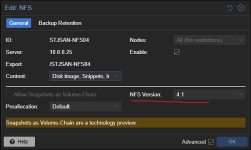
ok so we managed to solve the issue on the new NFS storage

1. we created a new storage without snapshot-as-volume-chain feature
2. we created a vm fresh windows
3. took veeam backup --- same issue so we figured the snapshot-as-volume-chain feature is not the issue
4. we shutdown VM detatched disks
5. then we changed NFS version: 4.1
6. re-attach disks
7. took backup with veeam and it worked

1792097904681.png
 
Last edited:
  • Like
Reactions: Onslow and bbgeek17