Hello,
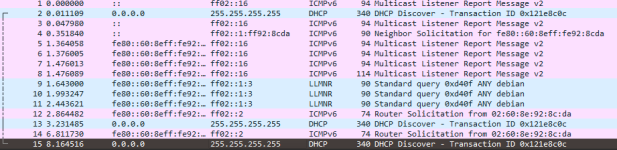
I have an issue where I am installing a new Debian VM on a new proxmox install, and once the VM is started I lose remote access to the proxmox gui nor can I SSH into the machine. In all reality this could be network related on Unifi but I am unsure. The only way I can get access again to the web gui is restarting proxmox; shutting down the VM and systemctl restart pveproxy.service has no change. status pveproxy.service shows UP.
Prior to starting the VM, proxmox can ping the gateway and ping 1.1.1.1. After the VM start, it cannot ping the gateway nor ping 1.1.1.1.
From another PC, I can ping the VM but I cannot ping pve.
IP address shows prior and after starting the VM is: 192.168.7.122.
The VM is showing on network as: 192.168.1.57. Planning on putting the VMs in an isolated VLAN later.
The system is using a realtek nic on a Phantom Gaming x870e using a r8126 driver.
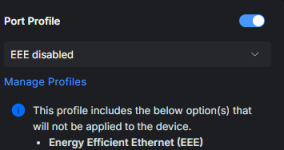
From the switch its connected to the only log entry I get is: "Port is experiencing frequent STP role state changes.". The port is set to an Edge Port.
ip a
/etc/network/interfaces
/etc/resolv.conf
cat /etc/hosts
hostname
SSH prior to VM start
I have an issue where I am installing a new Debian VM on a new proxmox install, and once the VM is started I lose remote access to the proxmox gui nor can I SSH into the machine. In all reality this could be network related on Unifi but I am unsure. The only way I can get access again to the web gui is restarting proxmox; shutting down the VM and systemctl restart pveproxy.service has no change. status pveproxy.service shows UP.
Prior to starting the VM, proxmox can ping the gateway and ping 1.1.1.1. After the VM start, it cannot ping the gateway nor ping 1.1.1.1.
From another PC, I can ping the VM but I cannot ping pve.
IP address shows prior and after starting the VM is: 192.168.7.122.
The VM is showing on network as: 192.168.1.57. Planning on putting the VMs in an isolated VLAN later.
The system is using a realtek nic on a Phantom Gaming x870e using a r8126 driver.
From the switch its connected to the only log entry I get is: "Port is experiencing frequent STP role state changes.". The port is set to an Edge Port.
ip a
ip a
1: lo: <LOOPBACK,UP,LOWER_UP> mtu 65536 qdisc noqueue state UNKNOWN group default qlen 1000
link/loopback 00:00:00:00:00:00 brd 00:00:00:00:00:00
inet 127.0.0.1/8 scope host lo
valid_lft forever preferred_lft forever
inet6 ::1/128 scope host noprefixroute
valid_lft forever preferred_lft forever
2: nic0: <BROADCAST,MULTICAST,UP,LOWER_UP> mtu 1500 qdisc fq_codel master vmbr0 state UP group default qlen 1000
link/ether 9c:6b:00:9b:1f:e8 brd ff:ff:ff:ff:ff:ff
altname enx9c6b009b1fe8
3: wlp9s0: <BROADCAST,MULTICAST> mtu 1500 qdisc noop state DOWN group default qlen 1000
link/ether d8:b3:2f:82:bf:3f brd ff:ff:ff:ff:ff:ff
altname wlxd8b32f82bf3f
4: vmbr0: <BROADCAST,MULTICAST,UP,LOWER_UP> mtu 1500 qdisc noqueue state UP group default qlen 1000
link/ether 9c:6b:00:9b:1f:e8 brd ff:ff:ff:ff:ff:ff
inet 192.168.7.122/24 scope global vmbr0
valid_lft forever preferred_lft forever
inet6 fe80::9e6b:ff:fe9b:1fe8/64 scope link proto kernel_ll
valid_lft forever preferred_lft forever
/etc/network/interfaces
auto lo
iface lo inet loopback
iface nic0 inet manual
post-up ethtool -K nic0 tso off gso off
iface nic1 inet manual
iface wlp9s0 inet manual
auto vmbr0
iface vmbr0 inet static
address 192.168.7.122/24
gateway 192.168.7.1
bridge-ports nic0
bridge-stp off
bridge-fd 0
source /etc/network/interfaces.d/*
/etc/resolv.conf
cat /etc/resolv.conf
search local
nameserver 192.168.7.1
cat /etc/hosts
cat /etc/hosts
127.0.0.1 localhost.localdomain localhost
192.168.7.122 pve.forge pve
# The following lines are desirable for IPv6 capable hosts
::1 ip6-localhost ip6-loopback
fe00::0 ip6-localnet
ff00::0 ip6-mcastprefix
ff02::1 ip6-allnodes
ff02::2 ip6-allrouters
ff02::3 ip6-allhosts
hostname
hostname
pve
SSH prior to VM start
ssh root@192.168.7.122
root@192.168.7.122's password:
Linux pve 7.0.12-1-pve #1 SMP PREEMPT_DYNAMIC PMX 7.0.12-1 (2026-06-09T21:07Z) x86_64
The programs included with the Debian GNU/Linux system are free software;
the exact distribution terms for each program are described in the
individual files in /usr/share/doc/*/copyright.
Debian GNU/Linux comes with ABSOLUTELY NO WARRANTY, to the extent
permitted by applicable law.
Last login: Wed Jul 1 12:53:19 2026 from 192.168.7.7
root@pve:~#