New Install PVE GUI loss when VM starts

byndgrv

New Member
Jul 6, 2026
5
0
1
Hello,

I have an issue where I am installing a new Debian VM on a new proxmox install, and once the VM is started I lose remote access to the proxmox gui nor can I SSH into the machine. In all reality this could be network related on Unifi but I am unsure. The only way I can get access again to the web gui is restarting proxmox; shutting down the VM and systemctl restart pveproxy.service has no change. status pveproxy.service shows UP.

Prior to starting the VM, proxmox can ping the gateway and ping 1.1.1.1. After the VM start, it cannot ping the gateway nor ping 1.1.1.1.

From another PC, I can ping the VM but I cannot ping pve.

IP address shows prior and after starting the VM is: 192.168.7.122.
The VM is showing on network as: 192.168.1.57. Planning on putting the VMs in an isolated VLAN later.

The system is using a realtek nic on a Phantom Gaming x870e using a r8126 driver.

From the switch its connected to the only log entry I get is: "Port is experiencing frequent STP role state changes.". The port is set to an Edge Port.

ip a
ip a
1: lo: <LOOPBACK,UP,LOWER_UP> mtu 65536 qdisc noqueue state UNKNOWN group default qlen 1000
link/loopback 00:00:00:00:00:00 brd 00:00:00:00:00:00
inet 127.0.0.1/8 scope host lo
valid_lft forever preferred_lft forever
inet6 ::1/128 scope host noprefixroute
valid_lft forever preferred_lft forever
2: nic0: <BROADCAST,MULTICAST,UP,LOWER_UP> mtu 1500 qdisc fq_codel master vmbr0 state UP group default qlen 1000
link/ether 9c:6b:00:9b:1f:e8 brd ff:ff:ff:ff:ff:ff
altname enx9c6b009b1fe8
3: wlp9s0: <BROADCAST,MULTICAST> mtu 1500 qdisc noop state DOWN group default qlen 1000
link/ether d8:b3:2f:82:bf:3f brd ff:ff:ff:ff:ff:ff
altname wlxd8b32f82bf3f
4: vmbr0: <BROADCAST,MULTICAST,UP,LOWER_UP> mtu 1500 qdisc noqueue state UP group default qlen 1000
link/ether 9c:6b:00:9b:1f:e8 brd ff:ff:ff:ff:ff:ff
inet 192.168.7.122/24 scope global vmbr0
valid_lft forever preferred_lft forever
inet6 fe80::9e6b:ff:fe9b:1fe8/64 scope link proto kernel_ll
valid_lft forever preferred_lft forever

/etc/network/interfaces
auto lo
iface lo inet loopback

iface nic0 inet manual
post-up ethtool -K nic0 tso off gso off

iface nic1 inet manual

iface wlp9s0 inet manual

auto vmbr0
iface vmbr0 inet static
address 192.168.7.122/24
gateway 192.168.7.1
bridge-ports nic0
bridge-stp off
bridge-fd 0

source /etc/network/interfaces.d/*

/etc/resolv.conf
cat /etc/resolv.conf
search local
nameserver 192.168.7.1

cat /etc/hosts
cat /etc/hosts
127.0.0.1 localhost.localdomain localhost
192.168.7.122 pve.forge pve

# The following lines are desirable for IPv6 capable hosts

::1 ip6-localhost ip6-loopback
fe00::0 ip6-localnet
ff00::0 ip6-mcastprefix
ff02::1 ip6-allnodes
ff02::2 ip6-allrouters
ff02::3 ip6-allhosts

hostname
hostname
pve

SSH prior to VM start
ssh root@192.168.7.122
root@192.168.7.122's password:
Linux pve 7.0.12-1-pve #1 SMP PREEMPT_DYNAMIC PMX 7.0.12-1 (2026-06-09T21:07Z) x86_64

The programs included with the Debian GNU/Linux system are free software;
the exact distribution terms for each program are described in the
individual files in /usr/share/doc/*/copyright.

Debian GNU/Linux comes with ABSOLUTELY NO WARRANTY, to the extent
permitted by applicable law.
Last login: Wed Jul 1 12:53:19 2026 from 192.168.7.7
root@pve:~#
 
This has a very specific signature and I'm fairly sure you're hitting two
things at once. Let's separate them.

## Problem 1: r8126 driver

The in-tree r8126 driver has a long history of misbehaving under bridge +
VM traffic on PVE. The failure mode you're describing — "host loses
connectivity but VM keeps working through the same NIC" — is documented in
multiple threads on this forum (search "r8126" or "r8125", you'll find
dozens). The `tso off gso off` you've already added helps some setups but
not all of them.

The community-tested fix is to blacklist the in-kernel r8169/r8126 and
install the DKMS driver maintained by awesometic on GitHub. Rough recipe
(check the repo for current version):

apt install build-essential dkms proxmox-headers-$(uname -r)
# download latest realtek-r8126-dkms .deb from
# https://github.com/awesometic/realtek-r8126-dkms/releases
dpkg -i realtek-r8126-dkms_*.deb
echo "blacklist r8169" > /etc/modprobe.d/blacklist-r8169.conf
update-initramfs -u
reboot

After the reboot check `lspci -k | grep -A2 Realtek` shows "Kernel driver
in use: r8126" (not r8169), and `dkms status` shows the module built.

Also, if you keep the ethtool workaround, expand it — the fix that
actually seems to help most people is:

post-up ethtool -K nic0 tx off sg off tso off gso off gro off

`tx off` and `sg off` are the two that matter more than gso/tso for this
specific pattern.

## Problem 2: UniFi STP flapping

Your switch log ("frequent STP role state changes" on a port set to Edge)
is telling you something important. Edge Port means UniFi expects the port
to have exactly one MAC behind it (an end device, no switch/loop). When
your VM starts, its tap adds a second MAC on the same physical port. Some
UniFi firmware versions react to that by putting the port through STP
transitions, and during the transition the host's own frames get dropped —
but the VM's MAC (which is what the port "learned" more recently) still
gets through. That matches your symptom exactly: from outside you can ping
the VM but not the host.

Fixes to try, in order of least invasive:

1) Disable STP-related "protection" features on that UniFi port:
- Loop prevention: off
- Storm control: off
- Bridging / BPDU guard: off
Different UniFi firmware versions expose these under different names
(Advanced port settings). Also make sure the port is NOT set to
"profile: default" if the default profile has these on.

2) Change the port from "Edge Port" to a regular access port. Edge is for
single-device scenarios; a hypervisor bridging N VMs is not one of them.

3) If you still see STP flapping after that, check whether the UniFi
controller has "Client Device Isolation" enabled on the network — that
also causes weird MAC-behind-MAC behavior.

## Bonus observation

Your host is on 192.168.7.122/24 but your VM got 192.168.1.57 — those are
different subnets. Assuming your UniFi has multiple VLANs, the port is
probably untagged in VLAN 1 (192.168.1.0/24) but you set the host's static
IP in a different range. That's not causing the freeze, but you'll want
to sort it out before adding more VMs. Either:

- Give the host an IP in the same untagged VLAN as what the port serves, or
- Make the bridge VLAN-aware (`bridge-vlan-aware yes` on vmbr0), tag the
port on UniFi, and set VLAN tags per VM in the PVE GUI.

## Order of operations for troubleshooting

1) Fix the driver first (Problem 1). Reboot. Reproduce.
2) If still broken, tune the UniFi port (Problem 2).
3) Clean up the VLAN/subnet situation.

Post back with `dmesg | grep -i "r812\|eth\|link"` from before AND after
starting the VM once you've done step 1 — that'll tell us if the driver
change made a difference.
 
I'll go slightly out of order for my answer.

2/3. The edge setting was mostly me just trying anything to get things to work with this issue. I originally had it set up the way you suggested and have now set that port back to that same place.

The only isolated network I have (at the moment) is an IoT VLAN. VMs will eventually be isolated for playground reasons. I have several VLANs for trusted/semi-trusted/untrusted devices as I'm sure a lot of us do in some way.

1. Tried the driver update and still same problem.

lspci -k | grep -A2 Realtek
08:00.0 Ethernet controller: Realtek Semiconductor Co., Ltd. RTL8126 5GbE Controller (rev 01)
Subsystem: ASRock Incorporation Device 8126
Kernel driver in use: r8126

dkms status
realtek-r8126/10.017.00, 7.0.14-3-pve, amd64: installed

dmesg | grep -i "r812\|eth\|link" **before VM start
[ 0.249164] NET: Registered PF_NETLINK/PF_ROUTE protocol family
[ 0.249485] audit: initializing netlink subsys (disabled)
[ 0.411925] ACPI: PCI: Interrupt link LNKA configured for IRQ 0
[ 0.411945] ACPI: PCI: Interrupt link LNKB configured for IRQ 0
[ 0.411961] ACPI: PCI: Interrupt link LNKC configured for IRQ 0
[ 0.411982] ACPI: PCI: Interrupt link LNKD configured for IRQ 0
[ 0.412000] ACPI: PCI: Interrupt link LNKE configured for IRQ 0
[ 0.412015] ACPI: PCI: Interrupt link LNKF configured for IRQ 0
[ 0.412030] ACPI: PCI: Interrupt link LNKG configured for IRQ 0
[ 0.412045] ACPI: PCI: Interrupt link LNKH configured for IRQ 0
[ 1.091533] ata3: SATA link down (SStatus 0 SControl 300)
[ 1.091539] ata9: SATA link down (SStatus 0 SControl 300)
[ 1.091541] ata1: SATA link down (SStatus 0 SControl 300)
[ 1.403610] ata2: SATA link down (SStatus 0 SControl 300)
[ 1.715225] ata4: SATA link down (SStatus 0 SControl 300)
[ 2.027445] ata5: SATA link down (SStatus 0 SControl 300)
[ 2.339503] ata6: SATA link down (SStatus 0 SControl 300)
[ 2.651548] ata10: SATA link down (SStatus 0 SControl 300)
[ 2.963603] ata11: SATA link down (SStatus 0 SControl 300)
[ 3.275468] ata12: SATA link down (SStatus 0 SControl 300)
[ 5.095334] r8126: module verification failed: signature and/or required key missing - tainting kernel
[ 5.683916] r8126 Ethernet controller driver 10.017.00-NAPI loaded
[ 5.688329] amdgpu: vga_switcheroo: detected switching method \_SB_.PCI0.GP17.VGA_.ATPX handle
[ 5.691380] r8126: This product is covered by one or more of the following patents: US6,570,884, US6,115,776, and US6,327,625.
[ 5.691390] r8126 Copyright (C) 2025 Realtek NIC software team <nicfae@realtek.com>
[ 5.707097] r8126 0000:08:00.0 nic0: renamed from eth0
[ 11.146199] r8126 0000:08:00.0 nic0: entered allmulticast mode
[ 11.146253] r8126 0000:08:00.0 nic0: entered promiscuous mode
[ 15.432545] r8126: nic0: link up

dmesg | grep -i "r812\|eth\|link" **after VM start
[ 0.249164] NET: Registered PF_NETLINK/PF_ROUTE protocol family233.953598[ 0.249485] audit: initializing netlink subsys (disabled)
[ 0.411925] ACPI: PCI: Interrupt link LNKA configured for IRQ 0
[ 0.411945] ACPI: PCI: Interrupt link LNKB configured for IRQ 0
[ 0.411961] ACPI: PCI: Interrupt link LNKC configured for IRQ 0
[ 0.411982] ACPI: PCI: Interrupt link LNKD configured for IRQ 0
[ 0.412000] ACPI: PCI: Interrupt link LNKE configured for IRQ 0
[ 0.412015] ACPI: PCI: Interrupt link LNKF configured for IRQ 0
[ 0.412030] ACPI: PCI: Interrupt link LNKG configured for IRQ 0
[ 0.412045] ACPI: PCI: Interrupt link LNKH configured for IRQ 0
[ 1.091533] ata3: SATA link down (SStatus 0 SControl 300)
[ 1.091539] ata9: SATA link down (SStatus 0 SControl 300)
[ 1.091541] ata1: SATA link down (SStatus 0 SControl 300)
[ 1.403610] ata2: SATA link down (SStatus 0 SControl 300)
[ 1.715225] ata4: SATA link down (SStatus 0 SControl 300)
[ 2.027445] ata5: SATA link down (SStatus 0 SControl 300)
[ 2.339503] ata6: SATA link down (SStatus 0 SControl 300)
[ 2.651548] ata10: SATA link down (SStatus 0 SControl 300)
[ 2.963603] ata11: SATA link down (SStatus 0 SControl 300)
[ 3.275468] ata12: SATA link down (SStatus 0 SControl 300)
[ 5.095334] r8126: module verification failed: signature and/or required key missing - tainting kernel
[ 5.683916] r8126 Ethernet controller driver 10.017.00-NAPI loaded
[ 5.688329] amdgpu: vga_switcheroo: detected switching method \_SB_.PCI0.GP17.VGA_.ATPX handle
[ 5.691380] r8126: This product is covered by one or more of the following patents: US6,570,884, US6,115,776, and US6,327,625.
[ 5.691390] r8126 Copyright (C) 2025 Realtek NIC software team <nicfae@realtek.com>
[ 5.707097] r8126 0000:08:00.0 nic0: renamed from eth0
[ 11.146199] r8126 0000:08:00.0 nic0: entered allmulticast mode
[ 11.146253] r8126 0000:08:00.0 nic0: entered promiscuous mode
[ 15.432545] r8126: nic0: link up
[ 233.953598] r8126: nic0: link down
[ 237.772568] r8126: nic0: link up
 
Great data — this actually pinpoints the real problem, and it's not what
we initially thought.

The DKMS driver is installed correctly (r8126 10.017.00-NAPI is the
current release), so that part is done and it wasn't wasted work — it
just wasn't the root cause.

Look at the last two lines of your "after VM start" dmesg:

[ 233.953598] r8126: nic0: link down
[ 237.772568] r8126: nic0: link up

That's the smoking gun. The physical link is going DOWN for ~4 seconds
when the VM starts. This isn't a driver bug or a bridge issue — it's the
NIC itself dropping the L1 link and renegotiating. Once you know this,
everything else falls into place:

- 4 seconds of link down → UniFi sees a link flap on an Edge port → STP
transition kicks in and blocks forwarding for 15-30s
- When the port comes back, the switch relearns MACs. The VM's tap sends
gratuitous ARP immediately and gets relearned fast; the host is more
quiet at L2 and takes longer
- Result: "VM reachable, host isolated" — which is exactly what you see

## Why the link flaps when the VM starts

Two well-known culprits on Realtek NICs, both worth eliminating:

1. **EEE (Energy Efficient Ethernet / 802.3az)** — when NIC traffic
pattern changes (bridge adds a tap, VM starts sending), the PHY tries
to renegotiate low-power idle timing with the switch. On Realtek + some
switches (including UniFi in various firmware versions), this
renegotiation causes a full link drop instead of a smooth transition.

2. **ASPM (PCIe power management)** — the r8126 module has an `aspm`
parameter and multiple threads on this forum report that leaving ASPM
enabled causes link instability under load.

## Fixes to try, in order

**Step 1 — disable EEE on the NIC (test immediately, no reboot needed):**

ethtool --set-eee nic0 eee off

Then start the VM again and check dmesg for another link down/up. If the
flap disappears, EEE was it. Make it persistent by adding to
/etc/network/interfaces:

iface nic0 inet manual
post-up ethtool -K nic0 tx off sg off tso off gso off gro off
post-up ethtool --set-eee nic0 eee off

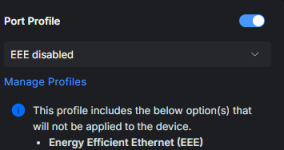
**Step 2 — if EEE alone doesn't fix it, also disable EEE on the UniFi
port.** EEE is negotiated between BOTH ends, so if the switch keeps
advertising it, the NIC may still try. On UniFi: port settings →
advanced → "Energy Efficient Ethernet" (or 802.3az) → off. Different
UniFi firmwares expose this differently; some hide it in "Port Profile"
advanced options.

**Step 3 — if still flapping, disable ASPM on the driver.** The r8126
module accepts a parameter. Create /etc/modprobe.d/r8126.conf:

options r8126 aspm=0

Then:

update-initramfs -u
reboot

**Step 4 — as a last resort, force fixed speed/duplex and turn off
autoneg:**

ethtool -s nic0 speed 2500 duplex full autoneg off

(assuming the switch port is 2.5G; adjust to whatever your NIC actually
negotiates in `ethtool nic0`). This eliminates renegotiation entirely
but you lose the ability to auto-adapt if you change cables/switch.

## Verification after each step

After each change, start the VM and run:

dmesg -T | grep -i "r8126\|link"

If you no longer see the "link down / link up" pair around VM start,
you've found it. Also check on the UniFi side — the "STP role state
changes" log entries should stop.

Also worth checking on the UniFi controller: in the port's insights,
look at the "flap count" over time. Should be 0 or very low. If it keeps
climbing, the L1 issue is still there.

My money is on EEE (step 1) — it's by far the most common cause of this
exact symptom on Realtek NICs. Let us know what step 1 alone does.
 
Unfortunately, none of these worked. The 4th step, I also could not do. The switch is a USW Pro XG 8; so it runs at 10 gbe and the nic is a 5gbe


ethtool --show-eee nic0
EEE settings for nic0:
EEE status: enabled - inactive
Tx LPI: 19 (us)
Supported EEE link modes: 100baseT/Full
1000baseT/Full
2500baseT/Full
5000baseT/Full
Advertised EEE link modes: 100baseT/Full
1000baseT/Full
2500baseT/Full
5000baseT/Full
Link partner advertised EEE link modes: Not reported

Switch configuration
Screenshot 2026-07-07 105656.png

cat /etc/modprobe.d/r8126.conf
options r8126 aspm=0
 
Last edited:
Fair enough, none of my hypotheses were right — and looking at your
`--show-eee` output more carefully I should have caught this earlier:

EEE status: enabled - inactive
Link partner advertised EEE link modes: Not reported

"Link partner: Not reported" means the switch isn't advertising EEE, so
EEE was never actually negotiated on this link — disabling it was a
no-op. My mistake for jumping there without asking for `--show-eee`
first. Similarly ASPM=0 with no effect suggests PCIe power management
isn't it either.

Time to change approach and isolate WHAT specifically triggers the flap
when the VM starts. Right now we know "starting the VM causes L1 link
down/up" but we don't know if it's:

(a) The tap being added to vmbr0
(b) The bridge switching into a different mode (promiscuous, learning)
(c) QEMU/KVM CPU load causing IRQ/PCIe misbehavior on the r8126
(d) Something the guest OS does at boot (DHCP burst, IPv6 RA, etc.)

Four small tests to narrow it down. Each takes 2 minutes.

## Test 1 — start the VM with NO network

In the VM's Hardware tab, temporarily REMOVE the network device (or
disconnect it: set `link_down` to yes in the NIC settings). Boot the VM.

Then check `dmesg -T | grep -i "r8126\|link"` on the host.

- If NO link flap: the flap is caused by the NIC being added to the
bridge / traffic hitting the NIC. Goes to test 2.
- If link flap STILL happens: it's not networking at all — it's
something about starting the VM process itself. Goes to test 3.

## Test 2 — simulate adding a tap manually, WITHOUT starting a VM

On the host, run:

ip tuntap add tap99 mode tap
ip link set tap99 master vmbr0
ip link set tap99 up
# wait 30s, watch dmesg
ip link del tap99

If this reproduces the link flap, we've proven the trigger is
"bridge gains a member". That's actionable — it points to bridge/NIC
interaction. Fix candidates: disable multicast snooping on the bridge,
disable IGMP querier, tune bridge ageing time.

If this does NOT reproduce the flap, the trigger is something more
specific about VM traffic (not just tap presence).

## Test 3 — check for hardware/thermal correlations

ethtool -S nic0 | grep -iE "err|drop|flap|reset|fifo|abort"

Run this before and after starting the VM. Growing rx_errors,
rx_missed, or any *_reset counter tells us the NIC is having internal
issues under load. Also worth watching `sensors` (install `lm-sensors`)
to see if PCIe/NIC temperature spikes.

## Test 4 — force fixed speed on the NIC side

Quick note on my earlier step 4: you CAN force a fixed speed even on a
10G switch port. The switch will happily negotiate down to whatever the
NIC forces. Try:

ethtool -s nic0 speed 5000 duplex full autoneg off

Start the VM, check if the flap still happens. If autoneg was involved
(the two sides re-negotiating when traffic pattern changes), this
eliminates it.

If none of these help, revert autoneg back on:

ethtool -s nic0 autoneg on

## While you're at it — check the physical layer

Two very boring things worth doing:
- Try a different cable. I know, I know. But Realtek 5G is picky about
cable quality more than 1G is, and a marginal cable can flap under
load. Cat6 or better only.
- Try a different port on the UniFi switch. If the problem moves with
the cable/NIC, it's the host side. If the problem stays on the port,
it's the switch port.

Report back with:
1) Test 1 result (VM with no NIC — does link still flap?)
2) `ethtool -S nic0 | grep -iE "err|drop|reset"` output before and
after starting the VM
3) Whether Test 4 (forced 5000 full) changes anything

That'll narrow it down significantly.
 
Test 1 and Test 2: no flap introduced.

Output before VM
tx_errors: 0
rx_errors: 0
align_errors: 0
tx_aborted: 0
tx_underrun: 0
tx_deferred: 0
tx_aborted32: 0
align_errors32: 0
rx_mac_error: 0
tx_underrun32: 0
rx_tcam_dropped: 0

Output After VM
tx_errors: 1
rx_errors: 0
align_errors: 0
tx_aborted: 0
tx_underrun: 0
tx_deferred: 0
tx_aborted32: 0
align_errors32: 0
rx_mac_error: 0
tx_underrun32: 0
rx_tcam_dropped: 0

Output when I try to do test 4
ethtool -s nic0 speed 5000 duplex full autoneg off
netlink error: link settings update failed
netlink error: Invalid argument

For the boring stuff:
With 2 different ethernet cables with three different ports (also plugged into a port on a Flex 2.5g ) same issue.
 
The single tx_errors incrementing from 0 to 1 exactly when the VM starts
is the smoking gun. Combined with Test 1 clean, Test 2 clean, and
different cables/ports/switches all failing identically, this pattern
matches a well-documented Proxmox failure mode:

VirtIO NIC + Realtek chip + checksum/segmentation offload interaction.

What happens: the VM's VirtIO NIC sends packets with offload flags set
(the guest tells the host "checksum this for me, segment this for me").
These flags are supposed to be handled by the host and stripped before
the packet hits the physical NIC. In some driver/kernel combinations —
r8126 is a known offender — the flags slip through, the chip receives a
packet with metadata it can't process, fails to transmit it (→ your
tx_errors +1), and does an internal reset which manifests as a PHY
link flap.

There are older forum threads on this exact issue with different
Realtek chips (search "virtio checksum offload" — Proxmox forum #22866
is a classic).

## The definitive test

Change the VM's virtual NIC model from VirtIO to E1000 (or e1000e).
GUI: VM → Hardware → Network Device → Edit → Model → Intel E1000.

Start the VM. If the link flap disappears, we've confirmed it 100% and
you have two options:
(a) keep the VM on E1000 (simpler, ~5-10% CPU overhead vs VirtIO)
(b) go back to VirtIO but disable offloads aggressively on the host
side (below)

## If E1000 fixes it and you want VirtIO back

Disable ALL offloads on both the physical NIC and the bridge:

ethtool -K nic0 rx off tx off sg off tso off gso off gro off lro off
ethtool -K vmbr0 tx off rx off sg off tso off

Make persistent in /etc/network/interfaces:

iface nic0 inet manual
post-up ethtool -K nic0 rx off tx off sg off tso off gso off gro off lro off

auto vmbr0
iface vmbr0 inet static
...
post-up ethtool -K vmbr0 tx off rx off sg off tso off

Then switch the VM back to VirtIO and see if it still flaps. If not,
you're done — you keep VirtIO performance and paid only a small offload
overhead on the host CPU (with a 5G link that's noise on any modern CPU).

## If E1000 does NOT fix it

Then the offload theory is wrong and we're looking at something more
fundamental. In that case, capture the exact packet that kills the link:

# in one terminal
tcpdump -i tap<VMID>i0 -w /tmp/vmboot.pcap -s 0

# in another terminal, watch dmesg live
dmesg -Tw | grep -i r8126

Start the VM, wait for the flap, stop tcpdump. Then look at
/tmp/vmboot.pcap in Wireshark — the last packet before the link went
down is the culprit. That'll tell us if it's a specific packet type
(IPv6 RA solicit, malformed DHCP, jumbo frame, etc.).

## The uncomfortable option

If nothing above works, it may be that this specific r8126 rev + this
kernel combination is genuinely broken and the workaround budget is
exhausted. There's a recent thread on this forum (#181670 from a few
months ago) about people going back to older kernels to get r8126
stable on PVE 9.x. Not a great answer, but real.

Longer term, a $30 Intel i226 NIC eliminates this whole class of
problem forever. I know it's not what you wanted to hear given the
motherboard already has a working chip on paper, but Realtek 5G on
Linux under load is a category of pain that a lot of people eventually
just walk away from.

Start with the E1000 test — that alone will tell us whether we're on
the right track. Post back with the result and (if E1000 works) the
`ethtool -k nic0 | head -30` output so I can check if any offload is
sneaking back on after boot.
 
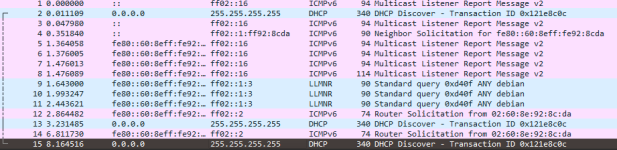
Looking at the wireshark results, it sems to be a DHCP or multicast.

I think at this point the best option for me is to get a Intel NIC. Is there any issues with setting up a i226 or is it pretty plug and play? I also have an open SFP+ on my switch and would be willing to look at 10 gbe as well.


1783529641336.png
 
Last edited:
Nice detective work on the pcap — that ICMPv6 multicast burst
(Multicast Listener Report + Neighbor Solicitation) hitting the r8126
in allmulticast mode is the trigger. Case closed on diagnosis.

On hardware choice, I want to give you the honest picture rather than
just recommend the first thing that comes to mind, because I sent you
toward "Intel i226 = plug and play" earlier and it's not quite that
simple on current PVE.

## Option A — Intel i226-V (2.5G RJ45, ~$25-40)

Pros:
- Uses the in-kernel `igc` driver, no DKMS, no external drivers
- Common, cheap, widely available (Aliexpress, Amazon, etc.)
- Basic case works out of the box

Cons — these are real, from recent forum threads on PVE 8 and 9:
- Some firmware revisions have a DHCP-related bug (AMT interpreting
DHCPOFFER as management traffic on the "-LM" variant; -V is mostly
spared but not always)
- EEE issues similar to Realtek — on some boards you have to disable
EEE explicitly (`ethtool --set-eee <if> eee off`)
- ASPM interaction with NVMe on some platforms — port goes dead when
NVMe is present, needs BIOS ASPM disable + kernel `pcie_aspm=off`
- Some users on PVE 9.x report high latency spikes (15-1000ms) that
weren't there on PVE 8.x — root cause not fully identified yet

None of these are dealbreakers and workarounds exist for all of them,
but "plug it in and forget" isn't guaranteed. Rev 04 with recent
firmware (2.25+) is what most working setups are on.

## Option B — 10G SFP+ (my recommendation given you have the port free)

Since your USW Pro XG 8 has a free SFP+ port, this is honestly the
better move. You skip an entire generation of hobby-tier NIC pain and
land on chips that data centers have been running for 10+ years.

Best options, all with excellent Linux drivers in-kernel:

- **Mellanox ConnectX-3 EN (MCX311A-XCAT)** — single port SFP+, PCIe
2.0 x4, ~$20-30 used on eBay. Driver `mlx4_en`. This is the "just
works" gold standard on Proxmox forums for cheap 10G. Runs a bit
warm, wants some airflow.

- **Mellanox ConnectX-4 Lx** — newer, ~$50-70 used. Driver `mlx5_core`.
Lower power than CX-3, more features. Overkill for home but futureproof.

- **Intel X520-DA2 (or X710-DA2)** — Intel's classic 10G SFP+ chips.
Driver `ixgbe` (X520) or `i40e` (X710). Rock solid but a bit more
expensive used (~$40-60). Runs cooler than Mellanox CX-3.

For the cable, one important warning: **your USW Pro XG 8 is somewhat
picky about DAC/transceiver compatibility**. Cheapest safe path:

- **UniFi UACC-DAC-SFP+ 1m or 3m** (~$25-30) — guaranteed to work on
UniFi. Direct Attach Copper, passive, no transceivers needed. Just
plugs into both ends.
- **FS.com "Ubiquiti-compatible" DAC** — cheaper (~$15), also fine.
- **Random Amazon DAC** — 50/50 whether UniFi accepts it. Don't.

If your PVE box is more than 3-5m from the switch, you'd need fiber +
transceivers instead of DAC. That gets more complex.

## Option C — 10G RJ45

Skip this. Aquantia/Marvell AQC107 chips work on Linux but run VERY
hot, draw a lot of power, and the driver (`atlantic`) is less mature
than Intel/Mellanox equivalents. Only makes sense if you can't do SFP+
for physical reasons.

## What I'd actually do in your shoes

Given you already have SFP+ available on the switch:

1. Order a used **Mellanox ConnectX-3 EN single-port** on eBay (~$25)
2. Order a **UniFi UACC-DAC-SFP+ 1m or 3m** to match your distance (~$25)
3. Total ~$50, done in a week, and you have a NIC that will still be
fine on this box in 8 years

Install:
- Physically drop the CX-3 into a spare PCIe x4 or x8 slot (x1 will
bottleneck it, don't use x1)
- Boot. `lspci -k | grep -A2 Mellanox` should show `Kernel driver in
use: mlx4_core`
- Move your bridge from nic0 (r8126) to whatever the Mellanox comes up
as (probably enp5s0 or similar depending on your slot). Update
/etc/network/interfaces accordingly
- Leave the Realtek disabled or use it as a management/OOB port on a
separate VLAN — since it works fine when no VM traffic hits it, it's
fine as a low-traffic backup

If you'd rather keep it simple and cheap with i226-V, that's still a
big upgrade from r8126 — just be prepared to disable EEE and possibly
tweak ASPM in BIOS. It'll probably work first try, but no guarantee.

Post back once you've picked and installed — happy to help with the
config swap if anything trips up.