Network Optimization for High-Volume UDP Traffic in PVE

PG1024

New Member
Feb 27, 2026
5
1
3
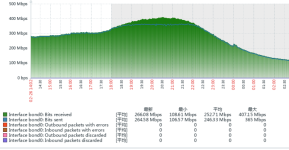
PVE_20260227140256_36_1091.png
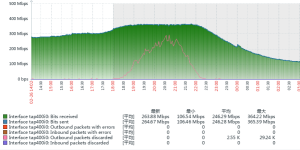
LVS_20260227140321_37_1091.png
Hardware Specification: The physical server network card model is the 82599ES 10-Gigabit SFI/SFP.
Problem Description: A virtual machine is running an LVS (Linux Virtual Server) service. When a single-source IP generates UDP traffic exceeding approximately 300 Mbps, packet loss begins to occur on the network interface. The actual business requires handling peak traffic rates of around 400 Mbps.
Requirement: Besides PCIe Passthrough (NIC Direct Pass-through), are there any other solutions that can ensure a single-source IP can receive UDP traffic exceeding 1 Gbps normally?
Traffic Characteristics: The UDP packets primarily consist of firewall logs. While individual packets are not large, the volume is high, with an estimated rate of 100,000 to 200,000 packets per second.
Baseline Observation: The same physical machine running VMware vSphere 6.7 with an identical virtual machine configuration appears to handle the 400 Mbps traffic load stably during testing.
 
I have dealt with similar high PPS UDP cases, and 100k to 200k packets per second is usually the real problem, not the Mbps. Small packets kill you with interrupt overhead and softirq saturation.

Before jumping to passthrough, I would check vNIC type. Make sure you are using something like vmxnet3, not e1000. Then tune multiqueue, RSS, RPS, and RFS so traffic spreads across CPU cores. Also increase ring buffers with ethtool and check for drops at the driver level.

Pin vCPUs, isolate IRQs, and confirm CPU is not the bottleneck. In my experience, careful CPU and queue tuning often fixes it without full PCIe passthrough.
 
Hi PG1024,

I made several test using iperf with this result:

Server
VM, Ubuntu 24.04, 4CPU, 4GB RAM, PVE node 1
$iperf -su

Client 1
Physical, Ubuntu 25.04, 1Gbps LAN
$iperf -c 192.168.1.69 -u -t 120 -b 500M
[ ID] Interval Transfer Bandwidth Jitter Lost/Total Datagrams
[ 1] 0.0000-119.9998 sec 7.32 GBytes 524 Mbits/sec 0.027 ms 231/5349881 (0.0043%)

$iperf -c 192.168.1.69 -u -t 120 -b 1000M
[ ID] Interval Transfer Bandwidth Jitter Lost/Total Datagrams
[ 2] 0.0000-120.0009 sec 13.4 GBytes 957 Mbits/sec 0.024 ms 661/9765300 (0.0068%)

Client 2
VM, Ubuntu 24.04., 4CPU, 4GB RAM, 10Gbps LAN, PVE node 2
$iperf -c 192.168.1.69 -u -t 120 -b 1000M
[ ID] Interval Transfer Bandwidth Jitter Lost/Total Datagrams
[ 1] 0.0000-119.9999 sec 14.6 GBytes 1.05 Gbits/sec 0.011 ms 460/10699758 (0.0043%)

$iperf -c 192.168.1.69 -u -t 120 -b 5000M
[ ID] Interval Transfer Bandwidth Jitter Lost/Total Datagrams
[ 2] 0.0000-119.9996 sec 43.8 GBytes 3.14 Gbits/sec 0.006 ms 19684/32038968 (0.061%)

Can you specify the percentage of your high packet loss?

The limitation may be in VM configuration. You write you use the same VM image and configuration as in VMware. Can you use Network Device Mode = virtio? (Post complete VM configuration).
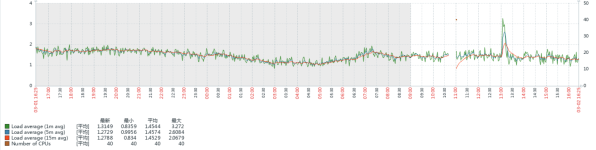
Can you post CPU and CPU Pressure Stall graphs from high packet loss period?

R.
 
as far I remember, virtio-net is limit is around 2millions pps by core (depend of the cpu frequency). The only way is to increase number of queue on the virtio nic.

(if you are cpu limited, you should see a vhost-net process at 100% on the pve host)

doing iperf with big packet will not help to test (virtio-net can reach 20~40gbit/s easily, it's not a problem, but it's with big packet.

doing iperf with "-l 64" to test worst case of synflood should show pss limit.
 
as far I remember, virtio-net is limit is around 2millions pps by core (depend of the cpu frequency). The only way is to increase number of queue on the virtio nic.

(if you are cpu limited, you should see a vhost-net process at 100% on the pve host)

doing iperf with big packet will not help to test (virtio-net can reach 20~40gbit/s easily, it's not a problem, but it's with big packet.

doing iperf with "-l 64" to test worst case of synflood should show pss limit.

My tests were made with default = 1470B packet size. Measured limit is 250566pps. I guess in my case the limit is single-thread CPU performance.
Using multi-thread in iperf I get 5.95 Gbits/sec 505548 pps but with high packet loss 16% - this may be the switch limitation.

I posted these numbers for the questioner to compare real word numbers...even made in our test lab.

R.
 
Have the tests been performed without any interfering L2/L3 equipment between VM and Client? If not, how did you rule out its not the networking equipment inbetween?
 
Have the tests been performed without any interfering L2/L3 equipment between VM and Client? If not, how did you rule out its not the networking equipment inbetween?
I am not sure I understand the question.

"Client 1" is physical machine (actually my work computer) traffic to VM goes thru two switches. "Client 2" is on another physical Proxmox node than "Server" (we have 3-node PVE cluster) in this case traffic goes thru one switch. In both cases the trafic goes thu physical ethernet cards. Common traffic in our company is around 0.5-2MB/s and it is less than 1% of measured numbers.

So I think my numbers may be trustable. There is one big but - those are is only network trafic measurements because PG1024's question is about UDP Proxmox incomming limits. Packet are not processed. When you process packets it takes time and can make packet proces limitation and make packet loss because there is packet queue size limitation and UDP can be droped by specification.

Is this answer to your question?

R.
 
I am not sure I understand the question.
So I think my numbers may be trustable. There is one big but - those are is only network trafic measurements because PG1024's question is about UDP Proxmox incomming limits. Packet are not processed. When you process packets it takes time and can make packet proces limitation and make packet loss because there is packet queue size limitation and UDP can be droped by specification.
I'm totally with you. Its not about the traffic amount, its about the pps, thats the bottleneck. My question was just aiming at the possibility that your network equipment might bottleneck aswell and was just curious if you ruled that possibility out.
 
I'm totally with you. Its not about the traffic amount, its about the pps, thats the bottleneck. My question was just aiming at the possibility that your network equipment might bottleneck aswell and was just curious if you ruled that possibility out.

My "Client 1" connection is 1Gbps and the number are very close (957 / 1024 = 93%) I guess here is not much space to improve. This twice as much then PG1024 issue point.

VM "Client 2" <-> "Server" connection is 10Gbis I measure (3.14 / 10Gbps = 31%) as I wrote it is probably single thread CPU limit of iperf. But this is almost 10x higher than PG1024's limit. On same envitonment using TCP I transfers 9.29 / 10 Gbps.

Actually I don't think about my bottleneck but about PG1024's bottleneck. If you want I can make more tests and try to find out the limits. At first place I need to solve VM CPU limits. But this is out scope this thread where PG1024 needs help with his VM's limits. Do you want to create such thread?

R.
 
Actually I don't think about my bottleneck but about PG1024's bottleneck. If you want I can make more tests and try to find out the limits. At first place I need to solve VM CPU limits. But this is out scope this thread where PG1024 needs help with his VM's limits. Do you want to create such thread?
Is your client able to multithread said application? I've seen (long time ago) a very nice talk from Valve about defending DDoS attacks in online games. Different topic but with the same technical aspect - PPS vs Bandwidth. Latter one neglectable while PPS are the real bummer. In case you're interested: https://youtu.be/2CQ1sxPppV4?t=462 (video starts at the interesting point for this discussion).

P.S.: Thanks for your answers, and clarifications, these helped me understand your problem in more detail :)
 
My tests were made with default = 1470B packet size. Measured limit is 250566pps. I guess in my case the limit is single-thread CPU performance.
Using multi-thread in iperf I get 5.95 Gbits/sec 505548 pps but with high packet loss 16% - this may be the switch limitation.

I posted these numbers for the questioner to compare real word numbers...even made in our test lab.

R.
250566pps is quite low, I mean , you should reach 1~2mpps for any each packetsize. I remember to reach easily 7~9gbit with 1core/thread with standard 1500mtu. (with epyc v3 3,5ghz and cpu forced to max frequency)
 
微信图片_20260228085128_38_1091.png微信图片_20260228085128_39_1091.png
微信图片_20260228085142_40_1091.png
  1. The situation is more severe when the virtual machine's network card model is set to vmxnet3. Monitoring with iftop -i enp6s18 shows that the bandwidth on the VM's interface does not exceed 200M, indicating significant data loss.
  2. iperf3 tests do not reveal obvious anomalies and show normal bandwidth figures.
  3. We have attempted several optimizations, including ethtool -G enp129sf01 rx 4096 tx 4096, enabling RPS, and removing the bonding configuration. However, the results were unsatisfactory and unstable.
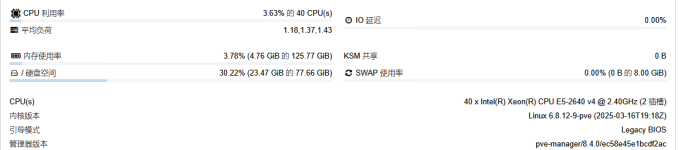
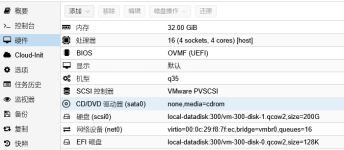
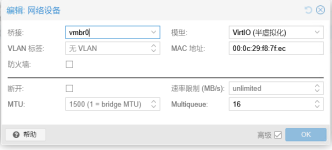
  4. The related screenshots show the configurations for both the virtual machine and the PVE host. Could you please review them to see if there are any misconfigurations? Thank you.
 
  1. The situation is more severe when the virtual machine's network card model is set to vmxnet3. Monitoring with iftop -i enp6s18 shows that the bandwidth on the VM's interface does not exceed 200M, indicating significant data loss
this is normal, don't use vmxnet3 or e1000, they are full software emulation. you need to use virtio which use vhost-net offloading on pvehost.

your cpu is quite old, and it's possible that spectre/meltdown/.... mitigation impact performance

Code:
nano /etc/default/grub to GRUB_CMDLINE_LINUX_DEFAULT="quiet mitigations=off"
update-grub
reboot
 
Last edited:
To VM configuration I have some notes:
  • You are using multigueue. My numbers are without it. Did you set multiqueue in VM too? In VM execute ethtool -L <ethX> combined 16 adapter name might change in PVE in compare to VMware.
  • As SCSI you use VMware PVSCSI. I recommend migrate to VirtIO SCSI for better performance.
To PVE configuration - consider:
  • disabling HT - It can increase performance in some scenarios and I strongly recommend disabling HT especiatly when you disable mitigations
  • upgrading to PVE v9.1
I expect bottleneck:
  1. Network card Model -> use VirtIO not vmxnet3 ... you already have this
  2. CPU bottleneck. If CPU is overloaded then it simply drops UDP packets. That's why I ask for CPU graphs. Not only VM graphs but Host's graphs too. Number of VMs in this node? You use "VMware PVSCSI" so post "IO Pressure Stall" too. PVE v8 don't have Pressure Stall graphs so you should collect these information in another way.
  3. Network configuration in PVE. Can you post network configuration (bonding, VLAN, bridge), firewall, and SDN? I don't need to know IPs.
  4. Post all special tunning like "ethtool -G enp129sf01 rx 4096 tx 4096"
R.
 
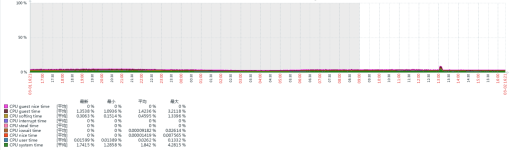
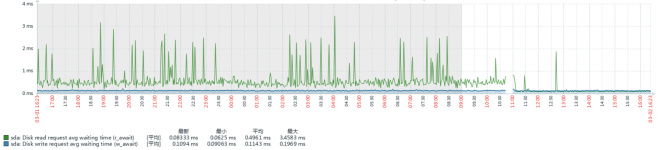
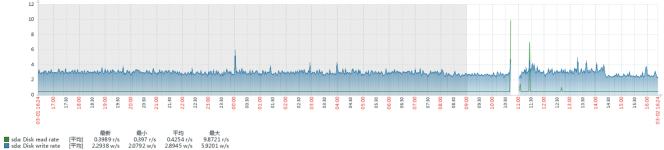
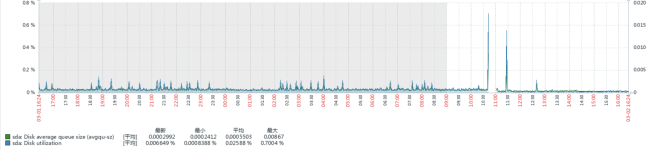
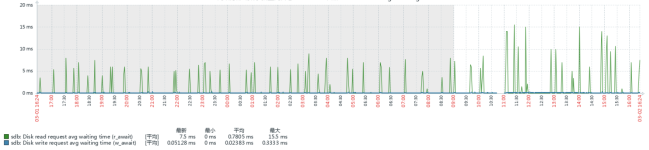
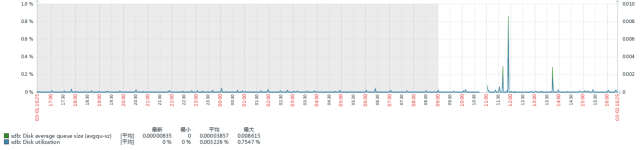
Supplementary Information on Physical Server Resource Monitoring:
b535bbf927e840bb206307bebcd6df53.png497b72d4f2705a329f92431e44d23996.pngf84b88a630ba6e41416b995ca68aaf01.pnga7cc24f94c2f02b11e605e022c06b0a9.png837c9c614b99c8ba5bd4dea352da2c81.pngaa65c7b598fb357aefd1aa2fc7f7bb9c.png47ca5a8df6ed200ddc1e618fe796d6e7.pngf8fd7d896b0cfdc996c6789dfd02534e.png
9bef390d79d0472e51ea02022526e04a.png

Code:
auto enp129s0f0
iface enp129s0f0 inet manual
        pre-up ethtool -G $IFACE rx 2048 tx 2048
        pre-up ethtool -C $IFACE rx-usecs 10 tx-usecs 10

iface enp3s0f0 inet manual

iface enp3s0f1 inet manual

iface enp130s0f0 inet manual

iface enp130s0f1 inet manual

iface enp4s0f0 inet manual

iface enp4s0f1 inet manual

auto enp129s0f1
iface enp129s0f1 inet manual
    pre-up ethtool -G $IFACE rx 2048 tx 2048
    pre-up ethtool -C $IFACE rx-usecs 10 tx-usecs 10

auto bond0
iface bond0 inet manual
    bond-slaves enp129s0f0 enp129s0f1
    bond-miimon 100
    bond-mode balance-tlb

auto vmbr0
iface vmbr0 inet static
    address X.X.X.X/24
    gateway X.X.X.X网关 X.X.X.X
    bridge-ports bond0桥接端口 bond0
    bridge-stp off桥接生成树协议 关闭
    bridge-fd 0桥接转发延迟 0
    post-up echo 2000 > /sys/class/net/$IFACE/tx_queue_len

source /etc/network/interfaces.d/*

Thanks for the input, everyone. Here is the update for synchronization:
  1. On a physical server with CentOS 7 installed and identical configurations, the LVS service handled a single-source UDP flow stably at 400 Mbps. With multiple source IPs, it easily reached over 1 Gbps without issues.
  2. A PVE 9.1 host has been deployed on identical hardware. The overall performance shows no significant degradation, with a slight improvement observed.
  3. Mitigations=off was applied at the PVE level on the afternoon of March 2, 2026. We will monitor the results and share the outcome later.
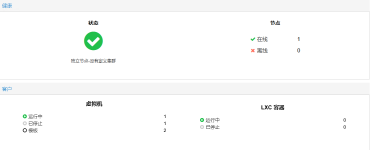
  4. The physical server is currently running minimal workloads. Most services are in a 1:1 mapping state (physical-to-VM), where VM configurations are not identical to the physical hardware specs.
  5. Disabling HT was tested on the physical CentOS 7 + LVS setup, resulting in no significant performance gain. We will test this configuration on the PVE environment at a later time.
  6. The firewall policy ACCEPTs entire subnets for interactive addresses. Additionally, the NOTRACK strategy has been implemented.
 

Attachments

  • e213c42ad18f4c1809e31f6478d354e6.png
    e213c42ad18f4c1809e31f6478d354e6.png
    185.8 KB · Views: 1
Below are the supplementary details for the virtual machine
e213c42ad18f4c1809e31f6478d354e6.png3951699b885a38cb4f7828ea3e0747e0.png36b6b47fc507be80cb6ba2971d05f1ff.png

Code:
Channel parameters for enp6s18:
Pre-set maximums:
RX:        n/a
TX:        n/a
Other:        n/a
Combined:    16
Current hardware settings:
RX:        n/a
TX:        n/a
Other:        n/a
Combined:    16
 
Why you use balance-tlb? This may cause out of order packet delivery (and UDP packet may be classified as invalid and dropped) and some delivery issue because second interface can send packets but not receive (TCP will resend, UDP just drop-lost).

Can you set bond to active-backup (or disconnect second interface) and post the status of packet loss?
R.
 
Why you use balance-tlb? This may cause out of order packet delivery (and UDP packet may be classified as invalid and dropped) and some delivery issue because second interface can send packets but not receive (TCP will resend, UDP just drop-lost).

Can you set bond to active-backup (or disconnect second interface) and post the status of packet loss?
R.
yes, I was thinking exactly the same
 
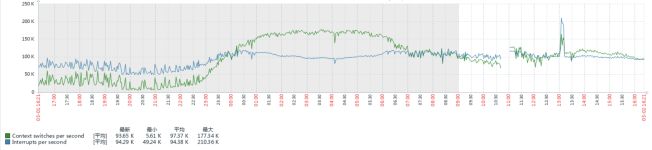
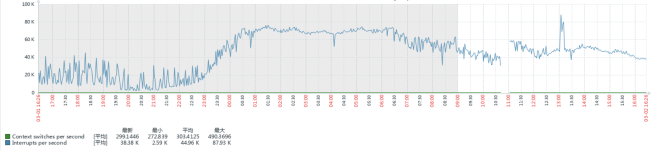
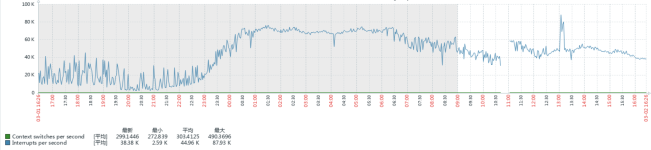
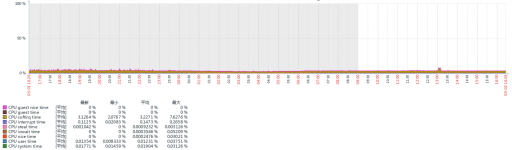
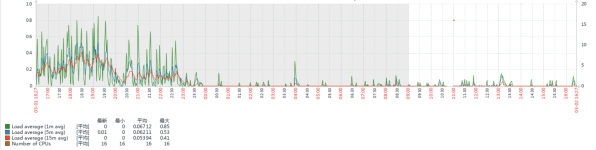
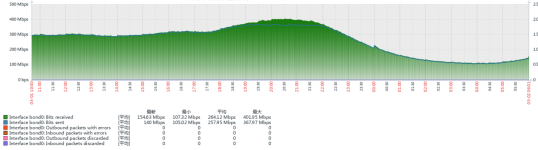
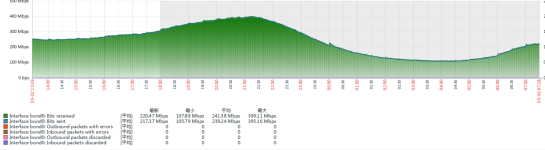
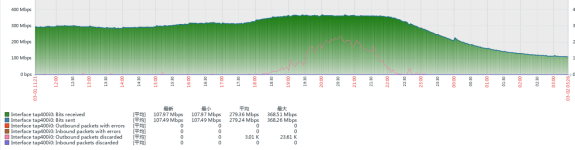
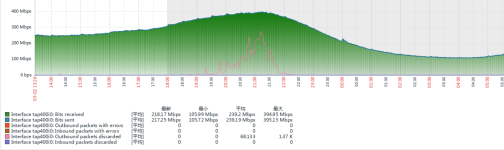
  1. Adding the mitigations=off parameter to /etc/default/grub yielded noticeable optimization and significant improvement. Performance in version 9.1 is particularly better compared to 8.4, so the hosts have been upgraded from 8.4 to 9.1.Below is the performance comparison observed during last night's peak hours on PVE 9.1.
    e3fc3ccc73a53ee21bcf49c470833d4e.png0e6453ad7824ac50b93f41f5d5246bdf.pngd6393ec92b6d45b0a1c0532964d8e288.png49e1bf8daa6b6cf0e0373c302c8e392c.png
  2. Previous tests showed that balance-tlb performs slightly better than active-backup for the bond-mode. Today, we will conduct a comparative analysis of this difference on two PVE hosts.
  3. Hyper-Threading (HT) has also been disabled today, and we will monitor its impact simultaneously.
 
  • Like
Reactions: fstrankowski