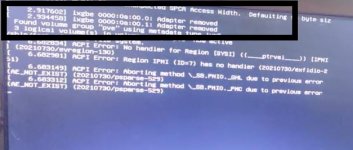
network adapter not working (Intel Eth Converged X520-DA2)

dev03jr

New Member
Apr 12, 2023
11
0
1
I'm trying to use a network card on my server, I've tried some configurations but without success, would anyone have any guidance on this?

-network card does not appear in IP link

Proxmox: 7.4-3

I tried this and it didn't work:
$modprobe -r ixgbe
$modprobe ixgbe allow_unsupported_sft=1

$ echo "options ixgbe allow_unsupported_sfp=1" > /etc/modprobe.d/ixgbe.conf
$depmod -a
$update-initramfs -u

Output:

lspci -v :

0a:00.0 Ethernet controller: Intel Corporation 82599ES 10-Gigabit SFI/SFP+ Network Connection (rev 01)
Subsystem: Intel Corporation Ethernet Server Adapter X520-2
Flags: fast devsel, IRQ 38, NUMA node 0
Memory at d0000000 (64-bit, non-prefetchable) [size=512K]
I/O ports at ecc0
Memory at d0100000 (64-bit, non-prefetchable) [size=16K]
Capabilities: [40] Power Management version 3
Capabilities: [50] MSI: Enable- Count=1/1 Maskable+ 64bit+
Capabilities: [70] MSI-X: Enable- Count=64 Masked-
Capabilities: [a0] Express Endpoint, MSI 00
Capabilities: [100] Advanced Error Reporting
Capabilities: [140] Device Serial Number .....
Capabilities: [150] Alternative Routing-ID Interpretation (ARI)
Capabilities: [160] Single Root I/O Virtualization (SR-IOV)
Kernel modules: ixgbe

0a:00.1 Ethernet controller: Intel Corporation 82599ES 10-Gigabit SFI/SFP+ Network Connection (rev 01)
Subsystem: Intel Corporation Ethernet Server Adapter X520-2
Flags: fast devsel, IRQ 39, NUMA node 0
Memory at d0080000 (64-bit, non-prefetchable) [size=512K]
I/O ports at ece0
Memory at d0304000 (64-bit, non-prefetchable) [size=16K]
Capabilities: [40] Power Management version 3
Capabilities: [50] MSI: Enable- Count=1/1 Maskable+ 64bit+
Capabilities: [70] MSI-X: Enable- Count=64 Masked-
Capabilities: [a0] Express Endpoint, MSI 00
Capabilities: [100] Advanced Error Reporting
Capabilities: [140] Device Serial Number ....
Capabilities: [150] Alternative Routing-ID Interpretation (ARI)
Capabilities: [160] Single Root I/O Virtualization (SR-IOV)
Kernel modules: ixgbe


dmesg | grep Gigabit

[ 1.922669] ixgbe: Intel(R) 10 Gigabit PCI Express Network Driver

lspci -k | sed -n '/Ethernet/,/Kernel/p'

01:00.0 Ethernet controller: Broadcom Inc. and subsidiaries NetXtreme BCM5720 2-port Gigabit Ethernet PCIe
DeviceName: NIC1
Subsystem: Dell NetXtreme BCM5720 2-port Gigabit Ethernet PCIe
Kernel driver in use: tg3
01:00.1 Ethernet controller: Broadcom Inc. and subsidiaries NetXtreme BCM5720 2-port Gigabit Ethernet PCIe
DeviceName: NIC2
Subsystem: Dell NetXtreme BCM5720 2-port Gigabit Ethernet PCIe
Kernel driver in use: tg3
0a:00.0 Ethernet controller: Intel Corporation 82599ES 10-Gigabit SFI/SFP+ Network Connection (rev 01)
Subsystem: Intel Corporation Ethernet Server Adapter X520-2
Kernel modules: ixgbe
0a:00.1 Ethernet controller: Intel Corporation 82599ES 10-Gigabit SFI/SFP+ Network Connection (rev 01)
Subsystem: Intel Corporation Ethernet Server Adapter X520-2
Kernel modules: ixgbe
 

Attachments

  • error ixgbe.jpeg
    error ixgbe.jpeg
    39.5 KB · Views: 25
Last edited:
Hi!
Did you found any solution?
I have the similar issue with Intel X540-AT2 (2 x 10Gigabit ports). I just installed the interface.

dmesg | grep ixgbe
[ 1.012430] ixgbe: Intel(R) 10 Gigabit PCI Express Network Driver
[ 1.012432] ixgbe: Copyright (c) 1999-2016 Intel Corporation.
[ 1.012555] ixgbe 0000:01:00.0: enabling device (0000 -> 0002)
[ 1.027548] ixgbe 0000:01:00.0: Adapter removed
[ 1.027612] ixgbe: probe of 0000:01:00.0 failed with error -5
[ 1.027625] ixgbe 0000:01:00.1: enabling device (0000 -> 0002)
[ 1.042589] ixgbe 0000:01:00.1: Adapter removed
[ 1.042623] ixgbe: probe of 0000:01:00.1 failed with error -5

lspci -k | sed -n '/Ethernet/,/Kernel/p'
01:00.0 Ethernet controller: Intel Corporation Ethernet Controller 10-Gigabit X540-AT2 (rev 01)
Subsystem: Inspur Electronic Information Industry Co., Ltd. 10G base-T DP EP102Ti3A Adapter
Kernel modules: ixgbe
01:00.1 Ethernet controller: Intel Corporation Ethernet Controller 10-Gigabit X540-AT2 (rev 01)
Subsystem: Inspur Electronic Information Industry Co., Ltd. 10G base-T DP EP102Ti3A Adapter
Kernel modules: ixgbe
03:00.0 Ethernet controller: Realtek Semiconductor Co., Ltd. RTL8111/8168/8411 PCI Express Gigabit Ethernet Controller (rev 0c)
Subsystem: Biostar Microtech Int'l Corp RTL8111/8168/8411 PCI Express Gigabit Ethernet Controller
Kernel driver in use: r8169

lshw -class network
*-network:0 UNCLAIMED
description: Ethernet controller
product: Ethernet Controller 10-Gigabit X540-AT2
vendor: Intel Corporation
physical id: 0
bus info: pci@0000:01:00.0
version: 01
width: 64 bits
clock: 33MHz
capabilities: pm msi msix pciexpress cap_list
configuration: latency=0
resources: memory:df600000-df7fffff memory:dfa00000-dfa03fff memory:dfa04000-dfb03fff memory:dfb04000-dfc03fff
*-network:1 UNCLAIMED
description: Ethernet controller
product: Ethernet Controller 10-Gigabit X540-AT2
vendor: Intel Corporation
physical id: 0.1
bus info: pci@0000:01:00.1
version: 01
width: 64 bits
clock: 33MHz
capabilities: pm msi msix pciexpress cap_list
configuration: latency=0
resources: memory:df800000-df9fffff memory:dfc04000-dfc07fff memory:dfc08000-dfd07fff memory:dfd08000-dfe07fff
*-network
description: Ethernet interface
product: RTL8111/8168/8411 PCI Express Gigabit Ethernet Controller
vendor: Realtek Semiconductor Co., Ltd.
physical id: 0
bus info: pci@0000:03:00.0
logical name: enp3s0
version: 0c
serial: b8:97:5a:e7:3a:51
capacity: 1Gbit/s
width: 64 bits
clock: 33MHz
capabilities: pm msi pciexpress msix vpd bus_master cap_list ethernet physical tp mii 10bt 10bt-fd 100bt 100bt-fd 1000bt-fd autonegotiation
configuration: autonegotiation=on broadcast=yes driver=r8169 driverversion=6.2.16-15-pve firmware=rtl8168g-2_0.0.1 02/06/13 latency=0 link=no multicast=yes port=twisted pair
resources: irq:17 ioport:e000(size=256) memory:f7c00000-f7c00fff memory:f0600000-f0603fff
*-network
description: Ethernet interface
physical id: 5
bus info: usb@4:1
logical name: enx00e04c6800d9
serial: 00:e0:4c:68:00:d9
capacity: 1Gbit/s
capabilities: ethernet physical tp mii 10bt 10bt-fd 100bt 100bt-fd 1000bt 1000bt-fd autonegotiation
configuration: autonegotiation=on broadcast=yes driver=r8152 driverversion=v1.12.13 duplex=full firmware=rtl8156b-2 v2 04/27/23 link=yes multicast=yes port=MII
 
Hi everyone,

I may have a similar issue : having installed Proxmox recently, I can't get network connectivity from inside the VM.

Proxmox itself can be updated (done today), I have also add a second NIC that can be used to access the webGui.

Having tried different configurations (bridged, routed), there is no ipv4 link in the VM - I can see an ipv6 one though - and I wonder if this is not a hw/driver compatibility issue as in dmesg, the type of the NIC is also r8152. The second NIC has the same problem, its type is ax881789_178a.

Previously, on the same machine, I could use these NICs with Linux distributions such as Debian, and also with FreeBSD-based systems.

Any thoughts please ? Your help would be greatly appreciated !

Alex