My RDS-2025 VM running extremely slow.

aiman

New Member
Dec 5, 2025
1
0
1
I recently migrated a Windows Server 2025 RDS virtual machine from VMware ESXi to Proxmox VE, and since the migration the VM has become extremely slow and almost unusable. Even when the VM is completely idle, the CPU usage inside Proxmox stays between 80–100% at all times. Basic actions inside the OS—such as opening menus, loading Server Manager, or navigating File Explorer—take significantly longer than they did on ESXi.


I have already tried several recommended optimizations (changing CPU type to “host,” installing VirtIO guest tools/drivers, adjusting network adapter to VirtIO, rebooting multiple times, etc.), but the performance issue remains. The VM is still consuming excessive CPU and feels much slower than it ever did on ESXi.


It seems that other users have reported similar problems when migrating VMs from ESXi to Proxmox, so I’m trying to determine what the root cause is in my case and how to fix it. I'm hoping to get some guidance on what settings, drivers, or hardware configurations may need to be adjusted to make the VM run normally again under Proxmox.


If anyone has experienced this issue or knows the best approach to diagnosing and solving it, I would really appreciate your help.
 
If you care about performance then don't use "host" with Windows 11 / Windows Server 2025 for now, try something like x86-64-v4. This will disable VBS inside Windows which should help a bit. You may want to use virtio-win-0.1.271 drivers, not virtio-win-0.1.285 because they seem to have some issues.

You can try is to use another virtual display / gpu typle like virt-gl which may help on a RDS server.

You can find more information here
https://forum.proxmox.com/threads/h...sage-on-idle-with-windows-server-2025.163564/
https://forum.proxmox.com/threads/t...-of-windows-when-the-cpu-type-is-host.163114/
https://forum.proxmox.com/threads/r...-to-device-system-unresponsive.139160/page-14
 
Hello Aimann,

I am struggling with the same situation as you. We migrated around 30 VMs, including Linux, Windows 2019, Windows 2022 and Windows 2025 from VMware to Proxmox.

However, with Windows Server 2025 the performance is horrible. We are using them as RDS sessions hosts, as you, and the latency/user experience is inacceptable. I therefore spend more than day to figure out the possible sources.

I did exclude the migration process, as also for a fresh VM with Windows Server 2025, the observation is the same. Most revealing was to look at the processor interrupt time, here i used the command:
Code:
typeperf "\Prozessor(_Total)\Interruptzeit (%)"

on a German language OS, or on an English system:
Code:
typeperf "\Processor(_Total)\% Interrupt Time"

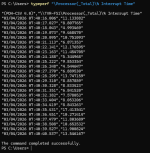
On the Windows 2025 systems, the times are between 2 and 20 %, which also corresponds to the CPU usage in the VM. Here, the System Interrupts take up that amount - although nothing is happening on the system.
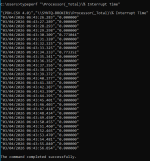
On a Windows 2022 system, the times are 0.0000%, and every 20 seconds taking a fraction of a %.

I did go all the paths to disable VBS in 2025 - which Microsoft seems to try to enable by around a dozen of sub processes. Via GPO I was not able to get there, but it worked by either removing the secure boot, or changing from "host" to an emulated CPU. But even then, the interrupt times do not improve.

From what I conclude, there is something really odd with interrupts on the driver level, so the Windows 2025 kernel not working smooth on Proxmox. Oh yes: I also switched from virtio 0.1.285 back to virtio 0.1.271, but that was at the very beginning and did not solve the issue. New test VMs I spun up using 0.1.271 from the start, with no success.

I am currently at the decision point to return to Windows Server 2022 for the RDS hosts. However, I am very interested to exchange further experiences. Have you managed to make progress or learn about the reason?

Regards
HR
 
Hello alexskysilk,
thank you for taking the time to review the post and cross-posting your thread. I did look into it and also attempted to apply the args. However, I was not able to gain any benefit. The situation remains as is.

However, I did spin up another ProxMox v8 for testing purpose and there installed an equivalent Windows Server 2025. And surprise, the behavior is much different. The interrupts are close to zero, even with VBS enabled.

The new production system we set up with proxmox 9, which now might be a headache. There is of course still the possible difference in CPU hardware, but at the moment I am more looking at the kernel difference and problems between Windows Server 2025 and the newer Linux kernel.

I am now torn what to do. One option is to upgrade the test machine from proxmox 8 to 9. If then suddenly behavior changes to the worse, I have the proof.
Or, as we are using paid licenses for our systems, I may reach out to Proxmox support.

Any though from your end on your tests?
HR
 
Or, as we are using paid licenses for our systems, I may reach out to Proxmox support.
that should be your first option ;)

PVE8 is not EOL yet, and even when it is (this august) you can keep running for some time after. might be the better option, especially if you dont need anything pve9 specific. This will give you time to figure out the issue on a pve9 testbed before upgrading. its a fairly trivial procedure.

Another option is to try different kernels. PVE9 can support 6.8, 6.11, 6.14, and 6.17. I dont think this is the root of the issue, however.

--edit- missed this part on my reply:
There is of course still the possible difference in CPU hardware
THAT is more than possible.
 
Last edited:
I have opened a ticket with proxmox, let's see what they say.
In terms of CPU, the systems with PVE9 and the observed behavior all have Intel(R) Xeon(R) 6520P. But even when setting the cpu type not to host but specific models (x86-64-v2-AES, x86-64-v3 and v4 tested), the situation does not change. Also enabling NUMA does not change anything.

SteveITS: I assume you are referring to the VM controller? My initial setup was for VirtIO SCSI single. I then also tested SATA and VirtIO Block, but no change on the observed behavior. And yes, I also enabled Write Back.

On the hypervisor side, we are using a HA TrueNAS system as storage backend, connected via NFS4.

For your reference, here the performance counter for the % Interrupt Time:
1772606515791.png

As you can see, this is beyond acceptable. The same test on a Windows 2022 on the same host with identical hardware config returns me this:

1772606639357.png


I will do some more tests today and update here. But of course interested in any input.

Regards
HR
 
We had the same (?) problem on our newly installed rds server with server 2025 (running on pve 8 with AMD EPYC 9124 cpu). extreme slow login, slow start of programs, overall a "slow" system.

Then we changed the cpu of the vm from "host" (like all other vm's) to "x86-64-v4".

What should I say: Everything is fast now after this little change!

Maybe this is helpful for others...
 
Last edited:
  • Like
Reactions: MarkusKo and fireon