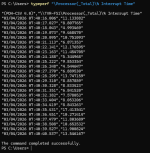
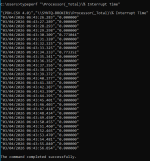
I recently migrated a Windows Server 2025 RDS virtual machine from VMware ESXi to Proxmox VE, and since the migration the VM has become extremely slow and almost unusable. Even when the VM is completely idle, the CPU usage inside Proxmox stays between 80–100% at all times. Basic actions inside the OS—such as opening menus, loading Server Manager, or navigating File Explorer—take significantly longer than they did on ESXi.
I have already tried several recommended optimizations (changing CPU type to “host,” installing VirtIO guest tools/drivers, adjusting network adapter to VirtIO, rebooting multiple times, etc.), but the performance issue remains. The VM is still consuming excessive CPU and feels much slower than it ever did on ESXi.
It seems that other users have reported similar problems when migrating VMs from ESXi to Proxmox, so I’m trying to determine what the root cause is in my case and how to fix it. I'm hoping to get some guidance on what settings, drivers, or hardware configurations may need to be adjusted to make the VM run normally again under Proxmox.
If anyone has experienced this issue or knows the best approach to diagnosing and solving it, I would really appreciate your help.
I have already tried several recommended optimizations (changing CPU type to “host,” installing VirtIO guest tools/drivers, adjusting network adapter to VirtIO, rebooting multiple times, etc.), but the performance issue remains. The VM is still consuming excessive CPU and feels much slower than it ever did on ESXi.
It seems that other users have reported similar problems when migrating VMs from ESXi to Proxmox, so I’m trying to determine what the root cause is in my case and how to fix it. I'm hoping to get some guidance on what settings, drivers, or hardware configurations may need to be adjusted to make the VM run normally again under Proxmox.
If anyone has experienced this issue or knows the best approach to diagnosing and solving it, I would really appreciate your help.