Missing local-lvm partiton

paxmobile

Member
Mar 3, 2023
44
1
13
Italia
bitnirvana.it
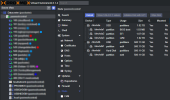
I'm using Proxmox for testing purposes since a couple of years but the learning curve, non being very found in linux commands, seems very steep to me. That said I have to running machines and I just noticed that thinpool partition is suddenly missing. I noticed that my other server has it, so in this server I cannot save Snippets anymore. How can I recreate the lvm thinpool using some space of sda ?

The normal server
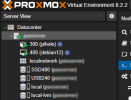
Screenshot (266).png
The server with missing local-lvm
paxmesh.png
 
Last edited:
  • Like
Reactions: leesteken
Did you install this server using the Proxmox iso installer or on top of Debian?
If the later, you might still have to create it yourself [1]
If the former, you already did and/or you are sure it did exist, check the datacenter -> Storage -> LVM-Thin, make sure that it is enabled and allowed on all hosts in your cluster.

[1] https://forum.proxmox.com/threads/create-lvm-partition-on-proxmox-installed-on-debian.129676
I installed it from an USB stick in April 2024, later I attached a second SSD for backup purposes. Adding went well but after a while I noticed the missing thinpool. Tried to manually add it but failed because, as I noticed from the second server, local-lvm has no path, and that was confusing to me.
 
It has no "path" because the data is saved as a block-device on a volume-group.
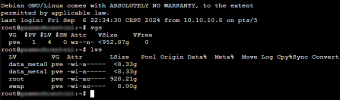
What is the status of your volume groups and logical volumes (use the commands vgs and lvs)?
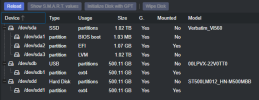
And what does it show in Datacenter -> Storage and in Node -> Disks -> LVM-Thin
 
I'm using this machine for testing the VMs I deliver on other datacenters so it has relatively small but new hardware. sda is the main 1Tb NvMe SSD, sdb and sdd are 500GB HDDs is use as USB backup for the VMs and snapshots. I wondered how it happened overnight as the LVM was not visible anymore.

Screenshot (274).png
Screenshot (275).png