Missing drives on new install --- how to add ?

pixler

New Member
May 26, 2026
4
0
1
Did a new install of 9.2.2 as a test / learning session today, but stuck trying to add 2 x HD sda & sdb ... PVE is on sdc

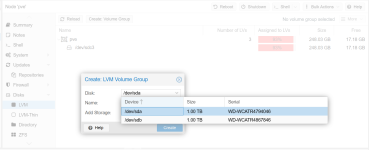
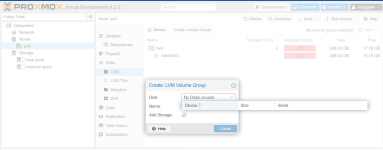
I think I'm in the correct menu to add the drives, but none listed in the pull down (see attached)

Looked up some linux commands to check on HD's ... this appears show they exist

So how do I create a zfs raid to create my test enviroments ?

root@pve:~# lsblk
NAME MAJ:MIN RM SIZE RO TYPE MOUNTPOINTS
sda 8:0 0 931.5G 0 disk <<<<<<<<<<<<<<<<<<<<<
sdb 8:16 0 931.5G 0 disk <<<<<<<<<<<<<<<<<<<<<
sdc 8:32 0 232.9G 0 disk
├─sdc1 8:33 0 1007K 0 part
├─sdc2 8:34 0 1G 0 part
└─sdc3 8:35 0 231G 0 part
├─pve-swap 252:0 0 8G 0 lvm [SWAP]
├─pve-root 252:1 0 67.7G 0 lvm /
├─pve-data_tmeta 252:2 0 1.4G 0 lvm
│ └─pve-data 252:4 0 136.5G 0 lvm
└─pve-data_tdata 252:3 0 136.5G 0 lvm
└─pve-data 252:4 0 136.5G 0 lvm
 

Attachments

  • PVE 1.png
    PVE 1.png
    147.5 KB · Views: 5
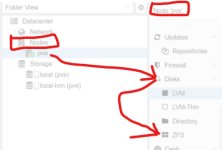
They need to be empty for the wizards to work. You can wipe them via node > Disks. Afterwards use the ZFS section within that sidebar. I'd recommend you enable the Thin Provision option for the storage afterwards in Datacenter > Storage.
 
Last edited:
Thanks for the reply, however I was not able to locate Node > Disks in the menu ...
I did however finally have luck using this cmd root@pve:~# wipefs --all --force /dev/sd X .... now the drives showup in the pull down on LVM
 
Just to clarify the orginal ask ... sda & sdb drives could not be found under any Disk create menu ... I thought maybe I was missing a step ... I just picked on LVM as an example in the pull down

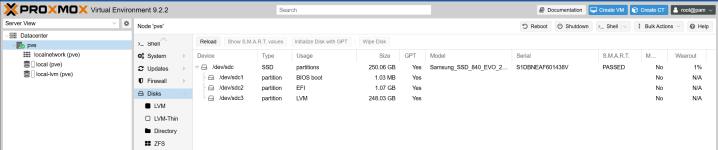
Before installing any OS, I always clear the drives with GPARTED, and while PVE / Linux found all 3 phyiscal drives, only sdc (where OS was installed) was visible under the NODES > Disk's > submenu's ... that is until I ran a direct cmd wipefs --all --force /dev/sd X .... NOW LVM / Thin / ZFS displays the raw drives in the create tool(s)

1779851686816.png
 
Last edited:
As said the wizards under node > Disks > ... only work with empty/unpartitioned drives. node > Disks has a Wipe button for doing this
1779855530679.png
If the disk is/was used for ZFS/LVM already it's best to wipe it via the relevant submenu as that is a bit smarter. Removes registered storages, handles depedencies and so on.
 
Last edited:
Attached is an oringinal screen grap looking for the missing sda sdb drives ....

I get it, however initially when selecting the Disks menu, sda / sdb did not show up ... you can't WIPE what doesn't exist and as new user to this software, I have no knowledge how disks should / are displayed (regardless of state), but assumed maybe they would show here or under LVM / ZFS menu(s). With consideration > all info on the sda / sdb disks were wiped using GPARTED before the install (or so I assumed)

Appreicate your asisstance, problem solved using a non-menu command and now the disks are visible on the web page

1779894455249.png
 
Maybe I misunderstood. Sorry about that. The disks not showing up there is weird indeed.
 
Last edited: