Background
I’ve been running pfSense as a VM on ESXi for several years without issues and I’m now migrating to Proxmox VE. At the same time I upgraded my internet connection to a 5Gbps plan (only €5 more than 1Gbps from my ISP, so it made sense).
Hardware
• Proxmox VE host with a dual-port Intel I226-V 2.5GbE PCIe NIC (in addition to an onboard 1GbE NIC)
• pfSense VM (VM 200) on Proxmox
• 1Gbps unmanaged switch for physical LAN clients
• Mix of LXC containers and VMs on the same Proxmox host
Current Network Config
VM config
Current Setup
• 07:00 — I226-V port 1, Kernel driver in use: vfio-pci → passed through to pfSense as WAN ( igc0 )
• 08:00 — I226-V port 2, Kernel driver in use: igc → Proxmox host bridge vmbr1 via nic2
• pfSense LAN ( em0 ) is an e1000 virtual NIC on vmbr1
• VMs and containers on the Proxmox host use vmbr1 as their network bridge
• Physical LAN switch is also connected to the nic2 port
The Problem
When running a speedtest from any other device — whether a VM/container on vmbr1 or a physical machine on the 1Gbps switch — download is capped at ~250 Mbps. Upload is at or near maximum in both cases which is 250Mbps. This affects:
• VMs with NICs on vmbr1
• Physical machines connected via the 1Gbps switch (which connects to nic2 )
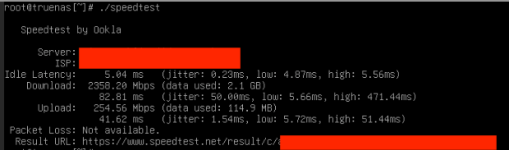
pfSense routing traffic to itself (speedtest from within the VM) works at full ~1800-2000 Mbps, so the WAN passthrough is functioning correctly. The bottleneck appears to be in the LAN path between pfSense and all downstream clients.
What I’ve Already Tried
• Hardware Checksum Offloading, Hardware TCP Segmentation Offloading, Hardware Large Receive Offloading : tired with all 3 disabled and enabled
• PowerD: Disabled
• Connectioned a device directly to LAN Nic incase there was some network traffic causing the issue. Still encountered speed limit of about 250Mb.
• Verified vfio.conf only contains ids=1000:0087 (no I226-V IDs)
• Tired the different adapter options in Proxmox. Vmxnet provides a bit more bandwidth at 350Mb. Using Virtio gives error below on pfsense console.
Comparison — What Worked on ESXi
On ESXi I had a similar setup: one 2.5GbE NIC passed through to pfSense for WAN, and the onboard 1GbE NIC used as the VM bridge for LAN. With that config, VMs on the bridge had no throughput issues and were not limited to 250 Mbps.
Question
Why does using the second I226-V port as a Proxmox bridge ( vmbr1 ) result in all clients being capped at ~250-350 Mbps download through pfSense, when pfSense itself can pull ~1800-2000+ Mbps on the same WAN connection?
Is this a known issue with e1000 emulated NIC performance on Proxmox/pfSense? Would switching the pfSense LAN NIC from e1000 to virtio resolve this, and if so how can i do it as i get errors and the NIC is not detected when i use virtio and pfSense on Proxmox?
Future
I am waiting on a 5Gbps NIC to come so will only have the one single 5Gbps NIC instead of the dual 2.5Gbps in the future so will use the brigded/management NIC
Any advice appreciated.
I’ve been running pfSense as a VM on ESXi for several years without issues and I’m now migrating to Proxmox VE. At the same time I upgraded my internet connection to a 5Gbps plan (only €5 more than 1Gbps from my ISP, so it made sense).
Hardware
• Proxmox VE host with a dual-port Intel I226-V 2.5GbE PCIe NIC (in addition to an onboard 1GbE NIC)
• pfSense VM (VM 200) on Proxmox
• 1Gbps unmanaged switch for physical LAN clients
• Mix of LXC containers and VMs on the same Proxmox host
Current Network Config
Code:
/etc/network/interfaces:

auto lo
iface lo inet loopback

iface nic1 inet manual

auto vmbr0
iface vmbr0 inet static
    address 192.168.0.50/24
    gateway 192.168.0.1
    bridge-ports nic1
    bridge-stp off
    bridge-fd 0

iface nic2 inet manual

auto vmbr1
iface vmbr1 inet manual
    bridge-ports nic2
    bridge-stp off
    bridge-fd 0
Code:
qm config 200:

hostpci0: 07:00,pcie=1       ← I226-V port 1, passed through as WAN
net0: e1000,bridge=vmbr1     ← I226-V port 2 (nic2) bridge, pfSense LAN
Current Setup
• 07:00 — I226-V port 1, Kernel driver in use: vfio-pci → passed through to pfSense as WAN ( igc0 )
• 08:00 — I226-V port 2, Kernel driver in use: igc → Proxmox host bridge vmbr1 via nic2
• pfSense LAN ( em0 ) is an e1000 virtual NIC on vmbr1
• VMs and containers on the Proxmox host use vmbr1 as their network bridge
• Physical LAN switch is also connected to the nic2 port
The Problem
When running a speedtest from any other device — whether a VM/container on vmbr1 or a physical machine on the 1Gbps switch — download is capped at ~250 Mbps. Upload is at or near maximum in both cases which is 250Mbps. This affects:
• VMs with NICs on vmbr1
• Physical machines connected via the 1Gbps switch (which connects to nic2 )
pfSense routing traffic to itself (speedtest from within the VM) works at full ~1800-2000 Mbps, so the WAN passthrough is functioning correctly. The bottleneck appears to be in the LAN path between pfSense and all downstream clients.
What I’ve Already Tried
• Hardware Checksum Offloading, Hardware TCP Segmentation Offloading, Hardware Large Receive Offloading : tired with all 3 disabled and enabled
• PowerD: Disabled
• Connectioned a device directly to LAN Nic incase there was some network traffic causing the issue. Still encountered speed limit of about 250Mb.
• Verified vfio.conf only contains ids=1000:0087 (no I226-V IDs)
• Tired the different adapter options in Proxmox. Vmxnet provides a bit more bandwidth at 350Mb. Using Virtio gives error below on pfsense console.
Code:
virtio_pci0: <VirtIO PCI (legacy) Network adapter> at device 18.0 on pci6

virtio_pci0: cannot set MSI-X resources

device_attach: virtio_pci0 attach returned 6
Comparison — What Worked on ESXi
On ESXi I had a similar setup: one 2.5GbE NIC passed through to pfSense for WAN, and the onboard 1GbE NIC used as the VM bridge for LAN. With that config, VMs on the bridge had no throughput issues and were not limited to 250 Mbps.
Question
Why does using the second I226-V port as a Proxmox bridge ( vmbr1 ) result in all clients being capped at ~250-350 Mbps download through pfSense, when pfSense itself can pull ~1800-2000+ Mbps on the same WAN connection?
Is this a known issue with e1000 emulated NIC performance on Proxmox/pfSense? Would switching the pfSense LAN NIC from e1000 to virtio resolve this, and if so how can i do it as i get errors and the NIC is not detected when i use virtio and pfSense on Proxmox?
Future
I am waiting on a 5Gbps NIC to come so will only have the one single 5Gbps NIC instead of the dual 2.5Gbps in the future so will use the brigded/management NIC
Any advice appreciated.
Last edited: