LXC Console Login Blank Screen

t-nician

New Member
Sep 20, 2026
6
0
1
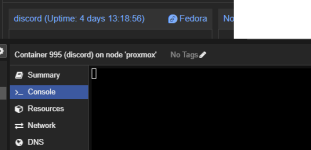
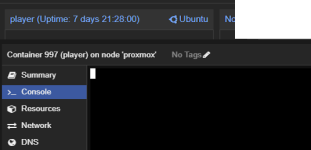
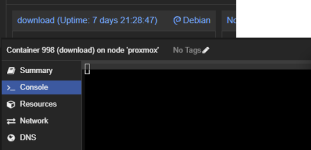
I've been a little bothered with this issue where none of my LXCs show the login screen when I access the Console.
The blank line expects a username, then it'll show "Password:" etc,.

It happens in Debian, Fedora & Ubuntu LXCs.
I've disabled my adblockers, tested it on Microsoft Edge and it still has the same issue.

Is there a way to fix this so it consistently shows the login display?
 

Attachments

  • debian.png
    debian.png
    20.7 KB · Views: 6
  • fedora.png
    fedora.png
    6.9 KB · Views: 6
  • ubuntu.png
    ubuntu.png
    24.7 KB · Views: 5
  • force dipslay.png
    force dipslay.png
    3.9 KB · Views: 6
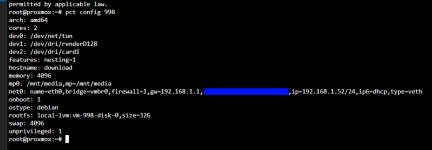
Does pressing enter or refreshing the tab work? Can you share pct config 998?

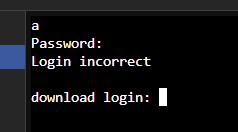
Pressing enter prompts "Password: "
Refreshing the tab just shows a blank screen.

The login works but the visual bug where it doesn't show the whole login screen has been bugging me.
 

Attachments

  • pic.png
    pic.png
    9.5 KB · Views: 6
Does pressing enter or refreshing the tab work? Can you share pct config 998?
Just did some more testing.

The Fedora LXCs accepts the enter key as the username.
The Ubuntu/Debian LXCs re-prompt the "hostname login: " for username.

I'm hoping that I can make it show "hostname login: " by default rather than just a blank screen.
 
Last edited:
Yeah that's what I meant. Another thing you could try is to start the CT in the foreground like this. Maybe something is blocking something: https://pve.proxmox.com/pve-docs/pve-admin-guide.html#_obtaining_debugging_logs
I've encountered that with DHCPv6 when there's no DHCPv6 server but space alone didn't fix it there. Just time.
Bash:
pct shutdown 998
lxc-start -n 998 -F -l DEBUG
Or perhaps check this inside the CT
Bash:
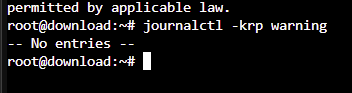
journalctl -krp warning
Did you create the CT manually from a debian template or via a script? Some of these modify getty settings.
 
Last edited:
Yeah that's what I meant. Another thing you could try is to start the CT in the foreground like this. Maybe something is blocking something: https://pve.proxmox.com/pve-docs/pve-admin-guide.html#_obtaining_debugging_logs
I've encountered that with DHCPv6 when there's no DHCPv6 server but space alone didn't fix it there. Just time.
Bash:
pct shutdown 998
lxc-start -n 998 -F -l DEBUG
Or perhaps check this inside the CT
Bash:
journalctl -krp warning
Did you create the CT manually from a debian template or via a script?
I created the CT manually from template.

1789931795407.png

Code:
lxc-start -n 998 -F -l DEBUG
systemd 257.13-1~deb13u1 running in system mode (+PAM +AUDIT +SELINUX +APPARMOR +IMA +IPE +SMACK +SECCOMP +GCRYPT -GNUTLS +OPENSSL +ACL +BLKID +CURL +ELFUTILS +FIDO2 +IDN2 -IDN +IPTC +KMOD +LIBCRYPTSETUP +LIBCRYPTSETUP_PLUGINS +LIBFDISK +PCRE2 +PWQUALITY +P11KIT +QRENCODE +TPM2 +BZIP2 +LZ4 +XZ +ZLIB +ZSTD +BPF_FRAMEWORK +BTF -XKBCOMMON -UTMP +SYSVINIT +LIBARCHIVE)
Detected virtualization lxc.
Detected architecture x86-64.


Welcome to Debian GNU/Linux 13 (trixie)!


bpf-restrict-fs: BPF LSM hook not enabled in the kernel, BPF LSM not supported.
Queued start job for default target graphical.target.
[  OK  ] Created slice system-container\x2dgetty.slice - Slice /system/container-getty.
[  OK  ] Created slice system-modprobe.slice - Slice /system/modprobe.
[  OK  ] Created slice user.slice - User and Session Slice.
[  OK  ] Started systemd-ask-password-console.path - Dispatch Password Requests to Console Directory Watch.
[  OK  ] Started systemd-ask-password-wall.path - Forward Password Requests to Wall Directory Watch.
[  OK  ] Reached target network-online.target - Network is Online.
[  OK  ] Reached target remote-fs.target - Remote File Systems.
[  OK  ] Reached target slices.target - Slice Units.
[  OK  ] Reached target swap.target - Swaps.
[  OK  ] Listening on systemd-creds.socket - Credential Encryption/Decryption.
[  OK  ] Listening on systemd-initctl.socket - initctl Compatibility Named Pipe.
[  OK  ] Listening on systemd-journald-dev-log.socket - Journal Socket (/dev/log).
[  OK  ] Listening on systemd-journald.socket - Journal Sockets.
[  OK  ] Listening on systemd-networkd.socket - Network Service Netlink Socket.
         Mounting dev-mqueue.mount - POSIX Message Queue File System...
         Mounting run-lock.mount - Legacy Locks Directory /run/lock...
         Mounting tmp.mount - Temporary Directory /tmp...
         Starting modprobe@drm.service - Load Kernel Module drm...
         Starting modprobe@efi_pstore.service - Load Kernel Module efi_pstore...
         Starting modprobe@fuse.service - Load Kernel Module fuse...
         Starting networking.service - Network initialization...
         Starting nftables.service - nftables...
         Starting systemd-journald.service - Journal Service...
         Starting systemd-modules-load.service - Load Kernel Modules...
         Starting systemd-network-generator.service - Generate Network Units from Kernel Command Line...
         Starting systemd-remount-fs.service - Remount Root and Kernel File Systems...
         Starting systemd-tmpfiles-setup-dev-early.service - Create Static Device Nodes in /dev gracefully...
         Starting systemd-udev-load-credentials.service - Load udev Rules from Credentials...
[  OK  ] Mounted dev-mqueue.mount - POSIX Message Queue File System.
[  OK  ] Mounted run-lock.mount - Legacy Locks Directory /run/lock.
[  OK  ] Mounted tmp.mount - Temporary Directory /tmp.
modprobe@drm.service: Deactivated successfully.
[  OK  ] Finished modprobe@drm.service - Load Kernel Module drm.
modprobe@efi_pstore.service: Deactivated successfully.
[  OK  ] Finished modprobe@efi_pstore.service - Load Kernel Module efi_pstore.
modprobe@fuse.service: Deactivated successfully.
[  OK  ] Finished modprobe@fuse.service - Load Kernel Module fuse.
[  OK  ] Finished systemd-modules-load.service - Load Kernel Modules.
         Starting systemd-sysctl.service - Apply Kernel Variables...
[  OK  ] Finished systemd-remount-fs.service - Remount Root and Kernel File Systems.
[  OK  ] Finished systemd-network-generator.service - Generate Network Units from Kernel Command Line.
[  OK  ] Finished systemd-udev-load-credentials.service - Load udev Rules from Credentials.
[  OK  ] Finished systemd-tmpfiles-setup-dev-early.service - Create Static Device Nodes in /dev gracefully.
[  OK  ] Started systemd-journald.service - Journal Service.
         Starting systemd-journal-flush.service - Flush Journal to Persistent Storage...
[  OK  ] Reached target time-set.target - System Time Set.
         Starting systemd-tmpfiles-setup-dev.service - Create Static Device Nodes in /dev...
[  OK  ] Finished nftables.service - nftables.
[  OK  ] Reached target network-pre.target - Preparation for Network.
[  OK  ] Finished systemd-sysctl.service - Apply Kernel Variables.
[  OK  ] Finished systemd-tmpfiles-setup-dev.service - Create Static Device Nodes in /dev.
[  OK  ] Reached target local-fs-pre.target - Preparation for Local File Systems.
[  OK  ] Reached target local-fs.target - Local File Systems.
[  OK  ] Listening on systemd-sysext.socket - System Extension Image Management.
[ASSERT] Assertion failed for apparmor.service - Load AppArmor profiles.
[  OK  ] Finished systemd-journal-flush.service - Flush Journal to Persistent Storage.
         Starting systemd-tmpfiles-setup.service - Create System Files and Directories...
[  OK  ] Finished systemd-tmpfiles-setup.service - Create System Files and Directories.
[  OK  ] Reached target sysinit.target - System Initialization.
[  OK  ] Started postfix-resolvconf.path - Watch for resolv.conf updates for postfix.
[  OK  ] Started apt-daily.timer - Daily apt download activities.
[  OK  ] Started apt-daily-upgrade.timer - Daily apt upgrade and clean activities.
[  OK  ] Started dpkg-db-backup.timer - Daily dpkg database backup timer.
[  OK  ] Started e2scrub_all.timer - Periodic ext4 Online Metadata Check for All Filesystems.
[  OK  ] Started logrotate.timer - Daily rotation of log files.
[  OK  ] Started man-db.timer - Daily man-db regeneration.
[  OK  ] Started systemd-tmpfiles-clean.timer - Daily Cleanup of Temporary Directories.
[  OK  ] Reached target paths.target - Path Units.
[  OK  ] Reached target timers.target - Timer Units.
[  OK  ] Listening on dbus.socket - D-Bus System Message Bus Socket.
         Starting docker.socket - Docker Socket for the API...
[  OK  ] Listening on ssh.socket - OpenBSD Secure Shell server socket.
[  OK  ] Listening on sshd-unix-local.socket - OpenSSH Server Socket (systemd-ssh-generator, AF_UNIX Local).
[  OK  ] Listening on systemd-hostnamed.socket - Hostname Service Socket.
         Starting wtmpdb-update-boot.service - Write boot and shutdown times into wtmpdb...
[  OK  ] Listening on docker.socket - Docker Socket for the API.
[  OK  ] Reached target sockets.target - Socket Units.
[  OK  ] Reached target basic.target - Basic System.
[  OK  ] Started cron.service - Regular background program processing daemon.
         Starting dbus.service - D-Bus System Message Bus...
         Starting e2scrub_reap.service - Remove Stale Online ext4 Metadata Check Snapshots...
         Starting postfix.service - Postfix Mail Transport Agent (main/default instance)...
         Starting ssh.service - OpenBSD Secure Shell server...
         Starting systemd-logind.service - User Login Management...
         Starting systemd-user-sessions.service - Permit User Sessions...
[  OK  ] Finished systemd-user-sessions.service - Permit User Sessions.
[  OK  ] Started console-getty.service - Console Getty.
[  OK  ] Started container-getty@1.service - Container Getty on /dev/tty1.
[  OK  ] Started container-getty@2.service - Container Getty on /dev/tty2.
[  OK  ] Reached target getty.target - Login Prompts.
[  OK  ] Started dbus.service - D-Bus System Message Bus.
[  OK  ] Finished e2scrub_reap.service - Remove Stale Online ext4 Metadata Check Snapshots.
         Starting containerd.service - containerd container runtime...
[  OK  ] Finished wtmpdb-update-boot.service - Write boot and shutdown times into wtmpdb.
[  OK  ] Started systemd-logind.service - User Login Management.
[  OK  ] Started ssh.service - OpenBSD Secure Shell server.
[  OK  ] Started containerd.service - containerd container runtime.
         Starting docker.service - Docker Application Container Engine...
         Starting systemd-networkd.service - Network Configuration...
[  OK  ] Started systemd-networkd.service - Network Configuration.
[  OK  ] Reached target network.target - Network.
         Starting systemd-networkd-persistent-storage.service - Enable Persistent Storage in systemd-networkd...
[  OK  ] Finished systemd-networkd-persistent-storage.service - Enable Persistent Storage in systemd-networkd.
[  OK  ] Started postfix.service - Postfix Mail Transport Agent (main/default instance).
[  OK  ] Finished networking.service - Network initialization.
[  OK  ] Started docker-2aa32a26995e9ae8980ade781f57937f93ec728b32d032da30e80f3c083da127.sco…ontainer container 2aa32a26995e9ae8980ade781f57937f93ec728b32d032da30e80f3c083da127.
[  OK  ] Started docker-4fb8df788bc107ec9ce16d9cfc3784767b2931ece8700174db0a6c7b42430c15.sco…ontainer container 4fb8df788bc107ec9ce16d9cfc3784767b2931ece8700174db0a6c7b42430c15.
[  OK  ] Started docker-4846b599f3ef6437309dcebb3366e957ac6ce16168d2b30df1321e9c72678361.sco…ontainer container 4846b599f3ef6437309dcebb3366e957ac6ce16168d2b30df1321e9c72678361.
[  OK  ] Started docker-7a5023ce81d56ba2bfbe5a9ef5f7adf93a69139799e4d61e78e07b7c54f7c6e2.sco…ontainer container 7a5023ce81d56ba2bfbe5a9ef5f7adf93a69139799e4d61e78e07b7c54f7c6e2.
[  OK  ] Started docker-6790980a9bb1a8ab5d210713e071362f6883c4c7de029541e4bc94d1814b2f88.sco…ontainer container 6790980a9bb1a8ab5d210713e071362f6883c4c7de029541e4bc94d1814b2f88.
[  OK  ] Started docker-868cc3c1db6f2b36939d81a8175e59f059635eb6bd68ee3b10bab29d6887225a.sco…ontainer container 868cc3c1db6f2b36939d81a8175e59f059635eb6bd68ee3b10bab29d6887225a.
[  OK  ] Started docker-93007cd2fc51ad7064f0ff0c93b49dd5750a045e408fd410a3debbbe0a1f5aba.sco…ontainer container 93007cd2fc51ad7064f0ff0c93b49dd5750a045e408fd410a3debbbe0a1f5aba.
[  OK  ] Started docker-d7b10df3f7bc61afe26fb5f673df881120ed186511515df8c94981eabe7827ed.sco…ontainer container d7b10df3f7bc61afe26fb5f673df881120ed186511515df8c94981eabe7827ed.
[  OK  ] Started docker.service - Docker Application Container Engine.
[  OK  ] Reached target multi-user.target - Multi-User System.
[  OK  ] Reached target graphical.target - Graphical Interface.


Debian GNU/Linux 13 download console


download login:
 
Sorry for the delay and not testing this myself sooner (thus wasting your time) but I had to get to a real PC first.
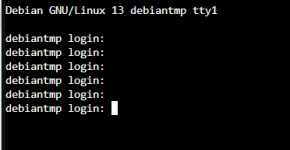
I can sort of reproduce it. When I create a fresh CT from the debian-13-standard_13.6-1_amd64.tar.zst template I can press (hold) enter and it looks like this
1789932976107.png
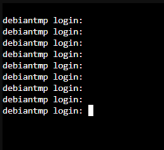
When I change between the tabs and back to Console I get a black screen but upon pressing (holding) enter it looks like this
1789933033824.png
It's the same for debian 12, by the way. This black screen does not happen with the shell console mode.
So in my case I only see the login prompt the first time I use the Console, otherwise I have to press enter or just write the username and press enter.
You can also see if setting up an autologin helps here but that increases memory usage a tiny bit.
I'm not quite sure if this is expected behavior but it seems to have been a thing for a while.
Disclaimer: I tested with a somewhat heavily modifed PVE node .
 
Last edited:
Sorry for the delay and not testing this myself sooner (thus wasting your time) but I had to get to a real PC first.
I can sort of reproduce it. When I create a fresh CT from the debian-13-standard_13.6-1_amd64.tar.zst template I can press (hold) enter and it looks like this
View attachment 100027
When I change between the tabs and back to Console I get a black screen but upon pressing (holding) enter it looks like this
View attachment 100028
It's the same for debian 12, by the way. This black screen does not happen with the shell console mode.
So in my case I only see the login prompt the first time I use the Console, otherwise I have to press enter or just write the username and press enter.
You can also see if setting up an autologin helps here but that increases memory usage a tiny bit.
I'm not quite sure if this is expected behavior but it seems to have been a thing for a while.
Disclaimer: I tested with a somewhat heavily modifed PVE node .

Damn... if you tryout a Fedora LXC pressing Enter will accept it as the username.
I hope this can get looked and fixed some point in the future.

I might swap everything from tty to shell but I'd much prefer having the login page.
I appreciate your help! Glad it's not just me having this issue, phew...