Hi
When I install proxmox 5 from OVH, I've not LVM-thin. I want it, to have snapshot backups.
So, I follow this guide (h ttps://blog.emaxilde.net/6-Proxmox-VE-4-Migration-de-ext4-vers-LVM-thin.html) to convert to LVM-thin.
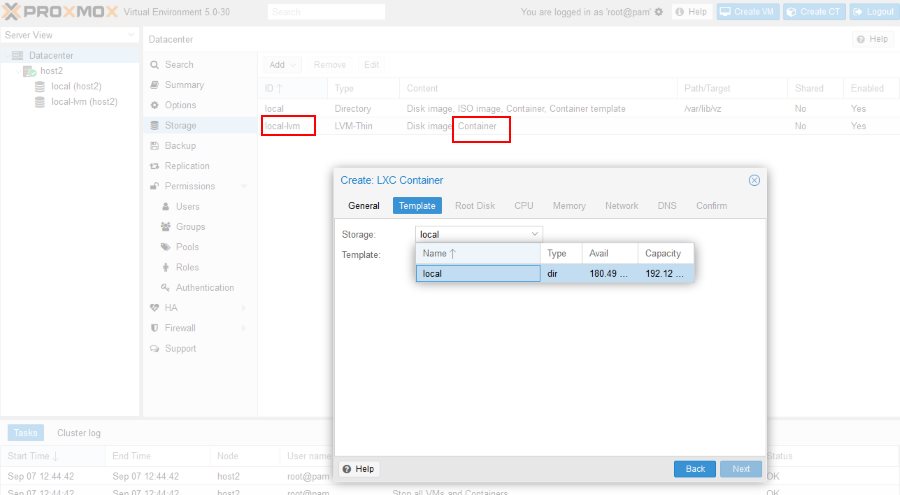
After that, I see on Proxmox GUI :
- local
- local-lvm
It seems ok, but I can't create CT on local-lvm. I've only local storage available, not local-lvm.
The guide is for Proxmox4, so maybe something is missing.
=> another problem : I don't see which path use, to send my backup in local-lvm part.
Thanks for your help.
When I install proxmox 5 from OVH, I've not LVM-thin. I want it, to have snapshot backups.
So, I follow this guide (h ttps://blog.emaxilde.net/6-Proxmox-VE-4-Migration-de-ext4-vers-LVM-thin.html) to convert to LVM-thin.
After that, I see on Proxmox GUI :
- local
- local-lvm
It seems ok, but I can't create CT on local-lvm. I've only local storage available, not local-lvm.
The guide is for Proxmox4, so maybe something is missing.
=> another problem : I don't see which path use, to send my backup in local-lvm part.
Thanks for your help.