Lost Proxmox host connectivity after adding vmbr1, but VMs still working

john0017

New Member
Mar 30, 2026
3
0
1
It was working for the past 1–2 years with 3 Windows 11 VMs and 1 Ubuntu machine running Tailscale. I was using the Ubuntu VM as a gateway to avoid installing Tailscale on each Windows VM individually. IP forwarding and routing were configured on Ubuntu, and everything was working fine up until this point.

About a week ago, I wanted to add another Windows 11 VM and isolate it from the local LAN (no access to other devices, no ping), so I planned to create a separate network using a Class A IP range. The idea was to connect this new network to the Ubuntu VM and handle routing + Tailscale there, while installing Tailscale directly on that new Windows VM.

So I went into Proxmox and:
  • Created a new bridge vmbr1
  • Did not assign an IP or gateway to vmbr1
  • Planned to handle addressing and routing inside Ubuntu
After applying the configuration, I lost connectivity to the Proxmox host.

Current situation:

  • I can access Proxmox via iDRAC/console
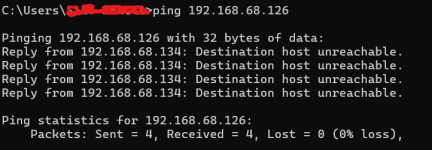
  • From the Proxmox host, I cannot ping the default gateway
  • From other machines, pinging the Proxmox host returns: Destination Host Unreachable
  • However, all VMs inside Proxmox are still running fine
  • I can still access the VMs remotely (including Ubuntu with Tailscale)

Troubleshooting already performed:

I have already verified and tested the following:
  1. Checked interfaces
    ip a
    ip link show
  2. Checked routing
    ip route
  3. Checked Proxmox web service
    systemctl status pveproxy
  4. Checked port 8006
    ss -tulnp | grep 8006
  5. Tested GUI locally
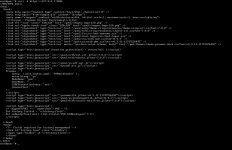
    curl -k https://127.0.0.1:8006
  6. Tested connectivity
    ping 192.168.x.x → no response
    ping 192.168.x.x from another machine → Destination Host Unreachable
  7. Checked ARP table
    arp -n
    ip neigh
  8. Flushed ARP
    ip neigh flush all
  9. Bridge + NIC reset
    ip link set vmbr0 down
    ip link set eno2 down
    sleep 02
    ip link set eno2 up
    ip link set vmbr0 up
  10. Reloaded network config
    ifreload -a
  11. Restarted networking
    systemctl restart networking
  12. Full interface reset
    ifdown vmbr0
    ifdown eno2
    ifup eno2
    ifup vmbr0
  13. Tried adding default route manually
    ip route add default via 192.168.x.x dev vmbr0
  14. Restarted SSH
    systemctl restart ssh
    systemctl enable ssh
  15. Rebooted system
  16. Reviewed /etc/network/interfaces
  17. Physical Removed NIC from Port re-add after 30seconds
All of the above appear to be correctly configured and behaving as expected.

What I suspect:

At this point, I believe the issue might be related to Layer 2 (bridge / MAC / switch / ARP behavior), possibly triggered after introducing vmbr1.

Questions:

  1. Could adding vmbr1 (even without IP/gateway) disrupt vmbr0 at Layer 2?
  2. Is it possible the physical NIC lost proper bridge association even if config looks correct?
  3. Could this be a MAC/ARP issue on the upstream router or switch?
  4. Should I temporarily remove/comment out vmbr1 to test recovery?
  5. What is the recommended way to isolate a VM on a separate subnet while routing through another VM (Ubuntu in this case)?
  6. Could this be related to firewall rules (Proxmox host, bridge firewall, or external network)?
  7. Are there specific logs (system logs, networking logs, or Proxmox logs) I should check to identify what broke after applying the bridge configuration?

Additional info:

  • vmbr0 → 192.168.x.0/24
  • Ubuntu VM handles Tailscale + routing
  • Planned new subnet → 10.0.0.0/24 via vmbr1
 

Attachments

  • curl.jpeg
    curl.jpeg
    166.6 KB · Views: 9
  • ip link show.jpeg
    ip link show.jpeg
    274.2 KB · Views: 9
  • grep 8006.jpeg
    grep 8006.jpeg
    11.8 KB · Views: 8
  • systemctl status pveproxy.jpeg
    systemctl status pveproxy.jpeg
    91.5 KB · Views: 8
  • Screenshot 2026-03-30 172856.png
    Screenshot 2026-03-30 172856.png
    36 KB · Views: 9
Looking at the outputs you have provided, it does seem that you have a second unused NIC in your PVE server. Were you planning to use it? Should eno1or eno2 be the physical NIC you want to associate with vmbr1?

If you are never looking to give these VMs a traditional gateway or outbound access then you could just make a VLAN to put them on even if you don't have a VLAN compatible switch. Simple SDN zones might give you a solution as well if you are not keen on VLANs.

Let me know if that helps. If not, please send the output of /etc/network/interfaces
 
Looking at the outputs you have provided, it does seem that you have a second unused NIC in your PVE server. Were you planning to use it? Should eno1or eno2 be the physical NIC you want to associate with vmbr1?

If you are never looking to give these VMs a traditional gateway or outbound access then you could just make a VLAN to put them on even if you don't have a VLAN compatible switch. Simple SDN zones might give you a solution as well if you are not keen on VLANs.

Let me know if that helps. If not, please send the output of /etc/network/interfaces
Thanks for your reply.

I think there may be a misunderstanding of the issue I’m facing. The main problem is not about designing the new network, but that I lost connectivity to the Proxmox host itself right after creating vmbr1.

Key symptoms:
  • Proxmox host cannot ping the default gateway
  • Other machines get “Destination Host Unreachable” when pinging the host
  • All VMs are still running and reachable (including via Tailscale)
  • Issue started immediately after adding vmbr1
Because of this, I believe the problem is related to vmbr0 / physical NIC / bridge configuration, rather than how to structure the new network.

Your suggestions about VLANs or SDN are useful for network design, but they don’t help diagnose or resolve the current connectivity loss on the host.

Regarding the NIC point: I understand the question about eno1 vs eno2, but I’ve already verified that the intended physical NIC is still associated with vmbr0.

If helpful, I can share my /etc/network/interfaces for a more precise look at what might have broken.
 
Let me be more direct. My primary suspicions were:

A: you are trying to use the same physical NIC for both vmbr0 and vmbr1

or

B: you have disassociated the proper physical NIC with vmbr0

So my question is, what NIC is associated with vmbr1 at this time? None?

Pardon me if the following is redundant information to you, but I do want to be sure we are on the same page:

Each vmbrX should be associated with it's own physical NIC or VLAN (or none at all), not the same physical NIC for two separate Linux bridges. Using a tool like the SDN can also streamline the use of this single Linux bridge in a flat network, by leveraging Simple Zones that use NAT for multiple subnets, like I mentioned previously. Essentially, think of a Linux bridge as a flat, dumb switch, without VLAN tagging, everything that comes in by default is going to be treated like it's on the same layer 2. Hence the need for VLANs, NAT, or separate NICs to allow for multiple subnets.

By sending the /etc/network/interfaces file we could at least rule out the possibilities I mentioned above. However, if the possibilities I listed are not the underlying issue in your opinion, please do not hesitate to clarify.
 
Let me be more direct. My primary suspicions were:

A: you are trying to use the same physical NIC for both vmbr0 and vmbr1

or

B: you have disassociated the proper physical NIC with vmbr0

So my question is, what NIC is associated with vmbr1 at this time? None?

Pardon me if the following is redundant information to you, but I do want to be sure we are on the same page:

Each vmbrX should be associated with it's own physical NIC or VLAN (or none at all), not the same physical NIC for two separate Linux bridges. Using a tool like the SDN can also streamline the use of this single Linux bridge in a flat network, by leveraging Simple Zones that use NAT for multiple subnets, like I mentioned previously. Essentially, think of a Linux bridge as a flat, dumb switch, without VLAN tagging, everything that comes in by default is going to be treated like it's on the same layer 2. Hence the need for VLANs, NAT, or separate NICs to allow for multiple subnets.

By sending the /etc/network/interfaces file we could at least rule out the possibilities I mentioned above. However, if the possibilities I listed are not the underlying issue in your opinion, please do not hesitate to clarify.
Thanks, this clarifies your suspicion and it makes sense.

To answer your question: vmbr1 currently has no physical NIC associated with it — it was intended to be handled entirely inside the Ubuntu VM (routing/NAT).

Also, I am not intentionally using the same physical NIC for both bridges, and from what I can see, the correct NIC is still assigned to vmbr0.

That said, your point about possibly disassociating the NIC from vmbr0 is valid and aligns with the behavior I’m seeing:
  • Host lost connectivity to the gateway
  • Other machines cannot reach the host
  • VMs are still running and reachable
So I agree the issue likely lies in how the physical NIC is bound to vmbr0.

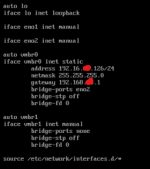
To move forward and rule this out properly, here is my /etc/network/interfaces:
1774986242619.png
 
@john0017
In your screenshot we can see that the gateway address is in a different network (192.168.x.1) than the iface's address (192.16.x.126/24) (note the second octets: 168 != 16)
It has no chance to work :cool: