Live Migrations get slower over time

Nov 23, 2023
20
1
8
Hi,

we are experiencing the problem that live migrations get slower over time - meaning the higher the uptime of a host the slower it gets. I know there are several posts already in regards to slow live migrations, however, we

- have dedicated 2 x 100Gbit connections for the live migrations per host
- the migrations is already set to "insecure"
- we are not doing storage migrations, it is ceph with 2 x 100Gbit connections (each, that global and the cluster network have that)
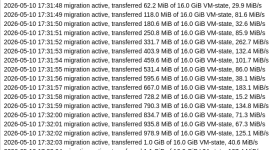
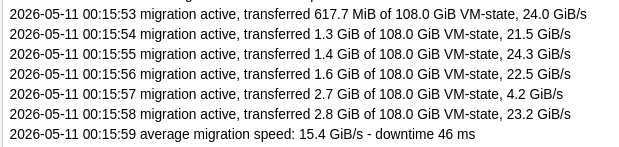
- and we can repetitivly see, that the live migration between hosts drops to 10 or 10MB/s sometimes it goes up to 100MB/s, sometimes it even drops below 1MB/s. After a reboot of the hosts, if i migrated between 2 freshly rebootet nodes, the live migration speed is 2 - 15 GB/s -see attached screenshots form the same cluster (and that was a fast one of the slow ones )

I saw posts where it blames memory fragmentation, which sounds odd for linux.

Does someone have an idea why this is happening (and @proxmox staff, the nodes all have a basic subscription - we could also make a ticket if you think it is necessary and if we want to check together)
 

Attachments
  • fast.png
    fast.png
    38.7 KB · Views: 30
  • slow.png
    slow.png
    92.9 KB · Views: 30
Last edited:
Hi,
please share the VM configuration of an affected VM qm config ID with the numerical ID of the VM as well as the output of pveversion -v and full system journal from the source and target node from the boot until and including the problematic migration. The start and end of the migration task logs (one fast and one slow) would also be interesting.
 
  • Like
Reactions: Kingneutron
Hi @mirko.plachta,
please provide more details about your setup and the information asked for in my previous post. Do you have KSM enabled for the affected VMs and if yes, how much memory is shared?
 
Hi everyone,

I had a very similar problem with live migrations and thought I would share my findings.
I have a 3-node Proxmox VE 9.2 cluster with 10 Gbit links between the nodes. After just rebooted nodes, migration performance is good,
and running at ~1 GiB/s. (it is my bandwidth limit on global option of datacenter)

But after some days of uptime, migration performance was highly dependent on the direction:

• Node 1 → Node 3: migration memory speed fluctuated between 20–100 MiB/s.
• Node 3 → Node 1: migration memory was consistently running at ~1 GiB/s.

After observing the nodes for several days, I noticed a significant difference in the host memory state:

On Node 1: free -w -h
free buffers available
1.5Ti 2.8Mi 1.5Ti

On Node 3: free -w -h
free buffers available
20Gi 1.3Ti 1.3Ti

So although Node 3 still had plenty of MemAvailable, almost all of its "free" memory was actually sitting in the kernel buffer memory.
This gave me a hypothesis that the destination node was having trouble quickly reclaiming/allocating memory while QEMU was receiving the VM's memory during live migration.

I tested this by clearing the buffers/cache on the problematic destination node 3:
sync && echo 1 > /proc/sys/vm/drop_caches

Then on Node 3: free -w -h
free buffers available
1.3Ti 1.8Mi 1.3Ti

and immediately repeated the migration from Node 1 → Node 3.
The result was quite striking: the migration completed without the previous slowdowns and ran at the maximum available speed (~1 GiB/s).

So, at least in my case, the problem appears to be related to the amount of kernel buffer memory accumulated on the destination node over time.

I currently suspect that cache=writeback option on the VM's virtual disks, placed on node 3, may be contributing significantly to this buffer accumulation.
I have since started testing VMs with disk caching disabled, together with virtio-scsi-single + io_uring + iothread=1.
The test is still ongoing, so I don't want to claim that cache=writeback is definitively the root cause yet. But the correlation between huge Buffers usage, migration degradation, and immediately restored migration performance after dropping the caches is quite strong.

Hopefully this helps someone else who is experiencing similar live migration performance degradation.
 
You could try if pre-allocation really helps, e.g. by setting the global pre-allocation option (needs a full restart of the VM):

qm set VMID --args '-mem-prealloc'

To clear that again (needs also restart): qm set VMID --delete args

If it indeed helps we could look into exposing this option (or even enabling this by default).
 
Hello,
thank you for attention to this issue.

Today I have got node 2 which is now experiencing almost complete buffering memory:
Code:
~# free -w -h
               total        used        free      shared     buffers       cache   available
Mem:           2.0Ti       675Gi        26Gi        67Mi       1.3Ti        18Gi       1.3Ti
Swap:          8.0Gi          0B       8.0Gi

I tried to migrate VM from node1 -> node2, speed is slow and fluctuating:
Code:
2026-09-10 09:13:55 migration active, transferred 1.4 GiB of 16.0 GiB VM-state, 71.5 MiB/s
2026-09-10 09:13:56 migration active, transferred 1.6 GiB of 16.0 GiB VM-state, 32.3 MiB/s
2026-09-10 09:13:57 migration active, transferred 1.8 GiB of 16.0 GiB VM-state, 188.7 MiB/s
2026-09-10 09:13:58 migration active, transferred 1.9 GiB of 16.0 GiB VM-state, 348.8 MiB/s
2026-09-10 09:13:59 migration active, transferred 2.0 GiB of 16.0 GiB VM-state, 174.5 MiB/s
2026-09-10 09:14:00 migration active, transferred 2.2 GiB of 16.0 GiB VM-state, 293.9 MiB/s
2026-09-10 09:14:01 migration active, transferred 2.4 GiB of 16.0 GiB VM-state, 237.4 MiB/s
2026-09-10 09:14:02 migration active, transferred 2.7 GiB of 16.0 GiB VM-state, 361.6 MiB/s
2026-09-10 09:14:03 migration active, transferred 2.8 GiB of 16.0 GiB VM-state, 69.0 MiB/s
2026-09-10 09:14:04 migration active, transferred 3.0 GiB of 16.0 GiB VM-state, 69.7 MiB/s
2026-09-10 09:14:05 migration active, transferred 3.2 GiB of 16.0 GiB VM-state, 44.5 MiB/s
2026-09-10 09:14:06 migration active, transferred 3.7 GiB of 16.0 GiB VM-state, 1.1 GiB/s
2026-09-10 09:14:07 migration active, transferred 4.1 GiB of 16.0 GiB VM-state, 28.2 MiB/s
2026-09-10 09:14:08 migration active, transferred 4.1 GiB of 16.0 GiB VM-state, 44.1 MiB/s
2026-09-10 09:14:09 migration active, transferred 4.3 GiB of 16.0 GiB VM-state, 166.7 MiB/s

I followed your advice and set args:
Code:
qm set 1046 --args '-mem-prealloc'

Then powered the VM off and started again. Then ran online migration from node1 -> node2, speed is:

Code:
...
2026-09-10 09:56:05 starting VM 1046 on remote node 'node2'
...
2026-09-10 09:57:15 migration active, transferred 385.7 MiB of 16.0 GiB VM-state, 1.1 GiB/s
2026-09-10 09:57:16 migration active, transferred 581.1 MiB of 16.0 GiB VM-state, 1.0 GiB/s
2026-09-10 09:57:17 migration active, transferred 887.3 MiB of 16.0 GiB VM-state, 2.7 GiB/s
2026-09-10 09:57:18 migration active, transferred 893.4 MiB of 16.0 GiB VM-state, 2.6 GiB/s
2026-09-10 09:57:19 average migration speed: 3.2 GiB/s - downtime 96 ms
2026-09-10 09:57:19 migration completed, transferred 1.0 GiB VM-state
2026-09-10 09:57:19 migration status: completed

Very good, but it hangs about a minute on "starting VM 1046 on remote node 'node2'". I think it "pre-allocating" 1.0 GiB VM-state or may be all 16 GiB memory of VM on node2 at this time.

This is just a guess for now, needed more tests with big memory VMs, but it seems to me there's no difference where wasting time: when copying memory blocks slowly or when starting a VM and slowly pre-allocating memory on a problematic node.

For now, I still believe that the root of the problem is memory buffering on the target node. I'm still looking for the reason why this happens.
 
Hello,

I did some additional testing based on your suggestion to use -mem-prealloc, and I think this gives a much better picture of what is happening.

I create test VM 3005 with 128 GiB of memory, and do
Code:
qm set 3005 --args '-mem-prealloc'

Fill up the memory with script, it makes about 120 GiB used memory inside the VM:
Code:
awk 'BEGIN { for (i=0; i<30000000; i++) a[i]=sprintf("%4096s","x"); print "Allocated, press Enter to release..."; getline }'

then migrate it from node1 -> node2...

It hangs up on stage "starting VM 3005 on remote node 'node2'" is about two minutes. Not so bad. And speed is pretty too:
Code:
2026-09-10 13:58:30 migration active, transferred 1.9 GiB of 128.0 GiB VM-state, 1.0 GiB/s
2026-09-10 13:58:31 migration active, transferred 2.9 GiB of 128.0 GiB VM-state, 1.4 GiB/s
2026-09-10 13:58:32 migration active, transferred 3.9 GiB of 128.0 GiB VM-state, 1022.5 MiB/s
2026-09-10 13:58:33 migration active, transferred 4.9 GiB of 128.0 GiB VM-state, 1.0 GiB/s
2026-09-10 13:58:34 migration active, transferred 6.0 GiB of 128.0 GiB VM-state, 1.0 GiB/s
2026-09-10 13:58:35 migration active, transferred 7.0 GiB of 128.0 GiB VM-state, 1.0 GiB/s
2026-09-10 13:58:36 migration active, transferred 8.0 GiB of 128.0 GiB VM-state, 1.0 GiB/s
2026-09-10 13:58:37 migration active, transferred 9.0 GiB of 128.0 GiB VM-state, 1.0 GiB/s
2026-09-10 13:58:38 migration active, transferred 10.0 GiB of 128.0 GiB VM-state, 1.0 GiB/s
2026-09-10 13:58:39 migration active, transferred 11.0 GiB of 128.0 GiB VM-state, 1.0 GiB/s
2026-09-10 13:58:40 migration active, transferred 12.0 GiB of 128.0 GiB VM-state, 1.0 GiB/s
2026-09-10 13:58:41 migration active, transferred 13.0 GiB of 128.0 GiB VM-state, 1022.5 MiB/s
2026-09-10 13:58:42 migration active, transferred 14.0 GiB of 128.0 GiB VM-state, 1.0 GiB/s
2026-09-10 13:58:43 migration active, transferred 15.0 GiB of 128.0 GiB VM-state, 1.0 GiB/s

Then If I first run:

Code:
sync
echo 1 > /proc/sys/vm/drop_caches

and then perform the same migration with -mem-prealloc, the VM starts within a few seconds and the migration is fast as well.

So it looks like -mem-prealloc does not actually solve the underlying problem. It appears to move the expensive memory allocation/preparation from the migration phase into the VM startup phase.

In fact, I think it is a very useful option for production environments. If the destination node is in a degraded memory state, preallocating the VM memory during startup may add a delay of a minute or two, but this is still much better than trying to transfer, for example, 128 GiB at only 20 MiB/s.

For this reason, I would actually like to see -mem-prealloc exposed as a normal option in the Proxmox GUI, and I would even consider making it the default behavior for VMs.

The current behavior can turn a relatively harmless memory-management condition on the host into a very long live migration. With preallocation, the cost is much more predictable: you pay the allocation cost when starting the VM, and once the VM is running, the actual migration can proceed at full speed.

So I think -mem-prealloc is definitely worth keeping and possibly enabling by default. At the same time, I believe the underlying issue with the host memory state still needs to be investigated, because without preallocation the same condition can cause a dramatic degradation of live migration performance.
 
could you post the output of grep "" /proc/sys/vm/dirty_*?
 
could you post the output of grep "" /proc/sys/vm/dirty_*?
Code:
~# grep "" /proc/sys/vm/dirty_*
/proc/sys/vm/dirty_background_bytes:0
/proc/sys/vm/dirty_background_ratio:10
/proc/sys/vm/dirty_bytes:0
/proc/sys/vm/dirty_expire_centisecs:3000
/proc/sys/vm/dirty_ratio:20
/proc/sys/vm/dirty_writeback_centisecs:500
 
  • Like
Reactions: fabian