

Hi to all , i'have execute upgrade pihole , but after upgrade , pihole not resolv dns query . in dmseg i'm view a kernel mount error .
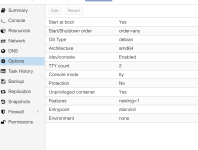
LXC config :
lxc.cgroup.relative = 0
lxc.cgroup.dir.monitor = lxc.monitor/126
lxc.cgroup.dir.container = lxc/126
lxc.cgroup.dir.container.inner = ns
lxc.arch = amd64
lxc.include = /usr/share/lxc/config/debian.common.conf
lxc.include = /usr/share/lxc/config/debian.userns.conf
lxc.seccomp.profile = /var/lib/lxc/126/rules.seccomp
lxc.apparmor.profile = generated
lxc.apparmor.raw = allow mqueue,
lxc.apparmor.allow_nesting = 1
lxc.apparmor.raw = allow userns,
lxc.mount.auto = sys:mixed
lxc.monitor.unshare = 1
lxc.idmap = u 0 100000 65536
lxc.idmap = g 0 100000 65536
lxc.tty.max = 2
lxc.environment = TERM=linux
lxc.uts.name = pi-hole
lxc.cgroup2.memory.max = 1073741824
lxc.cgroup2.memory.high = 1065353216
lxc.cgroup2.memory.swap.max = 536870912
lxc.rootfs.path = /var/lib/lxc/126/rootfs
lxc.net.0.type = veth
lxc.net.0.veth.pair = veth126i0
lxc.net.0.hwaddr = 76:59:4E:A2:FA:92
lxc.net.0.name = eth0
lxc.net.0.mtu = 1500
lxc.net.0.script.up = /usr/share/lxc/lxcnetaddbr
lxc.cgroup2.cpuset.cpus = 1
(END)
Code:
  sys-fs-fuse-connections.mount                    loaded active mounted   FUSE Control File System
● sys-kernel-config.mount                          loaded failed failed    Kernel Configuration File System
  systemd-ask-password-console.path                loaded active waiting   Dispatch Password Requests to Console Directory Watch
  systemd-ask-password-wall.path                   loaded active waiting   Forward Password Requests to Wall Directory Watch
  init.scope                                       loaded active running   System and Service Manager
  session-c1.scope                                 loaded active running   Session c1 of user root
  console-getty.service                            loaded active running   Console Getty
  container-getty@1.service                        loaded active running   Container Getty on /dev/tty1
  container-getty@2.service                        loaded active running   Container Getty on /dev/tty2
  cron.service                                     loaded active running   Regular background program processing daemon
  dbus.service                                     loaded active running   D-Bus System Message Bus
  glpi-agent.service                               loaded active running   GLPI agent
  ifupdown-pre.service                             loaded active exited    Helper to synchronize boot up for ifupdown
  ifupdown-wait-online.service                     loaded active exited    Wait for network to be configured by ifupdown
  networking.service                               loaded active exited    Raise network interfaces
  nftables.service                                 loaded active exited    nftables
  pihole-FTL.service                               loaded active running   Pi-hole FTL
  postfix.service                                  loaded active exited    Postfix Mail Transport Agent
  postfix@-.service                                loaded active running   Postfix Mail Transport Agent (instance -)
  rsyslog.service                                  loaded active running   System Logging Service
  ssh@0-192.168.3.123:22-192.168.3.7:53990.service loaded active running   OpenBSD Secure Shell server per-connection daemon (192.168.3.7:53990)
  systemd-journal-flush.service                    loaded active exited    Flush Journal to Persistent Storage
  systemd-journald.service                         loaded active running   Journal Service
  systemd-logind.service                           loaded active running   User Login Management
  systemd-modules-load.service                     loaded active exited    Load Kernel Modules
  systemd-networkd-wait-online.service             loaded active exited    Wait for Network to be Configured
  systemd-networkd.service                         loaded active running   Network Service
  systemd-remount-fs.service                       loaded active exited    Remount Root and Kernel File Systems
  systemd-resolved.service                         loaded active running   Network Name Resolution
  systemd-sysctl.service                           loaded active exited    Apply Kernel Variables
  systemd-sysusers.service                         loaded active exited    Create System Users
  systemd-tmpfiles-setup-dev.service               loaded active exited    Create Static Device Nodes in /dev
  systemd-tmpfiles-setup.service                   loaded active exited    Create Volatile Files and Directories
  systemd-update-utmp.service                      loaded active exited    Update UTMP about System Boot/Shutdown
  systemd-user-sessions.service                    loaded active exited    Permit User Sessions
  user-runtime-dir@0.service                       loaded active exited    User Runtime Directory /run/user/0
  user@0.service                                   loaded active running   User Manager for UID 0
  -.slice                                          loaded active active    Root Slice
  system-container\x2dgetty.slice                  loaded active active    system-container\x2dgetty.slice
  system-modprobe.slice                            loaded active active    system-modprobe.slice
  system-postfix.slice                             loaded active active    system-postfix.slice
  system-ssh.slice                                 loaded active active    system-ssh.slice
  system.slice                                     loaded active active    System Slice
  user-0.slice                                     loaded active active    User Slice of UID 0
  user.slice                                       loaded active active    User and Session Slice
  dbus.socket                                      loaded active running   D-Bus System Message Bus Socket
  ssh.socket                                       loaded active listening OpenBSD Secure Shell server socket
  syslog.socket                                    loaded active running   Syslog Socket
  systemd-initctl.socket                           loaded active listening initctl Compatibility Named Pipe
● systemd-journald-audit.socket                    loaded failed failed    Journal Audit
LXC config :
lxc.cgroup.relative = 0
lxc.cgroup.dir.monitor = lxc.monitor/126
lxc.cgroup.dir.container = lxc/126
lxc.cgroup.dir.container.inner = ns
lxc.arch = amd64
lxc.include = /usr/share/lxc/config/debian.common.conf
lxc.include = /usr/share/lxc/config/debian.userns.conf
lxc.seccomp.profile = /var/lib/lxc/126/rules.seccomp
lxc.apparmor.profile = generated
lxc.apparmor.raw = allow mqueue,
lxc.apparmor.allow_nesting = 1
lxc.apparmor.raw = allow userns,
lxc.mount.auto = sys:mixed
lxc.monitor.unshare = 1
lxc.idmap = u 0 100000 65536
lxc.idmap = g 0 100000 65536
lxc.tty.max = 2
lxc.environment = TERM=linux
lxc.uts.name = pi-hole
lxc.cgroup2.memory.max = 1073741824
lxc.cgroup2.memory.high = 1065353216
lxc.cgroup2.memory.swap.max = 536870912
lxc.rootfs.path = /var/lib/lxc/126/rootfs
lxc.net.0.type = veth
lxc.net.0.veth.pair = veth126i0
lxc.net.0.hwaddr = 76:59:4E:A2:FA:92
lxc.net.0.name = eth0
lxc.net.0.mtu = 1500
lxc.net.0.script.up = /usr/share/lxc/lxcnetaddbr
lxc.cgroup2.cpuset.cpus = 1
(END)
Attachments
Last edited:


