

Hi All,
I am very new to Proxmox, having installed on a new mini PC about 2 months ago. Everything has been going along swimmingly until the last few days when, upon rebooting the physical machine, a message was thrown that the Journal was recovering. I left this overnight and when I returned in the morning the same message was presented with the same progress for files and blocks.
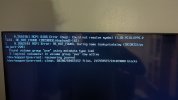
I did some reading and this can be an issue when you are using passthrough for devices. I had set up video card passthrough for transcoding about a month and a half ago, and had restarted the machine multiple times since then without issue, however this seemed to be a good lead to pursue.
I first disabled SVM in the BIOS (Running an AMD processor) and rebooted. Same issue.
Next I booted into Grub and removed 'quiet' value from the standard boot and pressed F10 to load. I don't get the previously discussed message, but the following instead:
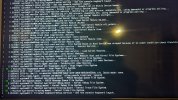
I left this to sit for a few hours to see if it progressed further, but no such luck.
Next, I used the installation USB to boot into recovery mode with the terminal. I attempted to run fsck, but the message returned was that the fstab file could not be located. I checked and there was no fstab in /etc/.
Does anyone have any additional ideas on how I can proceed from here?
Thank you in advance for your help.
I am very new to Proxmox, having installed on a new mini PC about 2 months ago. Everything has been going along swimmingly until the last few days when, upon rebooting the physical machine, a message was thrown that the Journal was recovering. I left this overnight and when I returned in the morning the same message was presented with the same progress for files and blocks.
I did some reading and this can be an issue when you are using passthrough for devices. I had set up video card passthrough for transcoding about a month and a half ago, and had restarted the machine multiple times since then without issue, however this seemed to be a good lead to pursue.
I first disabled SVM in the BIOS (Running an AMD processor) and rebooted. Same issue.
Next I booted into Grub and removed 'quiet' value from the standard boot and pressed F10 to load. I don't get the previously discussed message, but the following instead:
I left this to sit for a few hours to see if it progressed further, but no such luck.
Next, I used the installation USB to boot into recovery mode with the terminal. I attempted to run fsck, but the message returned was that the fstab file could not be located. I checked and there was no fstab in /etc/.
Does anyone have any additional ideas on how I can proceed from here?
Thank you in advance for your help.
