Intel 245k iGPU passthrough - no hdmi audio

adolfotregosa

Well-Known Member
Jan 8, 2019
61
16
48
43
Did anyone manage to get HDMI audio working using a similar CPU/iGPU? Yes, I have both the iGPU and audio device passed through to the VM. Inside the VM, I can see in dmesg that when snd_hda_intel maps everything, the HDMI/DP ports are missing, only the analog audio shows up. I remember in the past having to give the audio device a romfile as well, but as far as I know, there's none available for Ultra CPUs.

Thank you.
 
I'm using an Intel Core Ultra 265k, and I tested this on Windows 11.

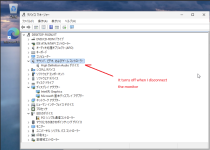
It appears that the HDMI audio device isn't displayed when no monitor is connected to the HDMI port, but I've confirmed that it does appear once a monitor is connected.

Code:
mv 6-14-qemu10.rom /usr/share/kvm/

qm set 929 -args '-set device.hostpci0.bus=pcie.0 -set device.hostpci0.addr=0x02.0 -set device.hostpci0.x-igd-gms=0x0 -set device.hostpci0.x-igd-opregion=on'
qm set 929 -hostpci0 0000:00:02.0,pcie=1,romfile=6-14-qemu10.rom
qm set 929 -hostpci1 0000:80:1f.3,pcie=1
qm set 929 -cpu host
qm set 929 -bios ovmf
qm set 929 -machine pc-q35-9.2+pve1
 
I'm using an Intel Core Ultra 265k, and I tested this on Windows 11.

It appears that the HDMI audio device isn't displayed when no monitor is connected to the HDMI port, but I've confirmed that it does appear once a monitor is connected.

Code:
mv 6-14-qemu10.rom /usr/share/kvm/

qm set 929 -args '-set device.hostpci0.bus=pcie.0 -set device.hostpci0.addr=0x02.0 -set device.hostpci0.x-igd-gms=0x0 -set device.hostpci0.x-igd-opregion=on'
qm set 929 -hostpci0 0000:00:02.0,pcie=1,romfile=6-14-qemu10.rom
qm set 929 -hostpci1 0000:80:1f.3,pcie=1
qm set 929 -cpu host
qm set 929 -bios ovmf
qm set 929 -machine pc-q35-9.2+pve1
Interesting. You are using 6-14-qemu10.rom and not ultra-1-2-qemu10.rom
Let me try it out.
 
@uzumo Unfortunately no hdmi audio but hdmi display works with 6-14-qemu.rom, ok.. lol

HDMI audio output is missing on the VM.

Code:
[    7.272508] snd_hda_codec_alc662 hdaudioC1D0: autoconfig for ALC897: line_outs=1 (0x14/0x0/0x0/0x0/0x0) type:line
[    7.272510] snd_hda_codec_alc662 hdaudioC1D0:    speaker_outs=0 (0x0/0x0/0x0/0x0/0x0)
[    7.272511] snd_hda_codec_alc662 hdaudioC1D0:    hp_outs=1 (0x1b/0x0/0x0/0x0/0x0)
[    7.272511] snd_hda_codec_alc662 hdaudioC1D0:    mono: mono_out=0x0
[    7.272512] snd_hda_codec_alc662 hdaudioC1D0:    inputs:
[    7.272512] snd_hda_codec_alc662 hdaudioC1D0:      Rear Mic=0x18
[    7.272513] snd_hda_codec_alc662 hdaudioC1D0:      Front Mic=0x19
[    7.272514] snd_hda_codec_alc662 hdaudioC1D0:      Line=0x1a
[    7.277346] i915 0000:00:02.0: [drm] GT1: Loaded GSC firmware i915/mtl_gsc_1.bin (cv1.0, r102.1.15.1926, svn 1)
[    7.295956] input: HDA Intel PCH Rear Mic as /devices/pci0000:00/0000:00:1c.1/0000:02:00.0/sound/card1/input6
[    7.295979] input: HDA Intel PCH Front Mic as /devices/pci0000:00/0000:00:1c.1/0000:02:00.0/sound/card1/input7
[    7.295998] input: HDA Intel PCH Line as /devices/pci0000:00/0000:00:1c.1/0000:02:00.0/sound/card1/input8
[    7.296013] input: HDA Intel PCH Line Out as /devices/pci0000:00/0000:00:1c.1/0000:02:00.0/sound/card1/input9
[    7.296028] input: HDA Intel PCH Front Headphone as /devices/pci0000:00/0000:00:1c.1/0000:02:00.0/sound/card1/input10

whereas on the host I have four HDA Intel PCH HDMI/DP:

Code:
[    2.381304] snd_hda_codec_alc662 hdaudioC0D0: autoconfig for ALC897: line_outs=1 (0x14/0x0/0x0/0x0/0x0) type:line
[    2.381307] snd_hda_codec_alc662 hdaudioC0D0:    speaker_outs=0 (0x0/0x0/0x0/0x0/0x0)
[    2.381308] snd_hda_codec_alc662 hdaudioC0D0:    hp_outs=1 (0x1b/0x0/0x0/0x0/0x0)
[    2.381309] snd_hda_codec_alc662 hdaudioC0D0:    mono: mono_out=0x0
[    2.381310] snd_hda_codec_alc662 hdaudioC0D0:    inputs:
[    2.381311] snd_hda_codec_alc662 hdaudioC0D0:      Rear Mic=0x18
[    2.381311] snd_hda_codec_alc662 hdaudioC0D0:      Front Mic=0x19
[    2.381312] snd_hda_codec_alc662 hdaudioC0D0:      Line=0x1a
[    2.391180] fbcon: i915drmfb (fb0) is primary device
[    2.428315] input: HDA Intel PCH Rear Mic as /devices/pci0000:80/0000:80:1f.3/sound/card0/input11
[    2.428344] input: HDA Intel PCH Front Mic as /devices/pci0000:80/0000:80:1f.3/sound/card0/input12
[    2.428707] input: HDA Intel PCH Line as /devices/pci0000:80/0000:80:1f.3/sound/card0/input13
[    2.428726] input: HDA Intel PCH Line Out as /devices/pci0000:80/0000:80:1f.3/sound/card0/input14
[    2.428744] input: HDA Intel PCH Front Headphone as /devices/pci0000:80/0000:80:1f.3/sound/card0/input15
[    2.428765] input: HDA Intel PCH HDMI/DP,pcm=3 as /devices/pci0000:80/0000:80:1f.3/sound/card0/input16
[    2.428801] input: HDA Intel PCH HDMI/DP,pcm=7 as /devices/pci0000:80/0000:80:1f.3/sound/card0/input17
[    2.428865] input: HDA Intel PCH HDMI/DP,pcm=8 as /devices/pci0000:80/0000:80:1f.3/sound/card0/input18
[    2.429055] input: HDA Intel PCH HDMI/DP,pcm=9 as /devices/pci0000:80/0000:80:1f.3/sound/card0/input19
 
It works like this on Windows, but it might be different on Linux.

If I have time, I’ll try it on Linux too, but I’m not very familiar with Linux (especially the GUI version, which I’ve only recently started using), so I don’t think I’ll get results right away.

*Ideally, someone else would come up with the results in the meantime, though.

If you don’t mind, could you let me know which distribution you’re using?
If I'm going to try it, I'd like to try the same thing, so...

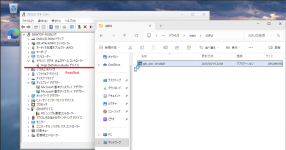
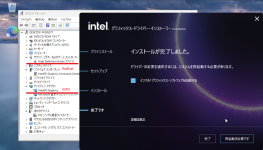
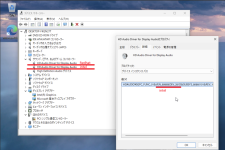
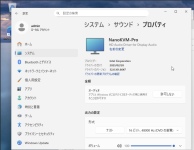
Screenshot from 2026-08-24 21-37-55.pngScreenshot from 2026-08-24 21-42-15.pngScreenshot from 2026-08-24 21-48-30.pngScreenshot from 2026-08-24 21-50-01.pngScreenshot from 2026-08-24 21-52-51.png
 
It works like this on Windows, but it might be different on Linux.

If I have time, I’ll try it on Linux too, but I’m not very familiar with Linux (especially the GUI version, which I’ve only recently started using), so I don’t think I’ll get results right away.

*Ideally, someone else would come up with the results in the meantime, though.

If you don’t mind, could you let me know which distribution you’re using?
If I'm going to try it, I'd like to try the same thing, so...

View attachment 99555View attachment 99556View attachment 99557View attachment 99558View attachment 99559
I've tried Windows before, and I also didn't have HDMI audio. It's a very simple test: boot the CachyOS live ISO. You'll either have audio or you won't when you reach the KDE desktop. What motherboard are you using with your 265K?
 
Last edited:
I'm using the Asrock Z890 Pro RS WiFi White.
As for the OS, I'll download it and give it a try.
 
It appears that the following BIOS is being used.

https://download.asrock.com/BIOS/1851/Z890 Pro RS WiFi White(3.24)ROM.zip

Code:
admin@pve1:~$ sudo dmidecode
          :
Handle 0x0000, DMI type 0, 26 bytes
BIOS Information
    Vendor: American Megatrends International, LLC.
    Version: 3.24 ★
    Release Date: 01/28/2026
    Address: 0xF0000
    Runtime Size: 64 kB
    ROM Size: 32 MB
    Characteristics:
        PCI is supported
        BIOS is upgradeable
        BIOS shadowing is allowed
        Boot from CD is supported
        Selectable boot is supported
        BIOS ROM is socketed
        EDD is supported
        ACPI is supported
        BIOS boot specification is supported
        Targeted content distribution is supported
        UEFI is supported
    BIOS Revision: 5.32

Handle 0x0001, DMI type 1, 27 bytes
System Information
    Manufacturer: ASRock
    Product Name: Z890 Pro RS WiFi White
    Version: To Be Filled By O.E.M.
    Serial Number: To Be Filled By O.E.M.
    UUID: XXXXX
    Wake-up Type: Power Switch
    SKU Number: To Be Filled By O.E.M.
    Family: To Be Filled By O.E.M.
 
It appears that the following BIOS is being used.

https://download.asrock.com/BIOS/1851/Z890 Pro RS WiFi White(3.24)ROM.zip

Code:
admin@pve1:~$ sudo dmidecode
          :
Handle 0x0000, DMI type 0, 26 bytes
BIOS Information
    Vendor: American Megatrends International, LLC.
    Version: 3.24 ★
    Release Date: 01/28/2026
    Address: 0xF0000
    Runtime Size: 64 kB
    ROM Size: 32 MB
    Characteristics:
        PCI is supported
        BIOS is upgradeable
        BIOS shadowing is allowed
        Boot from CD is supported
        Selectable boot is supported
        BIOS ROM is socketed
        EDD is supported
        ACPI is supported
        BIOS boot specification is supported
        Targeted content distribution is supported
        UEFI is supported
    BIOS Revision: 5.32

Handle 0x0001, DMI type 1, 27 bytes
System Information
    Manufacturer: ASRock
    Product Name: Z890 Pro RS WiFi White
    Version: To Be Filled By O.E.M.
    Serial Number: To Be Filled By O.E.M.
    UUID: XXXXX
    Wake-up Type: Power Switch
    SKU Number: To Be Filled By O.E.M.
    Family: To Be Filled By O.E.M.

I don't get it. My Bios is now 3.24, still no hdmi audio. I installed windows 11 and those two "HD Audio Driver for Display Audio" never show up for me. You will have audio in linux. Do you have anything special on proxmox ? custom kernel? pve-test enabled ? anything ?
 
I tried booting the LiveCD on the exact same virtual machine, and the result was the same as yours.

I'll try a few different things.

Code:
elcome to your CachyOS!
[root@CachyOS ~]# lspci
00:00.0 Host bridge: Intel Corporation 82G33/G31/P35/P31 Express DRAM Controller
00:01.0 VGA compatible controller: Device 1234:1111 (rev 02)
00:02.0 VGA compatible controller: Intel Corporation Arrow Lake-S [Intel Graphics] (rev 06) ★
00:1a.0 USB controller: Intel Corporation 82801I (ICH9 Family) USB UHCI Controller #4 (rev 03)
00:1a.1 USB controller: Intel Corporation 82801I (ICH9 Family) USB UHCI Controller #5 (rev 03)
00:1a.2 USB controller: Intel Corporation 82801I (ICH9 Family) USB UHCI Controller #6 (rev 03)
00:1a.7 USB controller: Intel Corporation 82801I (ICH9 Family) USB2 EHCI Controller #2 (rev 03)
00:1b.0 Audio device: Intel Corporation 82801I (ICH9 Family) HD Audio Controller (rev 03)
00:1c.0 PCI bridge: Red Hat, Inc. QEMU PCIe Root port
00:1c.1 PCI bridge: Red Hat, Inc. QEMU PCIe Root port
00:1c.2 PCI bridge: Red Hat, Inc. QEMU PCIe Root port
00:1c.3 PCI bridge: Red Hat, Inc. QEMU PCIe Root port
00:1d.0 USB controller: Intel Corporation 82801I (ICH9 Family) USB UHCI Controller #1 (rev 03)
00:1d.1 USB controller: Intel Corporation 82801I (ICH9 Family) USB UHCI Controller #2 (rev 03)
00:1d.2 USB controller: Intel Corporation 82801I (ICH9 Family) USB UHCI Controller #3 (rev 03)
00:1d.7 USB controller: Intel Corporation 82801I (ICH9 Family) USB2 EHCI Controller #1 (rev 03)
00:1e.0 PCI bridge: Intel Corporation 82801 PCI Bridge (rev 92)
00:1f.0 ISA bridge: Intel Corporation 82801IB (ICH9) LPC Interface Controller (rev 02)
00:1f.2 SATA controller: Intel Corporation 82801IR/IO/IH (ICH9R/DO/DH) 6 port SATA Controller [AHCI mode] (rev 02)
00:1f.3 SMBus: Intel Corporation 82801I (ICH9 Family) SMBus Controller (rev 02)
02:00.0 Audio device: Intel Corporation 800 Series Chipset Family Audio Context Engine (ACE) (rev 10) ★
05:01.0 PCI bridge: Red Hat, Inc. QEMU PCI-PCI bridge
05:02.0 PCI bridge: Red Hat, Inc. QEMU PCI-PCI bridge
05:03.0 PCI bridge: Red Hat, Inc. QEMU PCI-PCI bridge
05:04.0 PCI bridge: Red Hat, Inc. QEMU PCI-PCI bridge
06:08.0 Communication controller: Red Hat, Inc. Virtio console
06:12.0 Ethernet controller: Intel Corporation 82540EM Gigabit Ethernet Controller (rev 03)

dmesg
[root@CachyOS ~]# dmesg | grep -Ei "i915|xe|hdmi|sound|snd|codec|drm"
[    0.000000] Command line: BOOT_IMAGE=/arch/boot/x86_64/vmlinuz-linux-cachyos archisobasedir=arch archisosearchuuid=2026-08-09-15-47-03-00 cow_spacesize=10G copytoram=auto module_blacklist=pcspkr i915.modeset=1 amdgpu.modeset=1 nvme_load=yes

[    0.424562] [drm] Initialized simpledrm 1.0.0 for simple-framebuffer.0 on minor 0
[    0.427321] simple-framebuffer simple-framebuffer.0: [drm] fb0: simpledrmdrmfb frame buffer device
[    3.812851] systemd[1]: Set up automount Arbitrary Executable File Formats File System Automount Point.
[    3.909118] systemd[1]: Load Kernel Module drm skipped, unmet condition check ConditionKernelModuleLoaded=!drm
[    5.616684] bochs-drm 0000:00:01.0: vgaarb: deactivate vga console
[    5.616785] [drm] Found bochs VGA, ID 0xb0c5.
[    5.616786] [drm] Framebuffer size 16384 kB @ 0xc0000000, mmio @ 0xc260b000.
[    5.616912] bochs-drm 0000:00:01.0: [drm] Registered 1 planes with drm panic
[    5.619996] [drm] Initialized bochs-drm 1.0.0 for 0000:00:01.0 on minor 0
[    5.622601] fbcon: bochs-drmdrmfb (fb0) is primary device
[    5.656980] bochs-drm 0000:00:01.0: [drm] fb0: bochs-drmdrmfb frame buffer device
[    6.050189] i915.modeset=1 is deprecated. Please remove it and the 'nomodeset' kernel parameter instead.
[    6.050399] i915 0000:00:02.0: [drm] Found meteorlake (device ID 7d67) integrated display version 14.00 stepping D0
[    6.051110] i915 0000:00:02.0: [drm] VT-d active for gfx access
[    6.051148] i915 0000:00:02.0: [drm] Using Transparent Hugepages
[    6.074439] i915 0000:00:02.0: vgaarb: VGA decodes changed: olddecodes=io+mem,decodes=io:owns=io+mem
[    6.103776] i915 0000:00:02.0: [drm] Finished loading DMC firmware i915/mtl_dmc.bin (v2.23)
[    6.142456] snd_hda_intel 0000:00:1b.0: no codecs found!
[    6.145392] i915 0000:00:02.0: [drm] GT0: GuC firmware i915/mtl_guc_70.bin version 70.53.0
[    6.155688] i915 0000:00:02.0: [drm] GT0: GUC: submission enabled
[    6.155691] i915 0000:00:02.0: [drm] GT0: GUC: SLPC enabled
[    6.155939] i915 0000:00:02.0: [drm] GT0: GUC: RC enabled
[    6.164163] RAPL PMU: API unit is 2^-32 Joules, 0 fixed counters, 10737418240 ms ovfl timer
[    6.167264] i915 0000:00:02.0: [drm] GT1: GuC firmware i915/mtl_guc_70.bin version 70.53.0
[    6.167267] i915 0000:00:02.0: [drm] GT1: HuC firmware i915/mtl_huc_gsc.bin version 8.5.4
[    6.174470] snd_hda_codec_alc662 hdaudioC1D0: autoconfig for ALC897: line_outs=1 (0x14/0x0/0x0/0x0/0x0) type:line
[    6.174474] snd_hda_codec_alc662 hdaudioC1D0:    speaker_outs=0 (0x0/0x0/0x0/0x0/0x0)
[    6.174475] snd_hda_codec_alc662 hdaudioC1D0:    hp_outs=1 (0x1b/0x0/0x0/0x0/0x0)
[    6.174476] snd_hda_codec_alc662 hdaudioC1D0:    mono: mono_out=0x0
[    6.174477] snd_hda_codec_alc662 hdaudioC1D0:    inputs:
[    6.174478] snd_hda_codec_alc662 hdaudioC1D0:      Rear Mic=0x18
[    6.174479] snd_hda_codec_alc662 hdaudioC1D0:      Front Mic=0x19
[    6.174479] snd_hda_codec_alc662 hdaudioC1D0:      Line=0x1a
[    6.187994] i915 0000:00:02.0: [drm] GT1: HuC: authenticated for clear media
[    6.188393] i915 0000:00:02.0: [drm] GT1: GUC: submission enabled
[    6.188394] i915 0000:00:02.0: [drm] GT1: GUC: SLPC enabled
[    6.188468] i915 0000:00:02.0: [drm] GT1: GUC: RC enabled
[    6.192618] i915 0000:00:02.0: [drm] Protected Xe Path (PXP) protected content support initialized
[    6.194370] i915 0000:00:02.0: [drm] Registered 4 planes with drm panic
[    6.194373] [drm] Initialized i915 1.6.0 for 0000:00:02.0 on minor 1
[    6.196565] input: HDA Intel PCH Rear Mic as /devices/pci0000:00/0000:00:1c.1/0000:02:00.0/sound/card1/input6
[    6.196863] input: HDA Intel PCH Front Mic as /devices/pci0000:00/0000:00:1c.1/0000:02:00.0/sound/card1/input7
[    6.196882] input: HDA Intel PCH Line as /devices/pci0000:00/0000:00:1c.1/0000:02:00.0/sound/card1/input8
[    6.196900] input: HDA Intel PCH Line Out as /devices/pci0000:00/0000:00:1c.1/0000:02:00.0/sound/card1/input9
[    6.196915] input: HDA Intel PCH Front Headphone as /devices/pci0000:00/0000:00:1c.1/0000:02:00.0/sound/card1/input10
[    6.263899] i915 0000:00:02.0: [drm] Allocating fbdev: Stolen memory not preferred.
[    6.265779] i915 0000:00:02.0: [drm] fb1: i915drmfb frame buffer device
[    6.334426] i915 0000:00:02.0: [drm] GT1: Loaded GSC firmware i915/mtl_gsc_1.bin (cv1.0, r102.1.15.1926, svn 1)
[    6.354977] i915 0000:00:02.0: [drm] GT1: HuC: authenticated for all workloads
[   26.356501] i915 0000:00:02.0: [drm] *ERROR* GT1: GSC proxy component didn't bind within the expected timeout
[   26.356506] i915 0000:00:02.0: [drm] *ERROR* GT1: GSC proxy handler failed to init
 
Last edited:
I tried booting the LiveCD on the exact same virtual machine, but I got the same result.

I'll try a few different things.

Code:
elcome to your CachyOS!
[root@CachyOS ~]# lspci
00:00.0 Host bridge: Intel Corporation 82G33/G31/P35/P31 Express DRAM Controller
00:01.0 VGA compatible controller: Device 1234:1111 (rev 02)
00:02.0 VGA compatible controller: Intel Corporation Arrow Lake-S [Intel Graphics] (rev 06) ★
00:1a.0 USB controller: Intel Corporation 82801I (ICH9 Family) USB UHCI Controller #4 (rev 03)
00:1a.1 USB controller: Intel Corporation 82801I (ICH9 Family) USB UHCI Controller #5 (rev 03)
00:1a.2 USB controller: Intel Corporation 82801I (ICH9 Family) USB UHCI Controller #6 (rev 03)
00:1a.7 USB controller: Intel Corporation 82801I (ICH9 Family) USB2 EHCI Controller #2 (rev 03)
00:1b.0 Audio device: Intel Corporation 82801I (ICH9 Family) HD Audio Controller (rev 03)
00:1c.0 PCI bridge: Red Hat, Inc. QEMU PCIe Root port
00:1c.1 PCI bridge: Red Hat, Inc. QEMU PCIe Root port
00:1c.2 PCI bridge: Red Hat, Inc. QEMU PCIe Root port
00:1c.3 PCI bridge: Red Hat, Inc. QEMU PCIe Root port
00:1d.0 USB controller: Intel Corporation 82801I (ICH9 Family) USB UHCI Controller #1 (rev 03)
00:1d.1 USB controller: Intel Corporation 82801I (ICH9 Family) USB UHCI Controller #2 (rev 03)
00:1d.2 USB controller: Intel Corporation 82801I (ICH9 Family) USB UHCI Controller #3 (rev 03)
00:1d.7 USB controller: Intel Corporation 82801I (ICH9 Family) USB2 EHCI Controller #1 (rev 03)
00:1e.0 PCI bridge: Intel Corporation 82801 PCI Bridge (rev 92)
00:1f.0 ISA bridge: Intel Corporation 82801IB (ICH9) LPC Interface Controller (rev 02)
00:1f.2 SATA controller: Intel Corporation 82801IR/IO/IH (ICH9R/DO/DH) 6 port SATA Controller [AHCI mode] (rev 02)
00:1f.3 SMBus: Intel Corporation 82801I (ICH9 Family) SMBus Controller (rev 02)
02:00.0 Audio device: Intel Corporation 800 Series Chipset Family Audio Context Engine (ACE) (rev 10) ★
05:01.0 PCI bridge: Red Hat, Inc. QEMU PCI-PCI bridge
05:02.0 PCI bridge: Red Hat, Inc. QEMU PCI-PCI bridge
05:03.0 PCI bridge: Red Hat, Inc. QEMU PCI-PCI bridge
05:04.0 PCI bridge: Red Hat, Inc. QEMU PCI-PCI bridge
06:08.0 Communication controller: Red Hat, Inc. Virtio console
06:12.0 Ethernet controller: Intel Corporation 82540EM Gigabit Ethernet Controller (rev 03)

dmesg
[root@CachyOS ~]# dmesg | grep -Ei "i915|xe|hdmi|sound|snd|codec|drm"
[    0.000000] Command line: BOOT_IMAGE=/arch/boot/x86_64/vmlinuz-linux-cachyos archisobasedir=arch archisosearchuuid=2026-08-09-15-47-03-00 cow_spacesize=10G copytoram=auto module_blacklist=pcspkr i915.modeset=1 amdgpu.modeset=1 nvme_load=yes

[    0.424562] [drm] Initialized simpledrm 1.0.0 for simple-framebuffer.0 on minor 0
[    0.427321] simple-framebuffer simple-framebuffer.0: [drm] fb0: simpledrmdrmfb frame buffer device
[    3.812851] systemd[1]: Set up automount Arbitrary Executable File Formats File System Automount Point.
[    3.909118] systemd[1]: Load Kernel Module drm skipped, unmet condition check ConditionKernelModuleLoaded=!drm
[    5.616684] bochs-drm 0000:00:01.0: vgaarb: deactivate vga console
[    5.616785] [drm] Found bochs VGA, ID 0xb0c5.
[    5.616786] [drm] Framebuffer size 16384 kB @ 0xc0000000, mmio @ 0xc260b000.
[    5.616912] bochs-drm 0000:00:01.0: [drm] Registered 1 planes with drm panic
[    5.619996] [drm] Initialized bochs-drm 1.0.0 for 0000:00:01.0 on minor 0
[    5.622601] fbcon: bochs-drmdrmfb (fb0) is primary device
[    5.656980] bochs-drm 0000:00:01.0: [drm] fb0: bochs-drmdrmfb frame buffer device
[    6.050189] i915.modeset=1 is deprecated. Please remove it and the 'nomodeset' kernel parameter instead.
[    6.050399] i915 0000:00:02.0: [drm] Found meteorlake (device ID 7d67) integrated display version 14.00 stepping D0
[    6.051110] i915 0000:00:02.0: [drm] VT-d active for gfx access
[    6.051148] i915 0000:00:02.0: [drm] Using Transparent Hugepages
[    6.074439] i915 0000:00:02.0: vgaarb: VGA decodes changed: olddecodes=io+mem,decodes=io:owns=io+mem
[    6.103776] i915 0000:00:02.0: [drm] Finished loading DMC firmware i915/mtl_dmc.bin (v2.23)
[    6.142456] snd_hda_intel 0000:00:1b.0: no codecs found!
[    6.145392] i915 0000:00:02.0: [drm] GT0: GuC firmware i915/mtl_guc_70.bin version 70.53.0
[    6.155688] i915 0000:00:02.0: [drm] GT0: GUC: submission enabled
[    6.155691] i915 0000:00:02.0: [drm] GT0: GUC: SLPC enabled
[    6.155939] i915 0000:00:02.0: [drm] GT0: GUC: RC enabled
[    6.164163] RAPL PMU: API unit is 2^-32 Joules, 0 fixed counters, 10737418240 ms ovfl timer
[    6.167264] i915 0000:00:02.0: [drm] GT1: GuC firmware i915/mtl_guc_70.bin version 70.53.0
[    6.167267] i915 0000:00:02.0: [drm] GT1: HuC firmware i915/mtl_huc_gsc.bin version 8.5.4
[    6.174470] snd_hda_codec_alc662 hdaudioC1D0: autoconfig for ALC897: line_outs=1 (0x14/0x0/0x0/0x0/0x0) type:line
[    6.174474] snd_hda_codec_alc662 hdaudioC1D0:    speaker_outs=0 (0x0/0x0/0x0/0x0/0x0)
[    6.174475] snd_hda_codec_alc662 hdaudioC1D0:    hp_outs=1 (0x1b/0x0/0x0/0x0/0x0)
[    6.174476] snd_hda_codec_alc662 hdaudioC1D0:    mono: mono_out=0x0
[    6.174477] snd_hda_codec_alc662 hdaudioC1D0:    inputs:
[    6.174478] snd_hda_codec_alc662 hdaudioC1D0:      Rear Mic=0x18
[    6.174479] snd_hda_codec_alc662 hdaudioC1D0:      Front Mic=0x19
[    6.174479] snd_hda_codec_alc662 hdaudioC1D0:      Line=0x1a
[    6.187994] i915 0000:00:02.0: [drm] GT1: HuC: authenticated for clear media
[    6.188393] i915 0000:00:02.0: [drm] GT1: GUC: submission enabled
[    6.188394] i915 0000:00:02.0: [drm] GT1: GUC: SLPC enabled
[    6.188468] i915 0000:00:02.0: [drm] GT1: GUC: RC enabled
[    6.192618] i915 0000:00:02.0: [drm] Protected Xe Path (PXP) protected content support initialized
[    6.194370] i915 0000:00:02.0: [drm] Registered 4 planes with drm panic
[    6.194373] [drm] Initialized i915 1.6.0 for 0000:00:02.0 on minor 1
[    6.196565] input: HDA Intel PCH Rear Mic as /devices/pci0000:00/0000:00:1c.1/0000:02:00.0/sound/card1/input6
[    6.196863] input: HDA Intel PCH Front Mic as /devices/pci0000:00/0000:00:1c.1/0000:02:00.0/sound/card1/input7
[    6.196882] input: HDA Intel PCH Line as /devices/pci0000:00/0000:00:1c.1/0000:02:00.0/sound/card1/input8
[    6.196900] input: HDA Intel PCH Line Out as /devices/pci0000:00/0000:00:1c.1/0000:02:00.0/sound/card1/input9
[    6.196915] input: HDA Intel PCH Front Headphone as /devices/pci0000:00/0000:00:1c.1/0000:02:00.0/sound/card1/input10
[    6.263899] i915 0000:00:02.0: [drm] Allocating fbdev: Stolen memory not preferred.
[    6.265779] i915 0000:00:02.0: [drm] fb1: i915drmfb frame buffer device
[    6.334426] i915 0000:00:02.0: [drm] GT1: Loaded GSC firmware i915/mtl_gsc_1.bin (cv1.0, r102.1.15.1926, svn 1)
[    6.354977] i915 0000:00:02.0: [drm] GT1: HuC: authenticated for all workloads
[   26.356501] i915 0000:00:02.0: [drm] *ERROR* GT1: GSC proxy component didn't bind within the expected timeout
[   26.356506] i915 0000:00:02.0: [drm] *ERROR* GT1: GSC proxy handler failed to init
Sometimes it only shows up a little more bellow. Did you see any audio device on KDE ?
 
I tried switching the driver to “xe,” but it seems the same issue you're experiencing is still occurring.

Code:
Sometimes it only shows up a little more bellow. Did you see any audio device on KDE ?

There's a line through the speaker icon, and “Playback Audio” is set to “Dummy,” so playback isn't possible at all.

Code:
Welcome to your CachyOS!
                                      
[root@CachyOS ~]# dmesg | grep -Ei "i915|xe|hdmi|sound|snd|codec|drm"
[    0.000000] Command line: BOOT_IMAGE=/arch/boot/x86_64/vmlinuz-linux-cachyos archisobasedir=arch archisosearchuuid=2026-08-09-15-47-03-00 cow_spacesize=10G copytoram=auto module_blacklist=pcspkr i915.force_probe=!7d67 xe.force_probe=7d67
[    0.000000] NX (Execute Disable) protection: active
[    0.000110] MTRR map: 4 entries (2 fixed + 2 variable; max 18), built from 8 variable MTRRs
[    0.022473] Kernel command line: BOOT_IMAGE=/arch/boot/x86_64/vmlinuz-linux-cachyos archisobasedir=arch archisosearchuuid=2026-08-09-15-47-03-00 cow_spacesize=10G copytoram=auto module_blacklist=pcspkr i915.force_probe=!7d67 xe.force_probe=7d67
[    0.436021] ACPI: bus type drm_connector registered
[    0.503137] simple-framebuffer simple-framebuffer.0: [drm] Registered 1 planes with drm panic
[    0.503213] [drm] Initialized simpledrm 1.0.0 for simple-framebuffer.0 on minor 0
[    0.505970] simple-framebuffer simple-framebuffer.0: [drm] fb0: simpledrmdrmfb frame buffer device
[    3.951535] systemd[1]: Set up automount Arbitrary Executable File Formats File System Automount Point.
[    4.039481] systemd[1]: Load Kernel Module drm skipped, unmet condition check ConditionKernelModuleLoaded=!drm
[    5.681418] bochs-drm 0000:00:01.0: vgaarb: deactivate vga console
[    5.681512] [drm] Found bochs VGA, ID 0xb0c5.
[    5.681513] [drm] Framebuffer size 16384 kB @ 0xc0000000, mmio @ 0xc260b000.
[    5.681943] bochs-drm 0000:00:01.0: [drm] Registered 1 planes with drm panic
[    5.684978] [drm] Initialized bochs-drm 1.0.0 for 0000:00:01.0 on minor 0
[    5.688552] fbcon: bochs-drmdrmfb (fb0) is primary device
[    5.724257] bochs-drm 0000:00:01.0: [drm] fb0: bochs-drmdrmfb frame buffer device
[    6.159484] i915 0000:00:02.0: I915 probe blocked for Device ID 7d67.
[    6.181805] RAPL PMU: API unit is 2^-32 Joules, 0 fixed counters, 10737418240 ms ovfl timer
[    6.236210] snd_hda_intel 0000:00:1b.0: no codecs found!
[    6.500711] xe 0000:00:02.0: [drm] Found meteorlake (device ID 7d67) integrated display version 14.00 stepping D0
[    6.504710] snd_hda_codec_alc662 hdaudioC1D0: autoconfig for ALC897: line_outs=1 (0x14/0x0/0x0/0x0/0x0) type:line
[    6.504715] snd_hda_codec_alc662 hdaudioC1D0:    speaker_outs=0 (0x0/0x0/0x0/0x0/0x0)
[    6.504716] snd_hda_codec_alc662 hdaudioC1D0:    hp_outs=1 (0x1b/0x0/0x0/0x0/0x0)
[    6.504717] snd_hda_codec_alc662 hdaudioC1D0:    mono: mono_out=0x0
[    6.504719] snd_hda_codec_alc662 hdaudioC1D0:    inputs:
[    6.504720] snd_hda_codec_alc662 hdaudioC1D0:      Rear Mic=0x18
[    6.504721] snd_hda_codec_alc662 hdaudioC1D0:      Front Mic=0x19
[    6.504721] snd_hda_codec_alc662 hdaudioC1D0:      Line=0x1a
[    6.524888] xe 0000:00:02.0: vgaarb: VGA decodes changed: olddecodes=io+mem,decodes=io:owns=io+mem
[    6.533888] xe 0000:00:02.0: [drm] Finished loading DMC firmware i915/mtl_dmc.bin (v2.23)
[    6.536456] input: HDA Intel PCH Rear Mic as /devices/pci0000:00/0000:00:1c.1/0000:02:00.0/sound/card1/input9
[    6.536630] input: HDA Intel PCH Front Mic as /devices/pci0000:00/0000:00:1c.1/0000:02:00.0/sound/card1/input10
[    6.536968] input: HDA Intel PCH Line as /devices/pci0000:00/0000:00:1c.1/0000:02:00.0/sound/card1/input11
[    6.537029] input: HDA Intel PCH Line Out as /devices/pci0000:00/0000:00:1c.1/0000:02:00.0/sound/card1/input12
[    6.537052] input: HDA Intel PCH Front Headphone as /devices/pci0000:00/0000:00:1c.1/0000:02:00.0/sound/card1/input13
[    6.539397] xe 0000:00:02.0: [drm] Tile0: GT0: Using GuC firmware from i915/mtl_guc_70.bin version 70.53.0
[    6.716771] xe 0000:00:02.0: [drm] Tile0: GT1: Using GuC firmware from i915/mtl_guc_70.bin version 70.53.0
[    6.720375] xe 0000:00:02.0: [drm] Tile0: GT1: Using HuC firmware from i915/mtl_huc_gsc.bin version 8.5.4
[    6.722312] xe 0000:00:02.0: [drm] Tile0: GT1: Using GSC firmware from i915/mtl_gsc_1.bin version 102.1.15.1926
[    6.744195] xe 0000:00:02.0: [drm] Tile0: GT1: vcs1 fused off
[    6.744198] xe 0000:00:02.0: [drm] Tile0: GT1: vcs3 fused off
[    6.744199] xe 0000:00:02.0: [drm] Tile0: GT1: vcs4 fused off
[    6.744199] xe 0000:00:02.0: [drm] Tile0: GT1: vcs5 fused off
[    6.744200] xe 0000:00:02.0: [drm] Tile0: GT1: vcs6 fused off
[    6.744200] xe 0000:00:02.0: [drm] Tile0: GT1: vcs7 fused off
[    6.744201] xe 0000:00:02.0: [drm] Tile0: GT1: vecs1 fused off
[    6.744202] xe 0000:00:02.0: [drm] Tile0: GT1: vecs2 fused off
[    6.744202] xe 0000:00:02.0: [drm] Tile0: GT1: vecs3 fused off
[    6.806594] xe 0000:00:02.0: [drm] Registered 4 planes with drm panic
[    6.806599] [drm] Initialized xe 1.1.0 for 0000:00:02.0 on minor 1
[    6.843197] xe 0000:00:02.0: [drm] Allocated fbdev into stolen
[    6.843920] xe 0000:00:02.0: [drm] fb1: xedrmfb frame buffer device
[    6.938500] xe 0000:00:02.0: [drm] Tile0: GT1: found GSC cv102.1.0
[   27.757982] xe 0000:00:02.0: [drm] *ERROR* Tile0: GT1: GSC proxy component not bound!

I think the issue described below—which appears in both cases—is the problem, but I couldn't figure out how to fix it...

Code:
[   26.356501] i915 0000:00:02.0: [drm] *ERROR* GT1: GSC proxy component didn't bind within the expected timeout
[   26.356506] i915 0000:00:02.0: [drm] *ERROR* GT1: GSC proxy handler failed to init
or
[   27.757982] xe 0000:00:02.0: [drm] *ERROR* Tile0: GT1: GSC proxy component not bound!

Since this is what is displayed on the physical machine, we believe the above error is the cause of the problem.

Code:
[    4.317712] i915 0000:00:02.0: [drm] GT1: Loaded GSC firmware i915/mtl_gsc_1.bin (cv1.0, r102.1.15.1926, svn 1)
[    4.338346] i915 0000:00:02.0: [drm] GT1: HuC: authenticated for all workloads

[    8.412532] snd_hda_intel 0000:80:1f.3: enabling device (0000 -> 0002) ★ 
[    8.412635] snd_hda_intel 0000:80:1f.3: bound 0000:00:02.0 (ops intel_audio_component_bind_ops [i915]) ★ It looks like the GPU and audio are bound together.

[    8.545380] input: HDA Intel PCH Rear Mic as /devices/pci0000:80/0000:80:1f.3/sound/card2/input21
[    8.545537] input: HDA Intel PCH Front Mic as /devices/pci0000:80/0000:80:1f.3/sound/card2/input22
[    8.545672] input: HDA Intel PCH Line as /devices/pci0000:80/0000:80:1f.3/sound/card2/input23
[    8.545803] input: HDA Intel PCH Line Out as /devices/pci0000:80/0000:80:1f.3/sound/card2/input24
[    8.545929] input: HDA Intel PCH Front Headphone as /devices/pci0000:80/0000:80:1f.3/sound/card2/input25
[    8.546053] input: HDA Intel PCH HDMI/DP,pcm=3 as /devices/pci0000:80/0000:80:1f.3/sound/card2/input26
[    8.546181] input: HDA Intel PCH HDMI/DP,pcm=7 as /devices/pci0000:80/0000:80:1f.3/sound/card2/input27
[    8.546202] input: HDA Intel PCH HDMI/DP,pcm=8 as /devices/pci0000:80/0000:80:1f.3/sound/card2/input28
[    8.546473] input: HDA Intel PCH HDMI/DP,pcm=9 as /devices/pci0000:80/0000:80:1f.3/sound/card2/input29

We can provide any type of Windows-related configuration.
 
Last edited:
I tried switching the driver to “xe,” but it seems the same issue you're experiencing is still occurring.

Code:
Sometimes it only shows up a little more bellow. Did you see any audio device on KDE ?

There's a line through the speaker icon, and “Playback Audio” is set to “Dummy,” so playback isn't possible at all.

Code:
Welcome to your CachyOS!
                                       
[root@CachyOS ~]# dmesg | grep -Ei "i915|xe|hdmi|sound|snd|codec|drm"
[    0.000000] Command line: BOOT_IMAGE=/arch/boot/x86_64/vmlinuz-linux-cachyos archisobasedir=arch archisosearchuuid=2026-08-09-15-47-03-00 cow_spacesize=10G copytoram=auto module_blacklist=pcspkr i915.force_probe=!7d67 xe.force_probe=7d67
[    0.000000] NX (Execute Disable) protection: active
[    0.000110] MTRR map: 4 entries (2 fixed + 2 variable; max 18), built from 8 variable MTRRs
[    0.022473] Kernel command line: BOOT_IMAGE=/arch/boot/x86_64/vmlinuz-linux-cachyos archisobasedir=arch archisosearchuuid=2026-08-09-15-47-03-00 cow_spacesize=10G copytoram=auto module_blacklist=pcspkr i915.force_probe=!7d67 xe.force_probe=7d67
[    0.436021] ACPI: bus type drm_connector registered
[    0.503137] simple-framebuffer simple-framebuffer.0: [drm] Registered 1 planes with drm panic
[    0.503213] [drm] Initialized simpledrm 1.0.0 for simple-framebuffer.0 on minor 0
[    0.505970] simple-framebuffer simple-framebuffer.0: [drm] fb0: simpledrmdrmfb frame buffer device
[    3.951535] systemd[1]: Set up automount Arbitrary Executable File Formats File System Automount Point.
[    4.039481] systemd[1]: Load Kernel Module drm skipped, unmet condition check ConditionKernelModuleLoaded=!drm
[    5.681418] bochs-drm 0000:00:01.0: vgaarb: deactivate vga console
[    5.681512] [drm] Found bochs VGA, ID 0xb0c5.
[    5.681513] [drm] Framebuffer size 16384 kB @ 0xc0000000, mmio @ 0xc260b000.
[    5.681943] bochs-drm 0000:00:01.0: [drm] Registered 1 planes with drm panic
[    5.684978] [drm] Initialized bochs-drm 1.0.0 for 0000:00:01.0 on minor 0
[    5.688552] fbcon: bochs-drmdrmfb (fb0) is primary device
[    5.724257] bochs-drm 0000:00:01.0: [drm] fb0: bochs-drmdrmfb frame buffer device
[    6.159484] i915 0000:00:02.0: I915 probe blocked for Device ID 7d67.
[    6.181805] RAPL PMU: API unit is 2^-32 Joules, 0 fixed counters, 10737418240 ms ovfl timer
[    6.236210] snd_hda_intel 0000:00:1b.0: no codecs found!
[    6.500711] xe 0000:00:02.0: [drm] Found meteorlake (device ID 7d67) integrated display version 14.00 stepping D0
[    6.504710] snd_hda_codec_alc662 hdaudioC1D0: autoconfig for ALC897: line_outs=1 (0x14/0x0/0x0/0x0/0x0) type:line
[    6.504715] snd_hda_codec_alc662 hdaudioC1D0:    speaker_outs=0 (0x0/0x0/0x0/0x0/0x0)
[    6.504716] snd_hda_codec_alc662 hdaudioC1D0:    hp_outs=1 (0x1b/0x0/0x0/0x0/0x0)
[    6.504717] snd_hda_codec_alc662 hdaudioC1D0:    mono: mono_out=0x0
[    6.504719] snd_hda_codec_alc662 hdaudioC1D0:    inputs:
[    6.504720] snd_hda_codec_alc662 hdaudioC1D0:      Rear Mic=0x18
[    6.504721] snd_hda_codec_alc662 hdaudioC1D0:      Front Mic=0x19
[    6.504721] snd_hda_codec_alc662 hdaudioC1D0:      Line=0x1a
[    6.524888] xe 0000:00:02.0: vgaarb: VGA decodes changed: olddecodes=io+mem,decodes=io:owns=io+mem
[    6.533888] xe 0000:00:02.0: [drm] Finished loading DMC firmware i915/mtl_dmc.bin (v2.23)
[    6.536456] input: HDA Intel PCH Rear Mic as /devices/pci0000:00/0000:00:1c.1/0000:02:00.0/sound/card1/input9
[    6.536630] input: HDA Intel PCH Front Mic as /devices/pci0000:00/0000:00:1c.1/0000:02:00.0/sound/card1/input10
[    6.536968] input: HDA Intel PCH Line as /devices/pci0000:00/0000:00:1c.1/0000:02:00.0/sound/card1/input11
[    6.537029] input: HDA Intel PCH Line Out as /devices/pci0000:00/0000:00:1c.1/0000:02:00.0/sound/card1/input12
[    6.537052] input: HDA Intel PCH Front Headphone as /devices/pci0000:00/0000:00:1c.1/0000:02:00.0/sound/card1/input13
[    6.539397] xe 0000:00:02.0: [drm] Tile0: GT0: Using GuC firmware from i915/mtl_guc_70.bin version 70.53.0
[    6.716771] xe 0000:00:02.0: [drm] Tile0: GT1: Using GuC firmware from i915/mtl_guc_70.bin version 70.53.0
[    6.720375] xe 0000:00:02.0: [drm] Tile0: GT1: Using HuC firmware from i915/mtl_huc_gsc.bin version 8.5.4
[    6.722312] xe 0000:00:02.0: [drm] Tile0: GT1: Using GSC firmware from i915/mtl_gsc_1.bin version 102.1.15.1926
[    6.744195] xe 0000:00:02.0: [drm] Tile0: GT1: vcs1 fused off
[    6.744198] xe 0000:00:02.0: [drm] Tile0: GT1: vcs3 fused off
[    6.744199] xe 0000:00:02.0: [drm] Tile0: GT1: vcs4 fused off
[    6.744199] xe 0000:00:02.0: [drm] Tile0: GT1: vcs5 fused off
[    6.744200] xe 0000:00:02.0: [drm] Tile0: GT1: vcs6 fused off
[    6.744200] xe 0000:00:02.0: [drm] Tile0: GT1: vcs7 fused off
[    6.744201] xe 0000:00:02.0: [drm] Tile0: GT1: vecs1 fused off
[    6.744202] xe 0000:00:02.0: [drm] Tile0: GT1: vecs2 fused off
[    6.744202] xe 0000:00:02.0: [drm] Tile0: GT1: vecs3 fused off
[    6.806594] xe 0000:00:02.0: [drm] Registered 4 planes with drm panic
[    6.806599] [drm] Initialized xe 1.1.0 for 0000:00:02.0 on minor 1
[    6.843197] xe 0000:00:02.0: [drm] Allocated fbdev into stolen
[    6.843920] xe 0000:00:02.0: [drm] fb1: xedrmfb frame buffer device
[    6.938500] xe 0000:00:02.0: [drm] Tile0: GT1: found GSC cv102.1.0
[   27.757982] xe 0000:00:02.0: [drm] *ERROR* Tile0: GT1: GSC proxy component not bound!

I think the issue described below—which appears in both cases—is the problem, but I couldn't figure out how to fix it...

Code:
[   27.757982] xe 0000:00:02.0: [drm] *ERROR* Tile0: GT1: GSC proxy component not bound!

Since this is what is displayed on the physical machine, we believe the above error is the cause of the problem.

Code:
[    4.317712] i915 0000:00:02.0: [drm] GT1: Loaded GSC firmware i915/mtl_gsc_1.bin (cv1.0, r102.1.15.1926, svn 1)
[    4.338346] i915 0000:00:02.0: [drm] GT1: HuC: authenticated for all workloads

[    8.412532] snd_hda_intel 0000:80:1f.3: enabling device (0000 -> 0002)
[    8.412635] snd_hda_intel 0000:80:1f.3: bound 0000:00:02.0 (ops intel_audio_component_bind_ops [i915])

[    8.545380] input: HDA Intel PCH Rear Mic as /devices/pci0000:80/0000:80:1f.3/sound/card2/input21
[    8.545537] input: HDA Intel PCH Front Mic as /devices/pci0000:80/0000:80:1f.3/sound/card2/input22
[    8.545672] input: HDA Intel PCH Line as /devices/pci0000:80/0000:80:1f.3/sound/card2/input23
[    8.545803] input: HDA Intel PCH Line Out as /devices/pci0000:80/0000:80:1f.3/sound/card2/input24
[    8.545929] input: HDA Intel PCH Front Headphone as /devices/pci0000:80/0000:80:1f.3/sound/card2/input25
[    8.546053] input: HDA Intel PCH HDMI/DP,pcm=3 as /devices/pci0000:80/0000:80:1f.3/sound/card2/input26
[    8.546181] input: HDA Intel PCH HDMI/DP,pcm=7 as /devices/pci0000:80/0000:80:1f.3/sound/card2/input27
[    8.546202] input: HDA Intel PCH HDMI/DP,pcm=8 as /devices/pci0000:80/0000:80:1f.3/sound/card2/input28
[    8.546473] input: HDA Intel PCH HDMI/DP,pcm=9 as /devices/pci0000:80/0000:80:1f.3/sound/card2/input29

We can provide any type of Windows-related configuration.
Yeah, pretty much what I see. Do you still have audio in windows 11? I don't. I was never able to see the hdmi audio devices on the device manager.
 
I accidentally deleted the disk from the virtual machine I was testing a moment ago, so please give me a moment.
On the N100 I use separately, Windows 11 works with HDMI audio using the same procedure, and since the display is the same, I think the sound should work.

Code:
qm set 628 -args '-set device.hostpci0.bus=pcie.0 -set device.hostpci0.addr=0x02.0 -set device.hostpci0.x-igd-gms=0x0 -set device.hostpci0.x-igd-opregion=on'
qm set 628 -hostpci0 0000:00:02.0,pcie=1,romfile=12-n100-q10.rom
qm set 628 -hostpci1 0000:00:1f.3,pcie=1
qm set 628 -cpu host,hidden=1,flags=+pdpe1gb
qm set 628 -bios ovmf
qm set 628 -machine pc-q35-9.2+pve1

nano /var/lib/vz/snippets/intel_igpu_reset.sh

---
#!/bin/bash
phase="$2"
echo "Phase is $phase"
if [ "$phase" == "pre-start" ]; then
    # Unbind gpu from i915
    echo "0000:00:02.0" > /sys/bus/pci/drivers/i915/unbind 2>/dev/null
    sleep 5
elif [ "$phase" == "post-stop" ]; then
    # Unbind gpu from vfio-pci
    sleep 5
    echo "0000:00:02.0" > /sys/bus/pci/drivers/vfio-pci/unbind 2>/dev/null
    sleep 2
    # Bind i915
    echo "0000:00:02.0" > /sys/bus/pci/drivers/i915/bind 2>/dev/null
    sleep 2
fi
---

chmod +x /var/lib/vz/snippets/intel_igpu_reset.sh
qm set 629 -hookscript local:snippets/intel_igpu_reset.sh

Excerpt from the May backup

Code:
agent: 1
args: -cpu host,migratable=off,hv_passthrough,-hypervisor,hv-vendor-id=0123456789AB,level=30,+vmx,invtsc=on,guest-phys-bits=39 -global intel-iommu.aw-bits=39 -set device.hostpci0.bus=pcie.0 -set device.hostpci0.addr=0x02.0 -set device.hostpci0.x-igd-gms=0x2 -set device.hostpci0.x-igd-opregion=on
balloon: 0
bios: ovmf
boot: order=ide0;ide2
cores: 4
cpu: host,hidden=1,flags=+pdpe1gb
efidisk0: nvme_Thin:vm-629-disk-0,efitype=4m,size=4M
hookscript: local:snippets/intel_igpu_reset.sh
hostpci0: 0000:00:02.0,pcie=1,romfile=12-n100-q10.rom
hostpci1: 0000:00:1f.3,pcie=1
ide0: none,media=cdrom
ide2: none,media=cdrom
machine: pc-q35-9.2+pve1
memory: 8192
meta: creation-qemu=9.0.0,ctime=1719914219
name: w11
net0: e1000e=BC:24:11:F5:A3:4C,bridge=vmbr0,firewall=1,queues=4
numa: 0
ostype: win11
parent: temp
scsi0: nvme_Thin:vm-629-disk-1,iothread=1,size=64G,ssd=1
scsihw: virtio-scsi-single
smbios1:
sockets: 1
tags: w11
tpmstate0: nvme_Thin:vm-629-disk-2,size=4M,version=v2.0
usb0: host=3-5
vga: none

 
Last edited:
I accidentally deleted the disk from the virtual machine I was testing a moment ago, so please give me a moment.
On the N100 I use separately, Windows 11 works with HDMI audio using the same procedure, and since the display is the same, I think the sound should work.

Code:
qm set 628 -args '-set device.hostpci0.bus=pcie.0 -set device.hostpci0.addr=0x02.0 -set device.hostpci0.x-igd-gms=0x0 -set device.hostpci0.x-igd-opregion=on'
qm set 628 -hostpci0 0000:00:02.0,pcie=1,romfile=12-n100-q10.rom
qm set 628 -hostpci1 0000:00:1f.3,pcie=1
qm set 628 -cpu host,hidden=1,flags=+pdpe1gb
qm set 628 -bios ovmf
qm set 628 -machine pc-q35-9.2+pve1

nano /var/lib/vz/snippets/intel_igpu_reset.sh

---
#!/bin/bash
phase="$2"
echo "Phase is $phase"
if [ "$phase" == "pre-start" ]; then
    # Unbind gpu from i915
    echo "0000:00:02.0" > /sys/bus/pci/drivers/i915/unbind 2>/dev/null
    sleep 5
elif [ "$phase" == "post-stop" ]; then
    # Unbind gpu from vfio-pci
    sleep 5
    echo "0000:00:02.0" > /sys/bus/pci/drivers/vfio-pci/unbind 2>/dev/null
    sleep 2
    # Bind i915
    echo "0000:00:02.0" > /sys/bus/pci/drivers/i915/bind 2>/dev/null
    sleep 2
fi
---

chmod +x /var/lib/vz/snippets/intel_igpu_reset.sh
qm set 629 -hookscript local:snippets/intel_igpu_reset.sh
Same over here. I always had hdmi audio working on previous intel cpu/igpu. On this 245k I don't either on windows or linux.
 
I tried reinstalling it in PVE using the 265k.

It appears that the audio is playing fine via HDMI.

Code:
Package List

proxmox-ve: 9.2.0 (running kernel: 7.0.14-14-pve)
pve-manager: 9.2.11 (running version: 9.2.11/f6997e698c7933ea)
proxmox-kernel-helper: 9.2.0
proxmox-kernel-7.0: 7.0.14-14
proxmox-kernel-7.0.14-14-pve-signed: 7.0.14-14
proxmox-kernel-7.0.14-13-pve-signed: 7.0.14-13
proxmox-kernel-7.0.14-12-pve-signed: 7.0.14-12
proxmox-kernel-7.0.14-11-pve-signed: 7.0.14-11
proxmox-kernel-7.0.14-9-pve-signed: 7.0.14-9
proxmox-kernel-7.0.14-8-pve-signed: 7.0.14-8
ceph-fuse: 19.2.3-pve2
corosync: 3.1.10-pve3
criu: 4.1.1-1
frr-pythontools: 10.6.1-1+pve3
ifupdown2: 3.3.0-1+pmx12
intel-microcode: 3.20251111.1~deb13u1
ksm-control-daemon: 1.5-1
libjs-extjs: 7.0.0-7
libproxmox-acme-perl: 1.7.2
libproxmox-backup-qemu0: 2.0.2
libproxmox-rs-perl: 0.4.1
libpve-access-control: 9.1.1
libpve-apiclient-perl: 3.4.2
libpve-cluster-api-perl: 9.1.6
libpve-cluster-perl: 9.1.6
libpve-common-perl: 9.2.1
libpve-guest-common-perl: 6.0.5
libpve-http-server-perl: 6.0.5
libpve-network-perl: 1.6.7
libpve-notify-perl: 9.1.6
libpve-rs-perl: 0.15.3
libpve-storage-perl: 9.1.9
libspice-server1: 0.15.2-1+b1
lvm2: 2.03.31-2+pmx1
lxc-pve: 7.0.0-2
lxcfs: 7.0.0-pve1
novnc-pve: 1.7.0-2
openvswitch-switch: 3.5.0-1+b1
proxmox-backup-client: 4.2.5-1
proxmox-backup-file-restore: 4.2.5-1
proxmox-backup-restore-image: 1.0.0
proxmox-enterprise-support-keyring: 1.1
proxmox-firewall: 1.2.3
proxmox-kernel-helper: 9.2.0
proxmox-mail-forward: 1.0.3
proxmox-mini-journalreader: 1.7
proxmox-offline-mirror-helper: 0.7.4
proxmox-widget-toolkit: 5.2.8
pve-cluster: 9.1.6
pve-container: 6.1.13
pve-docs: 9.2.4
pve-edk2-firmware: 4.2025.05-3
pve-esxi-import-tools: 1.0.1
pve-firewall: 6.0.5
pve-firmware: 3.18-6
pve-ha-manager: 5.2.5
pve-i18n: 3.10.0
pve-qemu-kvm: 11.0.3-2
pve-xtermjs: 6.0.0-2
qemu-server: 9.2.6
smartmontools: 7.5-pve2
spiceterm: 3.4.2
swtpm: 0.8.0+pve3
vncterm: 1.9.2
zfsutils-linux: 2.4.4-pve1

vm config

affinity: 8-19
agent: 1
allow-ksm: 0
args: -set device.hostpci0.bus=pcie.0 -set device.hostpci0.addr=0x02.0 -set device.hostpci0.x-igd-gms=0x0 -set device.hostpci0.x-igd-opregion=on
balloon: 0
bios: ovmf
boot: order=ide0;ide2
cores: 4
cpu: host
efidisk0: zfs_husmm3280ass201:vm-929-disk-0,efitype=4m,pre-enrolled-keys=1,size=1M
hostpci0: 0000:00:02.0,pcie=1,romfile=6-14-qemu10.rom
hostpci1: 0000:80:1f.3,pcie=1
ide0: none,media=cdrom
ide2: none,media=cdrom
machine: pc-q35-9.2+pve1
memory: 8192
meta: creation-qemu=9.0.0,ctime=1719914219
name: w11-igpu
net0: e1000=BC:24:11:7C:06:2E,bridge=vmbr0,firewall=1,link_down=1
numa: 0
ostype: win11
scsi0: zfs_husmm3280ass201:vm-929-disk-1,iothread=1,size=64G,ssd=1
scsihw: virtio-scsi-single
smbios1:
sockets: 1
tags: default
usb0: host=1d6b:0104
vmgenid:

PVE host setting

sed -i '1s/$/ quiet iommu=pt split_lock_detect=off/g' /etc/kernel/cmdline
sed -i '/GRUB_CMDLINE_LINUX_DEFAULT=/c GRUB_CMDLINE_LINUX_DEFAULT="quiet iommu=pt split_lock_detect=off"' /etc/default/grub
cat << EOF > /etc/modules
vfio
vfio_iommu_type1
vfio_pci
nct6683
coretemp
EOF
echo "options kvm ignore_msrs=1 report_ignored_msrs=0" > /etc/modprobe.d/kvm.conf
echo "options kvm-intel nested=Y" > /etc/modprobe.d/kvm-intel.conf
echo "options nct6683 force=1" > /etc/modprobe.d/nct6686d.conf
 
Last edited:
If there are any differences in PVE and virtual machine settings, I think they’re limited to the version of Windows OS, the drivers being used, and… probably just the monitor.

Just to be sure, please let me check your VM.conf file and the results of running the following command.

Code:
cat /etc/kernel/cmdline
cat /etc/default/grub
cat /etc/modprobe.d/*
cat /etc/pve/qemu-server/<vmid>.conf

・I’m using Windows 11 25H2 Enterprise Evaluation—which version are you using?
・I’m using the gfx_win_101.6647 driver—which driver are you using?
・I’m using the pikvm monitor (with HDMI audio enabled)—which monitor are you using?
 
If there are any differences in PVE and virtual machine settings, I think they’re limited to the version of Windows OS, the drivers being used, and… probably just the monitor.

Just to be sure, please let me check your VM.conf file and the results of running the following command.

Code:
cat /etc/kernel/cmdline
cat /etc/default/grub
cat /etc/modprobe.d/*
cat /etc/pve/qemu-server/<vmid>.conf

・I’m using Windows 11 25H2 Enterprise Evaluation—which version are you using?
・I’m using the gfx_win_101.6647 driver—which driver are you using?
・I’m using the pikvm monitor (with HDMI audio enabled)—which monitor are you using?
Thank you but I won't use windows, I'll wait for a solution in the future, hopefully.
Even so I did try using your gfx_win_101.6647 driver, same result.
Kernel cmd is untouched from stock. I tried i440 and q35 and all the args related to intel igpu. No audio on VMs, I only have hdmi audio with bare metal.

I'm gonna give up for now.