Intel 245k iGPU passthrough - no hdmi audio

adolfotregosa

Well-Known Member
Jan 8, 2019
53
15
48
43
Did anyone manage to get HDMI audio working using a similar CPU/iGPU? Yes, I have both the iGPU and audio device passed through to the VM. Inside the VM, I can see in dmesg that when snd_hda_intel maps everything, the HDMI/DP ports are missing, only the analog audio shows up. I remember in the past having to give the audio device a romfile as well, but as far as I know, there's none available for Ultra CPUs.

Thank you.
 
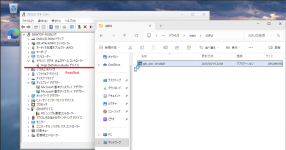
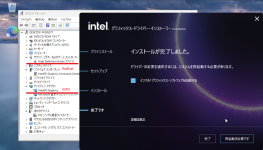
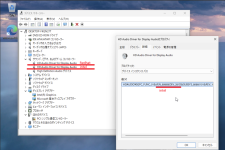
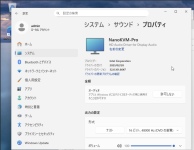
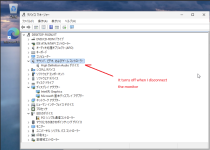
I'm using an Intel Core Ultra 265k, and I tested this on Windows 11.

It appears that the HDMI audio device isn't displayed when no monitor is connected to the HDMI port, but I've confirmed that it does appear once a monitor is connected.

Code:
mv 6-14-qemu10.rom /usr/share/kvm/

qm set 929 -args '-set device.hostpci0.bus=pcie.0 -set device.hostpci0.addr=0x02.0 -set device.hostpci0.x-igd-gms=0x0 -set device.hostpci0.x-igd-opregion=on'
qm set 929 -hostpci0 0000:00:02.0,pcie=1,romfile=6-14-qemu10.rom
qm set 929 -hostpci1 0000:80:1f.3,pcie=1
qm set 929 -cpu host
qm set 929 -bios ovmf
qm set 929 -machine pc-q35-9.2+pve1
 
I'm using an Intel Core Ultra 265k, and I tested this on Windows 11.

It appears that the HDMI audio device isn't displayed when no monitor is connected to the HDMI port, but I've confirmed that it does appear once a monitor is connected.

Code:
mv 6-14-qemu10.rom /usr/share/kvm/

qm set 929 -args '-set device.hostpci0.bus=pcie.0 -set device.hostpci0.addr=0x02.0 -set device.hostpci0.x-igd-gms=0x0 -set device.hostpci0.x-igd-opregion=on'
qm set 929 -hostpci0 0000:00:02.0,pcie=1,romfile=6-14-qemu10.rom
qm set 929 -hostpci1 0000:80:1f.3,pcie=1
qm set 929 -cpu host
qm set 929 -bios ovmf
qm set 929 -machine pc-q35-9.2+pve1
Interesting. You are using 6-14-qemu10.rom and not ultra-1-2-qemu10.rom
Let me try it out.
 
@uzumo Unfortunately no hdmi audio but hdmi display works with 6-14-qemu.rom, ok.. lol

HDMI audio output is missing on the VM.

Code:
[    7.272508] snd_hda_codec_alc662 hdaudioC1D0: autoconfig for ALC897: line_outs=1 (0x14/0x0/0x0/0x0/0x0) type:line
[    7.272510] snd_hda_codec_alc662 hdaudioC1D0:    speaker_outs=0 (0x0/0x0/0x0/0x0/0x0)
[    7.272511] snd_hda_codec_alc662 hdaudioC1D0:    hp_outs=1 (0x1b/0x0/0x0/0x0/0x0)
[    7.272511] snd_hda_codec_alc662 hdaudioC1D0:    mono: mono_out=0x0
[    7.272512] snd_hda_codec_alc662 hdaudioC1D0:    inputs:
[    7.272512] snd_hda_codec_alc662 hdaudioC1D0:      Rear Mic=0x18
[    7.272513] snd_hda_codec_alc662 hdaudioC1D0:      Front Mic=0x19
[    7.272514] snd_hda_codec_alc662 hdaudioC1D0:      Line=0x1a
[    7.277346] i915 0000:00:02.0: [drm] GT1: Loaded GSC firmware i915/mtl_gsc_1.bin (cv1.0, r102.1.15.1926, svn 1)
[    7.295956] input: HDA Intel PCH Rear Mic as /devices/pci0000:00/0000:00:1c.1/0000:02:00.0/sound/card1/input6
[    7.295979] input: HDA Intel PCH Front Mic as /devices/pci0000:00/0000:00:1c.1/0000:02:00.0/sound/card1/input7
[    7.295998] input: HDA Intel PCH Line as /devices/pci0000:00/0000:00:1c.1/0000:02:00.0/sound/card1/input8
[    7.296013] input: HDA Intel PCH Line Out as /devices/pci0000:00/0000:00:1c.1/0000:02:00.0/sound/card1/input9
[    7.296028] input: HDA Intel PCH Front Headphone as /devices/pci0000:00/0000:00:1c.1/0000:02:00.0/sound/card1/input10

whereas on the host I have four HDA Intel PCH HDMI/DP:

Code:
[    2.381304] snd_hda_codec_alc662 hdaudioC0D0: autoconfig for ALC897: line_outs=1 (0x14/0x0/0x0/0x0/0x0) type:line
[    2.381307] snd_hda_codec_alc662 hdaudioC0D0:    speaker_outs=0 (0x0/0x0/0x0/0x0/0x0)
[    2.381308] snd_hda_codec_alc662 hdaudioC0D0:    hp_outs=1 (0x1b/0x0/0x0/0x0/0x0)
[    2.381309] snd_hda_codec_alc662 hdaudioC0D0:    mono: mono_out=0x0
[    2.381310] snd_hda_codec_alc662 hdaudioC0D0:    inputs:
[    2.381311] snd_hda_codec_alc662 hdaudioC0D0:      Rear Mic=0x18
[    2.381311] snd_hda_codec_alc662 hdaudioC0D0:      Front Mic=0x19
[    2.381312] snd_hda_codec_alc662 hdaudioC0D0:      Line=0x1a
[    2.391180] fbcon: i915drmfb (fb0) is primary device
[    2.428315] input: HDA Intel PCH Rear Mic as /devices/pci0000:80/0000:80:1f.3/sound/card0/input11
[    2.428344] input: HDA Intel PCH Front Mic as /devices/pci0000:80/0000:80:1f.3/sound/card0/input12
[    2.428707] input: HDA Intel PCH Line as /devices/pci0000:80/0000:80:1f.3/sound/card0/input13
[    2.428726] input: HDA Intel PCH Line Out as /devices/pci0000:80/0000:80:1f.3/sound/card0/input14
[    2.428744] input: HDA Intel PCH Front Headphone as /devices/pci0000:80/0000:80:1f.3/sound/card0/input15
[    2.428765] input: HDA Intel PCH HDMI/DP,pcm=3 as /devices/pci0000:80/0000:80:1f.3/sound/card0/input16
[    2.428801] input: HDA Intel PCH HDMI/DP,pcm=7 as /devices/pci0000:80/0000:80:1f.3/sound/card0/input17
[    2.428865] input: HDA Intel PCH HDMI/DP,pcm=8 as /devices/pci0000:80/0000:80:1f.3/sound/card0/input18
[    2.429055] input: HDA Intel PCH HDMI/DP,pcm=9 as /devices/pci0000:80/0000:80:1f.3/sound/card0/input19
 
It works like this on Windows, but it might be different on Linux.

If I have time, I’ll try it on Linux too, but I’m not very familiar with Linux (especially the GUI version, which I’ve only recently started using), so I don’t think I’ll get results right away.

*Ideally, someone else would come up with the results in the meantime, though.

If you don’t mind, could you let me know which distribution you’re using?
If I'm going to try it, I'd like to try the same thing, so...

Screenshot from 2026-08-24 21-37-55.pngScreenshot from 2026-08-24 21-42-15.pngScreenshot from 2026-08-24 21-48-30.pngScreenshot from 2026-08-24 21-50-01.pngScreenshot from 2026-08-24 21-52-51.png
 
It works like this on Windows, but it might be different on Linux.

If I have time, I’ll try it on Linux too, but I’m not very familiar with Linux (especially the GUI version, which I’ve only recently started using), so I don’t think I’ll get results right away.

*Ideally, someone else would come up with the results in the meantime, though.

If you don’t mind, could you let me know which distribution you’re using?
If I'm going to try it, I'd like to try the same thing, so...

View attachment 99555View attachment 99556View attachment 99557View attachment 99558View attachment 99559
I've tried Windows before, and I also didn't have HDMI audio. It's a very simple test: boot the CachyOS live ISO. You'll either have audio or you won't when you reach the KDE desktop. What motherboard are you using with your 265K?
 
Last edited:
I'm using the Asrock Z890 Pro RS WiFi White.
As for the OS, I'll download it and give it a try.
 
It appears that the following BIOS is being used.

https://download.asrock.com/BIOS/1851/Z890 Pro RS WiFi White(3.24)ROM.zip

Code:
admin@pve1:~$ sudo dmidecode
          :
Handle 0x0000, DMI type 0, 26 bytes
BIOS Information
    Vendor: American Megatrends International, LLC.
    Version: 3.24 ★
    Release Date: 01/28/2026
    Address: 0xF0000
    Runtime Size: 64 kB
    ROM Size: 32 MB
    Characteristics:
        PCI is supported
        BIOS is upgradeable
        BIOS shadowing is allowed
        Boot from CD is supported
        Selectable boot is supported
        BIOS ROM is socketed
        EDD is supported
        ACPI is supported
        BIOS boot specification is supported
        Targeted content distribution is supported
        UEFI is supported
    BIOS Revision: 5.32

Handle 0x0001, DMI type 1, 27 bytes
System Information
    Manufacturer: ASRock
    Product Name: Z890 Pro RS WiFi White
    Version: To Be Filled By O.E.M.
    Serial Number: To Be Filled By O.E.M.
    UUID: XXXXX
    Wake-up Type: Power Switch
    SKU Number: To Be Filled By O.E.M.
    Family: To Be Filled By O.E.M.
 
It appears that the following BIOS is being used.

https://download.asrock.com/BIOS/1851/Z890 Pro RS WiFi White(3.24)ROM.zip

Code:
admin@pve1:~$ sudo dmidecode
          :
Handle 0x0000, DMI type 0, 26 bytes
BIOS Information
    Vendor: American Megatrends International, LLC.
    Version: 3.24 ★
    Release Date: 01/28/2026
    Address: 0xF0000
    Runtime Size: 64 kB
    ROM Size: 32 MB
    Characteristics:
        PCI is supported
        BIOS is upgradeable
        BIOS shadowing is allowed
        Boot from CD is supported
        Selectable boot is supported
        BIOS ROM is socketed
        EDD is supported
        ACPI is supported
        BIOS boot specification is supported
        Targeted content distribution is supported
        UEFI is supported
    BIOS Revision: 5.32

Handle 0x0001, DMI type 1, 27 bytes
System Information
    Manufacturer: ASRock
    Product Name: Z890 Pro RS WiFi White
    Version: To Be Filled By O.E.M.
    Serial Number: To Be Filled By O.E.M.
    UUID: XXXXX
    Wake-up Type: Power Switch
    SKU Number: To Be Filled By O.E.M.
    Family: To Be Filled By O.E.M.

I don't get it. My Bios is now 3.24, still no hdmi audio. I installed windows 11 and those two "HD Audio Driver for Display Audio" never show up for me. You will have audio in linux. Do you have anything special on proxmox ? custom kernel? pve-test enabled ? anything ?