Install Immich in LXC and map ZFS storage

stefiliev123

New Member
Mar 22, 2025
1
0
1
Hello,
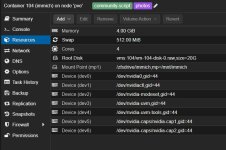
I am a newbie and I have very hard time understanding unprivileged containers. I want to install Immich in LXC and map ZFS mirrored storage /mnt/tank/immich to the LXC to use it as storage for immich.
I mapped the storage to container 100 like this:
mp0: /mnt/tank/immich,mp=/mnt/immich

now Immich doesn't have permissions to write to mnt/immich. As I understand I need to map the uid and gid in the .conf file. How can I do it?
 
Hello,
I am a newbie and I have very hard time understanding unprivileged containers. I want to install Immich in LXC and map ZFS mirrored storage /mnt/tank/immich to the LXC to use it as storage for immich.
I mapped the storage to container 100 like this:
mp0: /mnt/tank/immich,mp=/mnt/immich

now Immich doesn't have permissions to write to mnt/immich. As I understand I need to map the uid and gid in the .conf file. How can I do it?
Edit /etc/pve/lxc/100.conf (replace 100 with your container ID) and add or modify the following lines to map UID/GID 1000 in the container directly to UID/GID 1000 on the host:

Code:
lxc.idmap: u 0 100000 1000
lxc.idmap: g 0 100000 1000
lxc.idmap: u 1000 1000 1
lxc.idmap: g 1000 1000 1
lxc.idmap: u 1001 101001 64535
lxc.idmap: g 1001 101001 64535

This means:
  • Container UIDs 0-999 → host UIDs 100000-100999
  • Container UID 1000 → host UID 1000 (1 user)
  • Container UIDs 1001-65535 → host UIDs 101001-165535
Update /etc/subuid and /etc/subgid on the Host. Add the following lines (if not already present):

root:1000:1
root:100000:65536
 
  • Like
Reactions: santinuk
Edit /etc/pve/lxc/100.conf (replace 100 with your container ID) and add or modify the following lines to map UID/GID 1000 in the container directly to UID/GID 1000 on the host:

Code:
lxc.idmap: u 0 100000 1000
lxc.idmap: g 0 100000 1000
lxc.idmap: u 1000 1000 1
lxc.idmap: g 1000 1000 1
lxc.idmap: u 1001 101001 64535
lxc.idmap: g 1001 101001 64535

This means:
  • Container UIDs 0-999 → host UIDs 100000-100999
  • Container UID 1000 → host UID 1000 (1 user)
  • Container UIDs 1001-65535 → host UIDs 101001-165535
Update /etc/subuid and /etc/subgid on the Host. Add the following lines (if not already present):

root:1000:1
root:100000:65536

The mapping is actually unnecessary, and I feel there is a better way to do it.

All you have to do is recursively "chown" the zfs dataset to the UID/GID the program on the container is using to write + 100000

So if the user (on the container) is immich:immich (just an example here), and say the UID:GID is 245:245, all you need to do is *FROM THE HOST*: chown -R 100245:100245 /mnt/tank/immich

This has several advantages, the biggest one that you don't need to 'hack' your conf files or your subuid/subgid on the host

I do this with several of my containers that have bind mounts to my ZFS datasets. It works with literally everything. My jellyfin container, my samba-server container, my immich container etc.

The only time there might be an issue is if you need to access the same dataset/folder from both the container AND the host. But that situation isn't ideal... If you are using immich, you should only be modifying / adding file THROUGH the webgui.
 
@samwathegreat Can you pls elaborate for another noob? Trying to create volumes but don't know what should be in place of the HDD name... Should it be the HDD name or should it be something else, like my actual ZFS name that I created for it? For instance, should it be
Code:
/mnt/(MYZFSNAME)/appdata/immich/ts-config:/config
? Thanks.
 
@samwathegreat Can you pls elaborate for another noob? Trying to create volumes but don't know what should be in place of the HDD name... Should it be the HDD name or should it be something else, like my actual ZFS name that I created for it? For instance, should it be
Code:
/mnt/(MYZFSNAME)/appdata/immich/ts-config:/config
? Thanks.
I'm not getting what you're trying to do...

Are you asking what the command for the bind mount should be?

If so, it should look something like this:

mp0: /mnt/tank/immich,mp=/mnt/immich

When the first part corresponds to the exact path on the HOST. If you are using ZFS you should have already created the data set on the host. You will use the same path that you would use if you were trying to access it on the host.

The second part is where you want to bind it inside the container. That means if you wanted to access the same files from inside the container you would do it from /mnt/immich in this example.

Alter both paths to fit your particular situation...

And finally, don't forget to recursively chown the folder on the host as previously described.

As you no doubt already know you will have to alter the immich config file to point to the Mount point you created inside the container so it knows to actually put the files there and not whatever the default location is.
 
@samwathegreat Hey thanks for the reply. So, I have already setup my ZFS with zraid1 (using 3 HDDs). And then I tried using that ZFS as the location to put all of my photos (is that the database?), but when I completed installing Immich the Immich UI shows 100 GB storage..meaning I did something wrong because that is the amount of storage that my PVE (local) storage is, with ISO files and such. So, now I'm needing to change where Immich should actually be saving, which should be in {my-ZFS-name}, right?

Also, I don't remember doing anything with "mp0:" or "mp="
I just used /mnt/{my-ZFS-name}/appdata/immich/...
 
Last edited:
@samwathegreat Hey thanks for the reply. So, I have already setup my ZFS with zraid1 (using 3 HDDs). And then I tried using that ZFS as the location to put all of my photos (is that the database?), but when I completed installing Immich the Immich UI shows 100 GB storage..meaning I did something wrong because that is the amount of storage that my PVE (local) storage is, with ISO files and such. So, now I'm needing to change where Immich should actually be saving, which should be in {my-ZFS-name}, right?

Also, I don't remember doing anything with "mp0:" or "mp="
I just used /mnt/{my-ZFS-name}/appdata/immich/...
Sounds like you didn't bind mount, then. To bind-mount you have to edit the lxc conf file as I've described (look up bind mount in the proxmox FAQs for more info). Before you do that make sure you have actually created your ZFS dataset....

For example, if your ZFS raid 1 is called "myzfs", then you would (on the proxmox HOST):

zfs create /myzfs/immich

that would create a zfs dataset for you to bind-mount to your lxc container.

Then you (on the HOST) edit the lxc conf file and add:

mp0: /myzfs/immich,mp=/mnt/immich

(change the mp to reflect the path you want the storage reflected inside the container)

Then, assuming that you used the script from proxmox helper scripts to create your immich container, your immich uid and gid should be 999:996

So you would (on the HOST):

chown -R 100999:100996 /myzfs/immich

This will set the permissions so that the container can properly access what it puts there.

Next, on the container:
cd /mnt/immich
(lets make sure you can access and write here)
mkdir /mnt/immich/upload
(this should be successful)
and
chown immich:immich /mnt/immich/upload

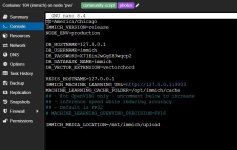
And FINALLY, after all of that, you will need to edit the immich CONF file at /opt/immich/.env to reflect the newly created storage location.

IMMICH_MEDIA_LOCATION=/mnt/immich/upload

reboot the container

Now it should be working as intended...immich should be saving assets to the "bind-mounted" zfs dataset you created on the host.


Hopefully you haven't started uploading stuff to immich yet or things will trickier as you'll need to move everything, verify correct permissions of the moved files, and possibly rebuild the database.

You may need to modify some or all of these instructions to fit your particular use case.

Good Luck!

 
  • Like
Reactions: used1d