

Incorrect work of the rate limiter

Andrii.B

Well-Known Member
Oct 10, 2019
57
2
48
41
I have detected that network rate limit work wrong using HTTP request.

This is a speed without rate limit:
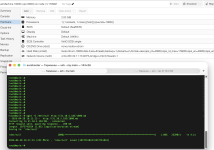
Screenshot 2026-04-20 at 4.11.25 PM.png

And here you can see a very slow speed using http, but normal speed when test using iperf:
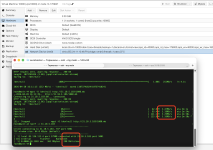
Screenshot 2026-04-20 at 4.12.30 PM.png

I reproduced this bug on all nodes with the last proxmox.
pveversion
pve-manager/9.1.7/16b139a017452f16 (running kernel: 6.17.13-2-pve)
 
Hi,

The real bug is the opposite of what you think. iperf is bypassing the rate limit, not HTTP being too slow. The rate=37.5 in Proxmox translates to ~4.7 MB/s, and wget is showing something in that ballpark. iperf should be capped at ~37.5 Mbps but is hitting 298 Mbps.

Proxmox's rate= parameter applies traffic shaping via tc on the tap interface egress (outbound from host to VM). iperf in default mode measures the reverse direction — traffic flows from your external machine into the VM, which is ingress on the tap interface and is not shaped.
Verify this:

# Test outbound from VM instead:
iperf -c <external_host> # run FROM the VM
# or use reverse mode:
iperf3 -c 31.10.5.183 -R # server sends to client
 
The rate is in MB/s, not in Mb/s.

See e.g. the image https://pve.proxmox.com/pve-docs/images/screenshot/gui-create-vm-network.png
which is included in
https://pve.proxmox.com/pve-docs/chapter-qm.html#qm_network_device

Also in https://pve.proxmox.com/pve-docs/qm.1.html we read:

"rate=<number> (0 - N)
Rate limit in mbps (megabytes per second) as floating point number."

BTW, the abbreviation of the physical unit in this doc is grossly wrong, as mbps literally means milli (sic!) bits per second, not mega bytes per second.
As "m" means 10^-3, not 10^6.
See e.g. https://en.wikipedia.org/wiki/Metric_prefix

So:
37.5 MB/s * 8 bits/byte = 300 Mb/s which is quite the same result as the OP shown (298 Mb/s).
 
I got similar speeds with curl and scp:

Code:
$ curl http://devel:8888/big > /dev/null
  % Total    % Received % Xferd  Average Speed   Time    Time     Time  Current
                                 Dload  Upload   Total   Spent    Left  Speed
100  100M  100  100M    0     0  5805k      0  0:00:17  0:00:17 --:--:-- 5834k

except when I randomly added --trace-ascii it somehow got faster:

Code:
$ curl --trace-ascii foo http://devel:8888/big > /dev/null
  % Total    % Received % Xferd  Average Speed   Time    Time     Time  Current
                                 Dload  Upload   Total   Spent    Left  Speed
100  100M  100  100M    0     0  24.6M      0  0:00:04  0:00:04 --:--:-- 24.6M

I suspect this is just some unfortunate interaction between the rate limit and TCP. The first one had a lot more retransmissions and partial acknowledgements of segments.