Inconsistencies between views in Task and failed task

Pigi_102

Member
May 24, 2024
30
5
8
Hello all,
we are running PDM 1.0.2 on our environment to keep everything under control in a single pain.
I have noticed a strange inconsistencies in the two views:
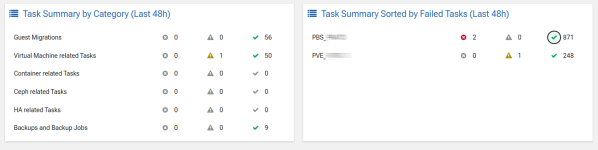
PDM_strange.png

As you can see, in the task summaries I see only 9 jobs and 0 failed while in the other views the succeded are 871 and failed 2 ( those being failed sync jobs so I' not completelly worried about not being present in the task summary).
Also for the PVE task there are 107 ( 1 warning ) in the first panel and 248 ( 1 warning ) in the second one.
Being that they all consider tasks in the last 48 hours ( same time interval then), I was expecting to get same values for succeded tasks.
Am I understanding wrong the data exposed in these two panels ?

Thanks in advance.
Pierluigi
 
The tasks in the “Task Summary by Category” panel only show tasks for selected categories. The “Backups and Backup Jobs” category includes only tasks of the type “vzdump”, so sync jobs wouldn't necessarily be included there as they have a different type. The panel “Task Summary Sorted by Failed Tasks” on the other hand, includes all possible task types on the given remote. So the discrepancy is somewhat expected. Does that make sense?
 
Thanks for your reply.
Still not quite. It makes sense for the sync vs backup, but if I do:
proxmox-backup-manager task list --all | grep backup | wc
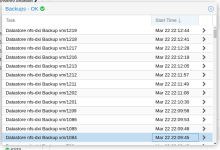
I get 18 ( starting from March 22 which is inside the 48 h ) and if I go to the dashboard of PBS I get more than 100 backups ( then I stopped counting ) ( see first image of multiple )
PDM_strange_1.png
So again I fail to understand the numbers.
Need to find the right command on PBS for extract the number of jobs executed.
 
PDM will also only consider tasks in its cache, so it could be that the cache misses some entries. Also, not that PDM handles tasks started through PDM differently from all tasks on a remote. They get polled more often.
 
Thanks, understood.
Maybe it should poll more often to get some useful informations.
We are evaluating to ditribute a big number of PVE with their local PBS, but we need to have, somewhere, an "god's eye" to check if everything is fine.
I will eventually raise an RFE.
 
On a view or the dashboard you can also try to change the maximum age of some information by clicking the top right “three gears” icon and adjust the “Max Age” property.
 
  • Like
Reactions: Pigi_102
Thanks.
I still need to find a way to get some more info's, or eventually more "self-explanatory".
We are trying to figure if we can use ( a single ) PDM to check a ( somewhat ) huge distributed PBS architecture ( hundreds of remote site ) to have a fast look of the state of their backups ( those environment only have 1PVE with 2 VM's and a PBS ) .
We are still in design phase and need to chose the best environment.
In my previous example ( where I failed to understand the numbers correctly ) all operations were older than 30 seconds ( a couple of hour ) and well whithin 48h ( on 24 ).