Important Sugestion for Backup Jobs : Custom Restore Backup

virmix

Member
Sep 4, 2020
36
1
13
The is any way to unselect HD file (qcow2) in restore backup?

My backup have 2 HD:

First 100Gb
Second 600Gb

how can I restore only first hd or restore all less unselect disk or create a custom job (See third post)
 
Last edited:
That is not possible out of the box. Are we talking about a VMA backup? For example, vzdump-qemu-.....vma.zstd or similar? In that case, you could decompress the vma file and use the vma CLI tool on the Proxmox VE host to extract only a single image, which you then could import to a VM with qm importdisk.

vma list and vma extract would be most likely what you want. You will still need a lot of free disk space.

If it is not disk space that is the problem, but you only want to restore the OS part of your VM, consider restoring to a new VM (by starting the restore from the Storage Content view). Then you can use the qm move-disk <source VMID> <disk key> --target-vmid <vmid> --target-disk <disk key> to reassign the disk to the other VM (needs Proxmox VE 7.1).
 
I want schedule 2 jobs in same VM

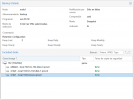
First job backup all to VM 102

1639755293815.png


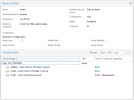
Second job backup only main hd on VM 102


1639755388859.png


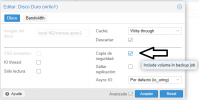
I think the option for backup must be in backup job and not in HD item


1639755468100.png
 
Last edited:
Second job backup only main hd on VM 102
That is not possible as the option if a VM disk should be included in (any) backup is done per disk, not per backup job.
If you restore a backup that does not include all the disks, the disks not included in the backup will show up as "unused disk" after the restore and need to be attached/configured.

What is the use case why you would like to have a separate backup only of the OS disk?
 
That is not possible as the option if a VM disk should be included in (any) backup is done per disk, not per backup job.
If you restore a backup that does not include all the disks, the disks not included in the backup will show up as "unused disk" after the restore and need to be attached/configured.

What is the use case why you would like to have a separate backup only of the OS disk?

It is interesting select which discs to include, because many times there are a secondary discs and not want to backup daily (for second disk), but monthly backup want to include.

For example I use VM for Windows, in first HD is the OS and all apps, and in second HD is used by emails stores, windows backup, dump mysql, etc ... If I upgrade Windows to new version, clean VM or VM have any problem I can move the second HD to other VM in real time without offline time or I can restore the first hd to run again OS.


Now if I set enable Backup into HD setting , always was included, and I don't want include all time, only 1 per month but I need a job every day for main HD and vm config
 
Last edited: