

I have a ASRock N100m mainboard/cpu, that should support iGPU passthrough just fine. To enable this functionality, I followed these steps:
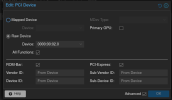
After rebooting Proxmox, I can now add the PCIe device to my VM (Raw device with proper address, all function, ROM-Bar, PCI Express all enabled).
I also changed the machine type to "q35".
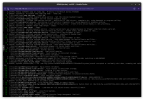
But when I start the VM (Ubuntu Server), it gets stuck during startup:
When I remove the PCIe device from the machine again, it starts up just fine.
Does anyone have a hint how to make this work?
- Update GRUB config to add Kernel parameters
- Adding VFIO modules
- Blacklist i915
After rebooting Proxmox, I can now add the PCIe device to my VM (Raw device with proper address, all function, ROM-Bar, PCI Express all enabled).
I also changed the machine type to "q35".
But when I start the VM (Ubuntu Server), it gets stuck during startup:
When I remove the PCIe device from the machine again, it starts up just fine.
Does anyone have a hint how to make this work?
Last edited: