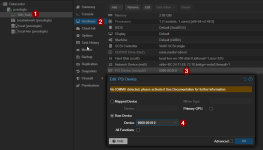
First real post to this forum, so please be gentle.
The Hardware: SuperMicro 846 36xHDD chassis with dual 1250W PS, Gigabyte MZ72-HB2 dual-socket AMD motherboard w 256GB ECC RAM, 2xEPYC 7F52 16-core processors, LSI SAS2308 HBA #1, 4x Samsung PM9A1 512GB SSD boot drive in zfs stripe/mirror config (RAID 10).
Built first ever bare metal server using Proxmox, first time using Linux. Steep learning curve. Booting UEFI. Passed through HBA #1 to TrueNAS VM. Also have Windows 11 VM. Got it all working (thrilled) after months of tinkering. Stored 6+TB in cloud for backup (whew)! Wanted to copy 1TB Onedrive dataset to NAS for archiving, but due to 1 TB SSD boot drive size limitation, was unable to do so, so got to thinking (I know, dangerous for me ). All HDD's were in the front 24 bays, so since I wasn't using the back 12 HDD bays yet, figured I could just throw in another SAS HBA and route the cable from the rear backplane to the 2nd HBA and have those drives available to PROXMOX. Plan was to put a 16TB data drive back there.
The only problem was, I had only one CPU installed originally, and the only slot available with x8 PCI lanes was tied to the 2nd CPU, so I added the 2nd CPU at the same time as I added the 2nd HBA.
That's when I broke the passthrough of HBA #1. TrueNAS could no longer see any vdevs. Got to looking at the IOMMU groups and discovered the results from pvesh get /nodes/www/hardware/pci --pci-class-blacklist "" showed the ID had changed for the group assigned to HBA #1.
ORIGINAL:
class │ device │ id │ iommugroup │ vendor │ device_name │ mdev │subsystm_device│subsystm_device_name│Ven
│ 0x010700 │ 0x0087 │ 0000:41:00.0 │ 30 │ 0x1000 │ SAS2308 PCI-Express Fusion-MPT SAS-2 │ │ 0x3050 │ SAS9217-8i │ 0x1000
NOW:
│ 0x010700 │ 0x0087 │ 0000:21:00.0 │ 30 │ 0x1000 │ SAS2308 P
│ 0x010700 │ 0x0072 │ 0000:a1:00.0 │ 92 │ 0x1000 │ SAS2008 P (2nd HBA)
It appears the "id" for HBA #1 has changed from 41:00.0 to 21:00.0 and I believe that's where it broke, but don't know how to fix it. Is it possible that adding the 2nd CPU changed the PCI Bus?
The Hardware: SuperMicro 846 36xHDD chassis with dual 1250W PS, Gigabyte MZ72-HB2 dual-socket AMD motherboard w 256GB ECC RAM, 2xEPYC 7F52 16-core processors, LSI SAS2308 HBA #1, 4x Samsung PM9A1 512GB SSD boot drive in zfs stripe/mirror config (RAID 10).
Built first ever bare metal server using Proxmox, first time using Linux. Steep learning curve. Booting UEFI. Passed through HBA #1 to TrueNAS VM. Also have Windows 11 VM. Got it all working (thrilled) after months of tinkering. Stored 6+TB in cloud for backup (whew)! Wanted to copy 1TB Onedrive dataset to NAS for archiving, but due to 1 TB SSD boot drive size limitation, was unable to do so, so got to thinking (I know, dangerous for me
). All HDD's were in the front 24 bays, so since I wasn't using the back 12 HDD bays yet, figured I could just throw in another SAS HBA and route the cable from the rear backplane to the 2nd HBA and have those drives available to PROXMOX. Plan was to put a 16TB data drive back there.The only problem was, I had only one CPU installed originally, and the only slot available with x8 PCI lanes was tied to the 2nd CPU, so I added the 2nd CPU at the same time as I added the 2nd HBA.
That's when I broke the passthrough of HBA #1. TrueNAS could no longer see any vdevs. Got to looking at the IOMMU groups and discovered the results from pvesh get /nodes/www/hardware/pci --pci-class-blacklist "" showed the ID had changed for the group assigned to HBA #1.
ORIGINAL:
class │ device │ id │ iommugroup │ vendor │ device_name │ mdev │subsystm_device│subsystm_device_name│Ven
│ 0x010700 │ 0x0087 │ 0000:41:00.0 │ 30 │ 0x1000 │ SAS2308 PCI-Express Fusion-MPT SAS-2 │ │ 0x3050 │ SAS9217-8i │ 0x1000
NOW:
│ 0x010700 │ 0x0087 │ 0000:21:00.0 │ 30 │ 0x1000 │ SAS2308 P
│ 0x010700 │ 0x0072 │ 0000:a1:00.0 │ 92 │ 0x1000 │ SAS2008 P (2nd HBA)
It appears the "id" for HBA #1 has changed from 41:00.0 to 21:00.0 and I believe that's where it broke, but don't know how to fix it. Is it possible that adding the 2nd CPU changed the PCI Bus?
Last edited: