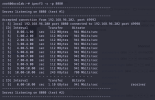
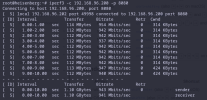
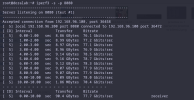
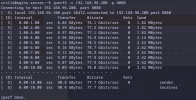
Good afternoon, I am a little desperate and need some help, I need to know why when I do a speedtest-cli on the host I have so little speed, "only" I get 450Mbit/s and I should get 920Mbit/s as I have contracted 1gbit and if I do the test in windows I get 920/930Mbits, I have another mini pc with proxmox and in that also I get very little speed, practically half of what I have! I am using the realtek r8169 driver on both proxmox servers I do not know if that will be affecting, if you need more information to get help I will send it thanks!
pveversion
lspci -nnk

speedtest-cli

I have seen that there is this guide to block the rt8169, but I don't know if it will help the internet speed.
pveversion
Code:
pve-manager/8.1.10/4b06efb5db453f29 (running kernel: 6.5.13-5-pve)lspci -nnk
speedtest-cli
I have seen that there is this guide to block the rt8169, but I don't know if it will help the internet speed.
Bash:
proxmox-ve: 8.1.0 (running kernel: 6.5.13-5-pve)
pve-manager: 8.1.10 (running version: 8.1.10/4b06efb5db453f29)
proxmox-kernel-helper: 8.1.0
pve-kernel-6.2: 8.0.5
proxmox-kernel-6.5.13-5-pve-signed: 6.5.13-5
proxmox-kernel-6.5: 6.5.13-5
proxmox-kernel-6.5.13-3-pve-signed: 6.5.13-3
proxmox-kernel-6.5.13-1-pve-signed: 6.5.13-1
proxmox-kernel-6.5.11-7-pve-signed: 6.5.11-7
proxmox-kernel-6.2.16-20-pve: 6.2.16-20
proxmox-kernel-6.2: 6.2.16-20
pve-kernel-6.2.16-3-pve: 6.2.16-3
ceph-fuse: 17.2.6-pve1+3
corosync: 3.1.7-pve3
criu: 3.17.1-2
glusterfs-client: 10.3-5
ifupdown2: 3.2.0-1+pmx8
ksm-control-daemon: 1.5-1
libjs-extjs: 7.0.0-4
libknet1: 1.28-pve1
libproxmox-acme-perl: 1.5.0
libproxmox-backup-qemu0: 1.4.1
libproxmox-rs-perl: 0.3.3
libpve-access-control: 8.1.3
libpve-apiclient-perl: 3.3.2
libpve-cluster-api-perl: 8.0.5
libpve-cluster-perl: 8.0.5
libpve-common-perl: 8.1.1
libpve-guest-common-perl: 5.0.6
libpve-http-server-perl: 5.0.6
libpve-network-perl: 0.9.6
libpve-rs-perl: 0.8.8
libpve-storage-perl: 8.1.5
libspice-server1: 0.15.1-1
lvm2: 2.03.16-2
lxc-pve: 6.0.0-1
lxcfs: 6.0.0-pve2
novnc-pve: 1.4.0-3
proxmox-backup-client: 3.1.5-1
proxmox-backup-file-restore: 3.1.5-1
proxmox-kernel-helper: 8.1.0
proxmox-mail-forward: 0.2.3
proxmox-mini-journalreader: 1.4.0
proxmox-widget-toolkit: 4.1.5
pve-cluster: 8.0.5
pve-container: 5.0.9
pve-docs: 8.1.5
pve-edk2-firmware: 4.2023.08-4
pve-firewall: 5.0.3
pve-firmware: 3.11-1
pve-ha-manager: 4.0.3
pve-i18n: 3.2.1
pve-qemu-kvm: 8.1.5-4
pve-xtermjs: 5.3.0-3
qemu-server: 8.1.1
smartmontools: 7.3-pve1
spiceterm: 3.3.0
swtpm: 0.8.0+pve1
vncterm: 1.8.0
zfsutils-linux: 2.2.3-pve2
Attachments

Last edited: