How use stored ISO file in ZFS for create a new VM

Hgalt

New Member
Feb 20, 2025
6
0
1
I have the following zfs
1750790094847.png
and I have uploaded a ISO file to IData/ISOs
1750790298547.png
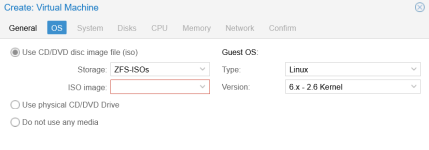
If I than try to generate a new VM and I want select the ISO under Storage it is already ZFS-ISO but under ISO image I have no possibility to choose the image.
1750790659772.pngSo what did I wrong?
 
Select the datastore on the sidebar then go to ISO Images and use the Upload button at the top.
Edit: Please don't delete a post people responded to.
 
Last edited:
When you say you "uploaded the ISO" to /DATA/ISOs, did you use the Proxmox UI to upload it, or just copy it there?
 
Hi, Hgalt, in which configured storage options do you have your ISO images stored?