

How to ensure that virtual machine was created?

Egor

New Member
Nov 21, 2016
28
1
3
33
In my code, right after I send POST request to create virtual machine, I am trying to get its configuration (or status): "pvesh get /nodes/pve/qemu/101/config"

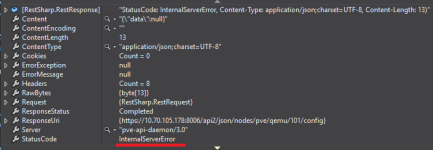
This command results in InternalServerError:
upload_2017-3-9_19-42-25.png

If I do a 2 second sleep before making a request for this config, then I don't get this error.
What is the right way to check that virtual machine was created and I can perform operations on it?
 
In my code, right after I send POST request to create virtual machine, I am trying to get its configuration (or status): "pvesh get /nodes/pve/qemu/101/config"

This command results in InternalServerError:
View attachment 4889

If I do a 2 second sleep before making a request for this config, then I don't get this error.
What is the right way to check that virtual machine was created and I can perform operations on it?

long running jobs (like creating guests) return a "UPID", which represents the task worker that was spawned for that job. you can query the status (and output) using the API (just like the web interface does when it displays those log / status dialogues):

Code:
pvesh create /nodes/NODENAME/qemu -vmid 123456
200 OK
UPID:NODENAME:0000537D:00060745:58C2590F:qmcreate:123456:root@pam:

Code:
pvesh get /nodes/NODENAME/tasks/UPID:NODENAME:0000537D:00060745:58C2590F:qmcreate:123456:root@pam:/status
200 OK
{
   "exitstatus" : "OK",
   "id" : "123456",
   "node" : "NODENAME",
   "pid" : 21373,
   "pstart" : 395077,
   "starttime" : 1489131791,
   "status" : "stopped",
   "type" : "qmcreate",
   "upid" : "UPID:NODENAME:0000537D:00060745:58C2590F:qmcreate:123456:root@pam:",
   "user" : "root@pam"
}
 
  • Like
Reactions: Egor