How to dismount and remount USB drive for manual backups on PVE

ichill55

New Member
Apr 10, 2026
4
0
1
Good morning,

I’m running a small proxmox server (8.4.11) to host Home Assistant and Unifi OS Server. It’s been a great foundation for learning and has potential for expansion.

My concern now is how to backup the VMs etc. I want to use a removeable USB drive and backup manually whenever I’m about to make changes.

I’ve set up a Directory based storage area called proxback on a 2TB USB drive. Having done some backups, I now want to dismount the drive until the next backup, so that it is air-gapped and less likely to be damaged by me accidentally moving it. But I can’t use umount and eject because the drive is not shown as mounted. It seems that the drive only has a UUID identity.

I don’t understand how to safely remove it from the proxmox server so that in say, a month’s time, I can reconnect it and do another backup.

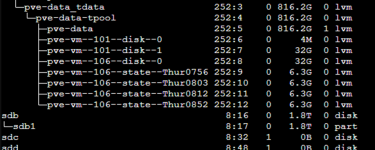
USB drive is showing as /dev/sdb and /dev/sdb1:

1775793196391.png

LSBLK output:

1775793210342.png

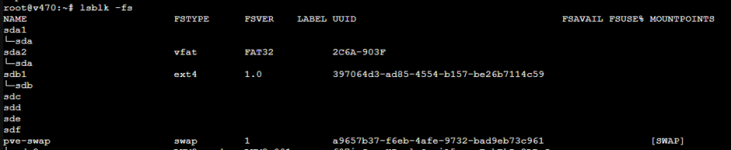
LSBLK -fs

1775793219008.png

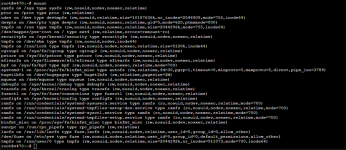
Mount output:

1775793229403.png

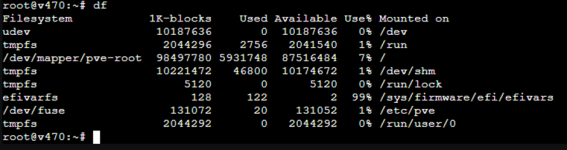
DF output:

1775793243342.png

systemctl list-unit-files -t mount output:
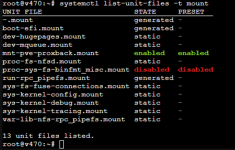
1775793255587.png

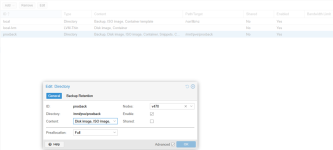
Storage area config:

1775793270809.png

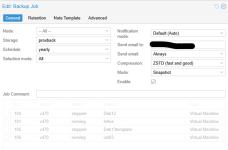
Backup config:

1775793276516.png

So now you’ve seen what I’ve done, some questions:
  • Was using a Directory storage area the right way to set up a USB device that is to be removed? If not, what should I have done? I am happy to nuke the disk and start again!
  • If the approach is OK, how can I safely dismount the USb drive for storage? And how do I then remount it when I next want to do another backup?
Thanks so much for reading this far and hopefully for your advice!

Ian
 
Hi,

From what I can see in your screenshots the volume /dev/sdb1 is not mounted. You mounted by creating the directory type of storage in the later screenshots, is that right? Generally speaking it's not recommended to plug in and out a storage device but you can do certain procedure:


1. Do the backup
2. Go to Datacenter->Storage->proxback edit the entry and uncheck enabled. Alternatively you can do it from shell: pvesm set proxback --disable 1)
3. Unmount the filesystem (from the proxmox shell): /mnt/pve/proxback
4. If the umount command completed without any errors you can safely remove the USB

Now when you want to bring it back:

1. Plugin the usb
2. mount /dev/sdb1 /mnt/pve/proxback
3. Enable the directory in the gui or pvesm set proxback --disable 0
4. Now you can repeat the process

Going this way by manually unmounting the usb you can be sure that all the buffers are flushed to the removable drive. The unmount command would error if any of the files are left open.
 
  • Like
Reactions: ichill55
Aha, thank you, that uncheck enabled step makes perfect logical sense, so I've done the disable step twice (both ways, via GUI and via shell).

However, I still can't umount the USB drive as shown below:

umount: /mnt/pve/proxback: not mounted.
root@v470:~# pvesm set proxback --disable 1
root@v470:~# umount /mnt/pve/proxback
umount: /mnt/pve/proxback: not mounted.
root@v470:~#

There's something weird about the way the disk is behaving as a result of me asking Proxmox to create a storage area on it. I've never mounted it with a Mount command (so therefore can't umount it) but Proxmox was still happy to use it.

I'm wondering whether in future I need to do a proper mount on it BEFORE enabling it as a storage area? That way I can probably umount it afterward? Do you think that might be the issue?
 
Got it. Although I never originally mounted it, proxmox was able to use it anyway - that confused me. The real issue is that when I connected the USB drive I should have mounted it before allowing PVE to use it. My mistake.

Thanks! I now have a strategy for doing what I need to do for my infrequent USB backups. :)
 
For other's benefit, this is what I will do in future (with thanks to psalkiewicz):

PROXMOX BACKUP TO USB​

NB Proxmox will use a USB drive without it being mounted, but then you can’t umount it when you need to after doing the backup. So ensure the drive is mounted first.

  • Plugin the usb
  • In shell:
    mount /dev/sdb1 /mnt/pve/proxback
  • Go to Datacenter->Storage->proxback edit the entry and check enabled to enable the directory in the gui or in shell:
    pvesm set proxback --disable 0
  • Now you can run the backup
  • Go to Datacenter->Storage->proxback edit the entry and uncheck enabled. Alternatively you can do it from shell:
    pvesm set proxback --disable 1
  • Unmount the filesystem (from the proxmox shell):
    umount /mnt/pve/proxback
  • If the umount command completed without any errors you can safely remove the USB. Doing this by manually unmounting the usb you can be sure that all the buffers are flushed to the removable drive. The unmount command would error if any of the files are left open.