[TUTORIAL] How to convert Raspberry Pi OS images and import to Proxmox

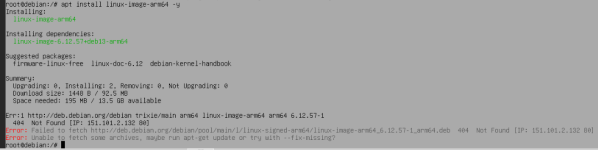
Ok so I tried to create a Trixie VM now and followed the instructions in this post... unfortunately when I enter the command "apt install linux-image-arm64 -y", I get the error message in the attached screenshot.
 

Attachments

  • Screenshot 2026-01-24 154655.png
    Screenshot 2026-01-24 154655.png
    54.6 KB · Views: 3
Ok so I tried to create a Trixie VM now and followed the instructions in this post... unfortunately when I enter the command "apt install linux-image-arm64 -y", I get the error message in the attached screenshot.
Ignore this post... I forgot to run "apt update" before I ran the install commands
 
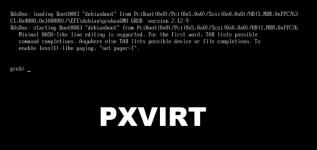
Ok I successfully completed the install/config steps above. When I attempt to boot the Trixie VM, I get the attached error message. Any idea how to resolve this to get the VM to boot?
 

Attachments

  • Screenshot 2026-01-24 160025.png
    Screenshot 2026-01-24 160025.png
    45.9 KB · Views: 6
It worked for me to install Raspberry OS Lite by following Peluko's steps 1-14,15, with one note. When I perform step 14, the bios settings don't get saved. Because I had excluded an EFI disk (in step 2). So to have the BIOS boot order settings persist upon VM reboot, I needed to first manually add an EFI disk, and then perform step 14.
 
It worked for me to install Raspberry OS Lite by following Peluko's steps 1-14,15, with one note. When I perform step 14, the bios settings don't get saved. Because I had excluded an EFI disk (in step 2). So to have the BIOS boot order settings persist upon VM reboot, I needed to first manually add an EFI disk, and then perform step 14.
Interesting... in my case the BIOS setting is EFI and the correct disk is booting. The problem appears to be with the setup of the grub