

Hi everyone
Well i have a issue with my datacenter.
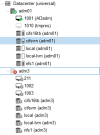
I have a datacenter with 6 nodes, every node have 2 VM with virtualdisks into a NAS storage.
the last weekend the node 3 have an issue and now is offline
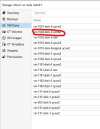
i have the virtual disk (.qcow2) of these VM's in my storage (NAS) but i can't use to create a new VM with other ID
can i use these disk to create a new VM in another node?
Well i have a issue with my datacenter.
I have a datacenter with 6 nodes, every node have 2 VM with virtualdisks into a NAS storage.
the last weekend the node 3 have an issue and now is offline
i have the virtual disk (.qcow2) of these VM's in my storage (NAS) but i can't use to create a new VM with other ID
can i use these disk to create a new VM in another node?
