Hi. I have an old Lenovo Yoga, and I have decided to repurpose it into my very first homelab using Proxmox.
Here are my specs.
CPU: Intel 17-8550U
RAM: 16GB
GPU: NVIDIA GeForce GTX 1050
Storage: 1TB SSD
I've finished installing Proxmox, and I've updated everything so now I'm ready to start creating containers.
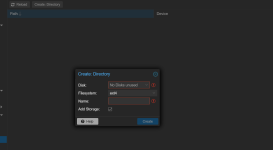
The first thing I want to do is make an LXC, install docker, and use docker compose to quickly setup Jellyfin. Before that though, my biggest problem is that I don't know where to put my Jellyfin video files on the SSD. Every guide references using a NAS for Jellyfin storage, which I don't have right now nor any other additional external storage devices; and I want to use Proxmox with just the single laptop I have right now.
Where do I put my Jellyfin video files on the SSD seperate from the containers, and how will I reference their directory when I setup Jellyfin?
Any help would be appreciated.
Here are my specs.
CPU: Intel 17-8550U
RAM: 16GB
GPU: NVIDIA GeForce GTX 1050
Storage: 1TB SSD
I've finished installing Proxmox, and I've updated everything so now I'm ready to start creating containers.
The first thing I want to do is make an LXC, install docker, and use docker compose to quickly setup Jellyfin. Before that though, my biggest problem is that I don't know where to put my Jellyfin video files on the SSD. Every guide references using a NAS for Jellyfin storage, which I don't have right now nor any other additional external storage devices; and I want to use Proxmox with just the single laptop I have right now.
Where do I put my Jellyfin video files on the SSD seperate from the containers, and how will I reference their directory when I setup Jellyfin?
Any help would be appreciated.