How Do I Setup Jellyfin on Proxmox With Only 1 SSD for Storage?

kosmicUser

New Member
Aug 10, 2026
4
0
1
Hi. I have an old Lenovo Yoga, and I have decided to repurpose it into my very first homelab using Proxmox.
Here are my specs.

CPU: Intel 17-8550U
RAM: 16GB
GPU: NVIDIA GeForce GTX 1050
Storage: 1TB SSD

I've finished installing Proxmox, and I've updated everything so now I'm ready to start creating containers.
The first thing I want to do is make an LXC, install docker, and use docker compose to quickly setup Jellyfin. Before that though, my biggest problem is that I don't know where to put my Jellyfin video files on the SSD. Every guide references using a NAS for Jellyfin storage, which I don't have right now nor any other additional external storage devices; and I want to use Proxmox with just the single laptop I have right now.

Where do I put my Jellyfin video files on the SSD seperate from the containers, and how will I reference their directory when I setup Jellyfin?

Any help would be appreciated.
 
The first thing I want to do is make an LXC, install docker, and use docker compose
You have not much experience with PVE, are using sub-optimal (not recommended) hardware and are starting with "Docker in LXC". This lands you immediately inside a battle field. That combination means you are piling up multiple problem areas from the beginning.

This is a recipe for frustration. My recommendation: install a "normal" Distribution of your choice and get happy using Docker.
 
Agree with @UdoB : a common distro (Debian/Ubuntu) with SSH access/server, docker base install and maybe portainer (or dockhand) for an easy entry or more simple management would the better choice. Your initial idea is like driving a formula one car through a minefield while hoping not to get blown up.
 
  • Like
Reactions: Johannes S and UdoB
You have not much experience with PVE, are using sub-optimal (not recommended) hardware and are starting with "Docker in LXC". This lands you immediately inside a battle field. That combination means you are piling up multiple problem areas from the beginning.

This is a recipe for frustration. My recommendation: install a "normal" Distribution of your choice and get happy using Docker.

I understand that my setup is sub-optimal. For the moment though, this is still the question I am asking:
Where do I put my Jellyfin video files on the SSD seperate from the containers, and how will I reference their directory when I setup Jellyfin?
It's okay if it's not possible, or ineffective; I just would like to know.
 
  • Like
Reactions: Johannes S
There are as many possible answers as there are people willing to give an answer. I will give you a few options and some pros and cons for each. This isn't a complete list of options, nor a complete list of pros and cons. Before we get to that, I would suggest that you install jellyfin without docker. If you create an LXC container on proxmox you already have a container and don't really need another one. Install debian LXC, and then follow the jellyfin instructions to install in debian inside that container.

These are basically from easiest to hardest to setup, and from hardest to easiest to maintain. So you either do extra work now, or later (like when you configure your backups, and when you need to replace hardware, etc.).


  • Store the media files inside the jellyfin container
Just make the container's disk big enough to hold your media, and copy the files into the container. This is probably the worst idea.
pros - It doesn't get easier to set up; Backups of the container will also back up the media files.
cons - Harder to share the media files with other containers. If you need to recreate the container for some reason you will also need to copy the files into the container. Harder to manage files. You will one day be redoing it if you plan to use jellyfin for long

  • Make a directory on the host
You can just make a place in the proxmox filesystem for the files to live in. The smart option here would be to make a separate dataset in zfs for the files to live in. So for example you copy your files into /media_files, and in the LXC config you add a mountpoint so that /data inside the container is /media_files from outside.
pros - easy to share the files with other containers
cons - Makes the backups harder; using the host to do things other than managind VMs and containers is generally a bad idea; hard to manage the files.

  • Host somewhere else (nas)
Put the files on a NAS or something that is shared with NFS or SMB. Mount the share inside your jellyfin container.
pros - Separates the data and program. Makes it easy to share the same files to other programs too. You can easily rebuild the jellyfin container and just mount the share, no need to mess with the data. Easier to manage the data since you can also mount the share from your computer to add/manage files.
cons - Requires separate storage location. You need to make your own arrangements for backups.

  • NFS or SMB server in another container or VM
Basically the same as the above, but instead of separate hardware, you use a container or VM on the proxmox host.
pros - Keeps the data and program separate. Can mount from your computer to manage files. Backups of the media files handled the same way as the jellyfin container (proxmox backup server, or whatever other tool you use). Easier to move to new hardware when the time comes (either moving to larger storage disk, or even to a new proxmox host it won't be very hard and probably won't require reconfiguring jellyfin at all).
cons - Most complicated to set up, but worth it if you plan to keep jellyfin going for a long time.
 
  • Like
Reactions: proxuser77 and UdoB
Just a quick note regarding the Docker in LXC topic. Jellyfin also offers Debian and Ubuntu repositories: https://jellyfin.org/docs/general/installation/advanced/manual#official-linux-repository-manual

They even provide a script that adds the repository and then installs Jellyfin in one step: https://jellyfin.org/docs/general/installation/linux.

Updates are then handled normally via the APT package manager, along with the rest of the system updates.

So, there’s absolutely no need to complicate things by running Docker in an LXC. Just spin up a standard Debian or Ubuntu LXC, use the manual instructions or the script from the links above, and you should be good to go.
 
  • Like
Reactions: Johannes S and UdoB
There are as many possible answers as there are people willing to give an answer. I will give you a few options and some pros and cons for each. This isn't a complete list of options, nor a complete list of pros and cons. Before we get to that, I would suggest that you install jellyfin without docker. If you create an LXC container on proxmox you already have a container and don't really need another one. Install debian LXC, and then follow the jellyfin instructions to install in debian inside that container.

These are basically from easiest to hardest to setup, and from hardest to easiest to maintain. So you either do extra work now, or later (like when you configure your backups, and when you need to replace hardware, etc.).


  • Store the media files inside the jellyfin container
Just make the container's disk big enough to hold your media, and copy the files into the container. This is probably the worst idea.
pros - It doesn't get easier to set up; Backups of the container will also back up the media files.
cons - Harder to share the media files with other containers. If you need to recreate the container for some reason you will also need to copy the files into the container. Harder to manage files. You will one day be redoing it if you plan to use jellyfin for long

  • Make a directory on the host
You can just make a place in the proxmox filesystem for the files to live in. The smart option here would be to make a separate dataset in zfs for the files to live in. So for example you copy your files into /media_files, and in the LXC config you add a mountpoint so that /data inside the container is /media_files from outside.
pros - easy to share the files with other containers
cons - Makes the backups harder; using the host to do things other than managind VMs and containers is generally a bad idea; hard to manage the files.

  • Host somewhere else (nas)
Put the files on a NAS or something that is shared with NFS or SMB. Mount the share inside your jellyfin container.
pros - Separates the data and program. Makes it easy to share the same files to other programs too. You can easily rebuild the jellyfin container and just mount the share, no need to mess with the data. Easier to manage the data since you can also mount the share from your computer to add/manage files.
cons - Requires separate storage location. You need to make your own arrangements for backups.

  • NFS or SMB server in another container or VM
Basically the same as the above, but instead of separate hardware, you use a container or VM on the proxmox host.
pros - Keeps the data and program separate. Can mount from your computer to manage files. Backups of the media files handled the same way as the jellyfin container (proxmox backup server, or whatever other tool you use). Easier to move to new hardware when the time comes (either moving to larger storage disk, or even to a new proxmox host it won't be very hard and probably won't require reconfiguring jellyfin at all).
cons - Most complicated to set up, but worth it if you plan to keep jellyfin going for a long time.

Thank you, this is a very informative answer.

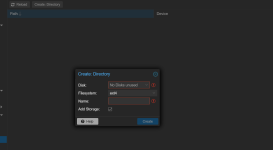
Creating a directory on the host is the option I'm going to go with, as it's the best for my use case right now. I would've liked to have tried making a ZFS pool, but it won't let me, and I believe this is because I need to wipe the disk first. I think this is also the case for making directories, because it won't let me do that either; this is what it looks like:
1786464785354.png

As I stated previously, I only have 1 SSD to work with, which is what Proxmox is installed on right now. I can't wipe the disk, otherwise it would just take down everything. Is there something I'm misunderstanding here? Or is there another way to make a directory/ZFS pool?
 
Just a quick note regarding the Docker in LXC topic. Jellyfin also offers Debian and Ubuntu repositories: https://jellyfin.org/docs/general/installation/advanced/manual#official-linux-repository-manual

They even provide a script that adds the repository and then installs Jellyfin in one step: https://jellyfin.org/docs/general/installation/linux.

Updates are then handled normally via the APT package manager, along with the rest of the system updates.

So, there’s absolutely no need to complicate things by running Docker in an LXC. Just spin up a standard Debian or Ubuntu LXC, use the manual instructions or the script from the links above, and you should be good to go.
Gotcha. I will look into installing Jellyfin with Debian.

The reason why I planned to use Jellyfin with Docker in an LXC is because I was following a guide that was using a docker compose file to setup Jellyfin configured to work with Tailscale in one container. I intend to use Tailscale later so I can share my Jellyfin library with friends/family outside my network, but if using docker for that isn't an option, I'm okay doing it another way.
 
Backups of the container will also back up the media files.
You can give it a small (OS/system) and big (Data/Media) vdisk and exclude the big one from backups. I consider a multiple vdisk system best practice for data heavy guests anyways. For example this allows you to store the data on a different/slower storage or in case of ZFS to use better compression just for data.
 
Last edited:
  • Like
Reactions: Johannes S
Before that though, my biggest problem is that I don't know where to put my Jellyfin video files on the SSD.
the gold standard for volume partitioning is the same regardless of number of disks:

part 1 (optional, default using pve installer) legacy grub
part 2 efi
part 3 root
part 4 data/payload

part4 layout and usage will depends on how you partition it. for this use case I'd format it btrfs, and you can use it for both virtual disks as well as filestore mounts. so, in your case, I would do something like

/mnt/data as the mountpoint
/mnt/data/pvestore as the root for the pve datastore
/mnt/data/media for your media files

This is a recipe for frustration. My recommendation: install a "normal" Distribution of your choice and get happy using Docker.
Truenas. probably a better fit.