

Horrible download speeds from enterprise.proxmox.com (120 KB/s in 2026?)

djsami

Renowned Member
Aug 24, 2009
212
7
83
Hi everyone,

I'm trying to download the latest Proxmox VE ISO (proxmox-ve_9.2-1.iso) from the official enterprise repository, and to be honest, the download speeds are absolutely unacceptable.

I am getting a frustrating 120-130 KB/sec transfer rate. For a 1.58 GB file, my download manager is showing a remaining time of nearly 30 hours.

Even with a download manager (IDM) trying to open multiple parallel connections to speed things up, the server seems to heavily throttle the connection or there is a massive peering issue happening on the Proxmox side. Some connections fail to establish entirely, while the active ones are barely moving.

We are living in 2026, and experiencing dial-up era speeds from an enterprise-grade infrastructure provider just doesn't feel right. Is anyone else experiencing this right now? Is there an official mirror or an alternative network path we can use to get the ISO without wasting a whole day?

I’ve attached a screenshot of the download status below. Any help or mirror suggestions would be highly appreciated.

Thanks.
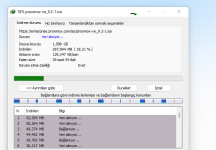

Screenshot_301.png
 
After seeing this thread, I decided to download the latest ISO since I hadn't done so recently, and I found that downloading the VE ISO only takes 3 minutes.

I think it's probably a network issue.
 
After seeing this thread, I decided to download the latest ISO since I hadn't done so recently, and I found that downloading the VE ISO only takes 3 minutes.

I think it's probably a network issue.
I've tried mobile, fiber, and in different cities, and they all have the same problem; it's not downloading. If it worked for you, could you please share the Google Drive link?
 
Hello, did you run a traceroute enterprise.proxmox.com?

In Germany over O2 VDSL 50 MBit download speed i got:
7 Hops to enterprise.proxmox.com:
Code:
$ traceroute enterprise.proxmox.com
[cut]
 4  lag2.0002.corp.02.fra.de.net.telefonica.de (62.53.9.53)  9.833 ms lag1.0002.corp.02.fra.de.net.telefonica.de (62.53.10.51)  10.394 ms  10.376 ms
 5  de-cix.fra.servinga.com (80.81.195.25)  10.954 ms  10.936 ms  10.949 ms
 6  eth-27.cs02.fra1.de.servinga.com (185.212.45.17)  11.423 ms  10.539 ms  10.833 ms
 7  185.219.221.167 (185.219.221.167)  10.914 ms  9.031 ms  9.052 ms
And a wget https://enterprise.proxmox.com/iso/proxmox-ve_9.2-1.iso work fine for me.
Code:
--2026-06-17 08:48:59-- https://enterprise.proxmox.com/iso/proxmox-ve_9.2-1.iso
Auflösen des Hostnamens enterprise.proxmox.com (enterprise.proxmox.com) … 2a0b:7140:5:100::167, 185.219.221.167
Verbindungsaufbau zu enterprise.proxmox.com (enterprise.proxmox.com)|2a0b:7140:5:100::167|:443 … verbunden.
HTTP-Anforderung gesendet, auf Antwort wird gewartet … 200 OK
Länge: 1706178560 (1,6G) [application/octet-stream]
Wird in ‘proxmox-ve_9.2-1.iso’ gespeichert.

proxmox-ve_9.2-1.iso                      100%[=====================================================================================>]   1,59G  6,85MB/s    in 3m 57s

2026-06-17 08:52:56 (6,86 MB/s) - ‘proxmox-ve_9.2-1.iso’ gespeichert [1706178560/1706178560]

Please check you dns record results:
Code:
$ dig -t a enterprise.proxmox.com
[cut]
;; ANSWER SECTION:
enterprise.proxmox.com.    540    IN    CNAME    enterprise.cdn.proxmox.com.
enterprise.cdn.proxmox.com. 56    IN    CNAME    de.eu.cdn.proxmox.com.
de.eu.cdn.proxmox.com.    56    IN    CNAME    de.cdn.proxmox.com.
de.cdn.proxmox.com.    56    IN    A    212.224.123.70

$ dig -t aaaa enterprise.proxmox.com
[cut]
;; ANSWER SECTION:
enterprise.proxmox.com.    32    IN    CNAME    enterprise.cdn.proxmox.com.
enterprise.cdn.proxmox.com. 32    IN    CNAME    de.eu.cdn.proxmox.com.
de.eu.cdn.proxmox.com.    32    IN    CNAME    de.cdn.proxmox.com.
de.cdn.proxmox.com.    0    IN    AAAA    2a01:7e0:0:424::249
So i think you must check all path to and from the world in your country.
My be there is some asymmetric routing?
 
Last edited:
Hello, did you run a traceroute enterprise.proxmox.com?

In Germany over O2 VDSL 50 MBit download speed i got:
7 Hops to enterprise.proxmox.com:
Code:
$ traceroute enterprise.proxmox.com
[cut]
 4  lag2.0002.corp.02.fra.de.net.telefonica.de (62.53.9.53)  9.833 ms lag1.0002.corp.02.fra.de.net.telefonica.de (62.53.10.51)  10.394 ms  10.376 ms
 5  de-cix.fra.servinga.com (80.81.195.25)  10.954 ms  10.936 ms  10.949 ms
 6  eth-27.cs02.fra1.de.servinga.com (185.212.45.17)  11.423 ms  10.539 ms  10.833 ms
 7  185.219.221.167 (185.219.221.167)  10.914 ms  9.031 ms  9.052 ms
And a wget https://enterprise.proxmox.com/iso/proxmox-ve_9.2-1.iso work fine for me.
Code:
--2026-06-17 08:48:59-- https://enterprise.proxmox.com/iso/proxmox-ve_9.2-1.iso
Auflösen des Hostnamens enterprise.proxmox.com (enterprise.proxmox.com) … 2a0b:7140:5:100::167, 185.219.221.167
Verbindungsaufbau zu enterprise.proxmox.com (enterprise.proxmox.com)|2a0b:7140:5:100::167|:443 … verbunden.
HTTP-Anforderung gesendet, auf Antwort wird gewartet … 200 OK
Länge: 1706178560 (1,6G) [application/octet-stream]
Wird in ‘proxmox-ve_9.2-1.iso’ gespeichert.

proxmox-ve_9.2-1.iso                      100%[=====================================================================================>]   1,59G  6,85MB/s    in 3m 57s

2026-06-17 08:52:56 (6,86 MB/s) - ‘proxmox-ve_9.2-1.iso’ gespeichert [1706178560/1706178560]

Please check you dns record results:
Code:
$ dig -t a enterprise.proxmox.com
[cut]
;; ANSWER SECTION:
enterprise.proxmox.com.    540    IN    CNAME    enterprise.cdn.proxmox.com.
enterprise.cdn.proxmox.com. 56    IN    CNAME    de.eu.cdn.proxmox.com.
de.eu.cdn.proxmox.com.    56    IN    CNAME    de.cdn.proxmox.com.
de.cdn.proxmox.com.    56    IN    A    212.224.123.70

$ dig -t aaaa enterprise.proxmox.com
[cut]
;; ANSWER SECTION:
enterprise.proxmox.com.    32    IN    CNAME    enterprise.cdn.proxmox.com.
enterprise.cdn.proxmox.com. 32    IN    CNAME    de.eu.cdn.proxmox.com.
de.eu.cdn.proxmox.com.    32    IN    CNAME    de.cdn.proxmox.com.
de.cdn.proxmox.com.    0    IN    AAAA    2a01:7e0:0:424::249
So i think you must check all path to and from the world in your country.
My be there is some asymmetric routing?

We tried 3 different operators, most likely there is a connection problem between Türkiye and Proxmox, this problem has been going on for about 6-7 months.


Code:
Tracing route to at1.cdn.proxmox.com [45.144.208.36]
over a maximum of 30 hops:

  1     3 ms     2 ms     2 ms  192.168.0.1
  2     8 ms     5 ms     5 ms  172.17.1.42
  3    16 ms    15 ms    17 ms  10.170.13.21
  4     *       19 ms     *     10.170.12.37
  5     *       15 ms     *     34.92.146.159.srv.turk.net [159.146.92.34]
  6    15 ms    15 ms    14 ms  166.103.192.193.static.turk.net [193.192.103.166]
  7     *       24 ms     *     210.39.223.31.srv.turk.net [31.223.39.210]
  8     *        *        *     Request timed out.
  9    23 ms    23 ms    23 ms  194.103.192.193.static.turk.net [193.192.103.194]
 10    48 ms    48 ms    48 ms  as57463.226.179.netix.net [185.1.226.179]
 11    55 ms    79 ms    56 ms  nix4.nextlayer.at [91.210.17.59]
 12    60 ms    60 ms    60 ms  ae2-0-r31.inx.vie.nextlayer.net [92.60.2.96]
 13    59 ms    60 ms    59 ms  et-0-0-3.e3.ix.vie.ipax.at [213.208.150.194]
 14     *        *        *     Request timed out.
 15    59 ms    58 ms    59 ms  45.144.208.36

Trace complete.
 
I've forwarded this thread to our infrastructure team - these kind of peering issues happen from time to time unfortunately.
 
  • Like
Reactions: jtru and djsami
We tried 3 different operators, most likely there is a connection problem between Türkiye and Proxmox, this problem has been going on for about 6-7 months.
hm - at least part of the issue is that an IP that might be yours (based on public IPs in your traceroute ) indeed ran into a rate limit - my guess is that your parallel downloader app opened too many parallel connections.
Sadly we had to install some rate-limits as else the download-speeds were worse for most users.

to rule out that there's indeed a bandwidth/peering issue between Türkiye and some of our download mirrors - could you try using the following ip's for downloading the iso (via /etc/hosts entry or the like):
* `45.144.208.36`
* `51.91.38.34`
* `45.84.67.184`

the individual download nodes do change from time to time - so I'd not recommend to make this a permanent entry.

I hope this helps!
 
  • Like
Reactions: _gabriel
hm - at least part of the issue is that an IP that might be yours (based on public IPs in your traceroute ) indeed ran into a rate limit - my guess is that your parallel downloader app opened too many parallel connections.
Sadly we had to install some rate-limits as else the download-speeds were worse for most users.

to rule out that there's indeed a bandwidth/peering issue between Türkiye and some of our download mirrors - could you try using the following ip's for downloading the iso (via /etc/hosts entry or the like):
* `45.144.208.36`
* `51.91.38.34`
* `45.84.67.184`

the individual download nodes do change from time to time - so I'd not recommend to make this a permanent entry.

I hope this helps!

Hi,

Thank you! The temporary host entry actually worked perfectly on my Linux server. As you can see below, wget pulled the ISO via 45.144.208.36 with great speed (~58 MB/s) and without any drops:

Bash

[root@cpanel06 ~]<span># wget https://enterprise.proxmox.com/iso/proxmox-ve_9.2-1.iso</span><br>Connecting to enterprise.proxmox.com (enterprise.proxmox.com)|45.144.208.36|:443... connected.<br>HTTP request sent, awaiting response... 200 OK<br>Length: 1706178560 (1.6G) [application/octet-stream]<br><br>proxmox-ve_9.2-1.iso 100%[===================&gt;] 1.59G 71.1MB/s <span>in</span> 28s<br>2026-06-17 20:00:24 (58.1 MB/s) - ‘proxmox-ve_9.2-1.iso’ saved<br>

Interestingly, the issue still persists on my Windows machine (even after updating the Windows hosts file and flushing the DNS). It seems like my Windows download manager or browser is aggressively trying to open multiple connections, or a persistent session is still getting blocked by your rate-limiter, whereas the single-connection wget on Linux bypasses it completely.

Since I successfully grabbed the ISO via Linux, I am good to go. I will investigate the connection behavior on my Windows client side.

Thanks again for pointing me to the correct nodes!
 
Interestingly, the issue still persists on my Windows machine (even after updating the Windows hosts file and flushing the DNS). It seems like my Windows download manager or browser is aggressively trying to open multiple connections, or a persistent session is still getting blocked by your rate-limiter, whereas the single-connection wget on Linux bypasses it completely.
if the download manager uses many connections than it will run into rate-limits on all our download mirrors.

As you can see below, wget pulled the ISO via 45.144.208.36 with great speed (~58 MB/s) and without any drop
Thanks for the feedback - would be great if you could try again with the other 2 hosts (with a short pause in between and a single wget) - might help us get a better view of how we could direct traffic better.