Hello all,
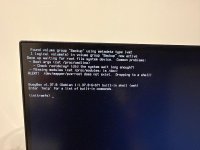
I have a spare PC which I am planning to use for Proxmox server backups, SMB transfer, image library, plex server and other stuff. I am currently having an issue with the HBA not working.
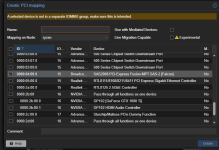
When I add the PCI mapping of the HBA to the Truenas, I get an error.
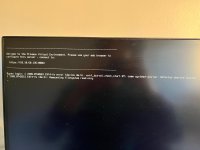
From this point on, I can't do anything. it stays on this screen. I order for me to get pass this, I need to re install proxmox.
The pc spec:
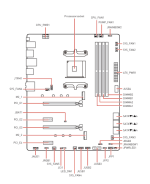
I wanted to utilise m.2 slot 2 but couldn't as it interferes with the bus lane for HBA.
My next option down the line is to get 2 SSD for redundancy and plug it into the motherboard Sata.
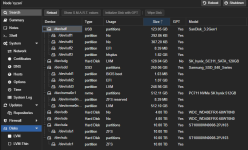
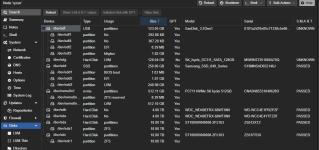
Anyhow, I can see proxmox has detected the HDD/SDD
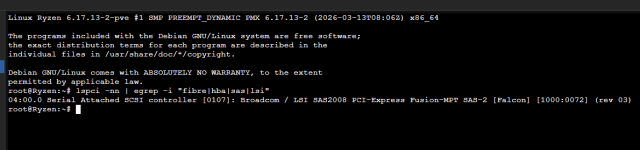
Proxmox can see the HBA by running this command in shell
root@ryzen:~# lspci | grep -iE "sas|raid|fibre"
02:00.1 RAID bus controller: Advanced Micro Devices, Inc. [AMD] Device 43bd
04:00.0 Serial Attached SCSI controller: Broadcom / LSI SAS2008 PCI-Express Fusion-MPT SAS-2 [Falcon] (rev 03)
root@ryzen:~#
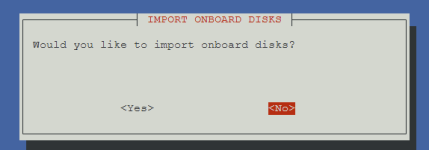
I am using the community script to install Truenas- https://community-scripts.org/scripts?q=truenas
I am using the advanced setup process and did not choose any disk as it would be backward approach adding it one by one.
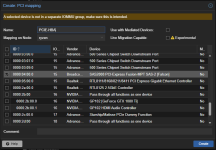
I have created the HBA under Datacenter > Resource mappings
When I create a container for Truenas and try and add the PCIE HBA into the hardware section I see the 1st picture error and can't do anything after that.
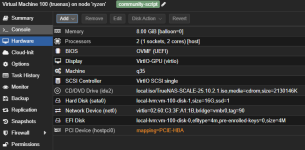
When I add the drivers individually using this command, I can see the drives within truenas.
qm set 100 -scsi1 /dev/disk/by-id/ata-ST10000VN0008-2PJ103_ZS512X
qm set 100 -scsi2 /dev/disk/by-id/ata-ST10000VN0008-2PJ103_ZS51FR
qm set 100 -scsi3 /dev/disk/by-id/ata-WDC_WD40EFRX-68WT0N0_WD-WCC4E1PRZP
qm set 100 -scsi3 /dev/disk/by-id/ata-WDC_WD40EFRX-68WT0N0_WD-WCC4E4YTFZ
Can someone point me into the right direction please
I have a spare PC which I am planning to use for Proxmox server backups, SMB transfer, image library, plex server and other stuff. I am currently having an issue with the HBA not working.
When I add the PCI mapping of the HBA to the Truenas, I get an error.
From this point on, I can't do anything. it stays on this screen. I order for me to get pass this, I need to re install proxmox.
The pc spec:
- MSI B550 Tomahawk
- 5950X
- 1080TI - PCIE slot 1
- HBA - LSI 9200-8i(IT Mode) - plugged into pcie slot 3
- x4 HDD drives (x2 4TB, x2 10TB)
- Samsung 2.5 SSD 256GB
- M.2 512GB slot 1
- USB adaptor which has an external m.2 128GB
I wanted to utilise m.2 slot 2 but couldn't as it interferes with the bus lane for HBA.
My next option down the line is to get 2 SSD for redundancy and plug it into the motherboard Sata.
Anyhow, I can see proxmox has detected the HDD/SDD
Proxmox can see the HBA by running this command in shell
Code:
lspci | grep -iE "sas|raid|fibre"root@ryzen:~# lspci | grep -iE "sas|raid|fibre"
02:00.1 RAID bus controller: Advanced Micro Devices, Inc. [AMD] Device 43bd
04:00.0 Serial Attached SCSI controller: Broadcom / LSI SAS2008 PCI-Express Fusion-MPT SAS-2 [Falcon] (rev 03)
root@ryzen:~#
I am using the community script to install Truenas- https://community-scripts.org/scripts?q=truenas
I am using the advanced setup process and did not choose any disk as it would be backward approach adding it one by one.
I have created the HBA under Datacenter > Resource mappings
When I create a container for Truenas and try and add the PCIE HBA into the hardware section I see the 1st picture error and can't do anything after that.
When I add the drivers individually using this command, I can see the drives within truenas.
qm set 100 -scsi1 /dev/disk/by-id/ata-ST10000VN0008-2PJ103_ZS512X
qm set 100 -scsi2 /dev/disk/by-id/ata-ST10000VN0008-2PJ103_ZS51FR
qm set 100 -scsi3 /dev/disk/by-id/ata-WDC_WD40EFRX-68WT0N0_WD-WCC4E1PRZP
qm set 100 -scsi3 /dev/disk/by-id/ata-WDC_WD40EFRX-68WT0N0_WD-WCC4E4YTFZ
Can someone point me into the right direction please
Attachments
Last edited: