Hello everyone,
today for the first time I installed Proxmox on the server “ProLiant DL360 Gen9”. All the Proxmox installations I have done so far were on home PCs.
Everything went well though I'm still left with doubts about disk partitioning.
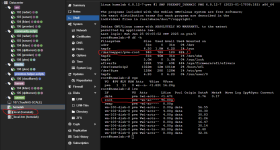
As you can see from the picture, in the 20 Gb “sda” disk I installed Proxmox.
Instead “sdb” is a raid of 8 disks (I have to figure out if the raid is already configured, I think so because before on the server there was ESXi).

Currently the server has:
I would like to remove these two volumes and extend the system partition and create these two volumes again within “sdb”.
I tried in do you install Proxmox to partition the disks but the setup only gave me the option to choose which disk to use and I chose the first 20 Gb one.
How do you recommend that I proceed?
Thank you all for the help!
today for the first time I installed Proxmox on the server “ProLiant DL360 Gen9”. All the Proxmox installations I have done so far were on home PCs.
Everything went well though I'm still left with doubts about disk partitioning.
As you can see from the picture, in the 20 Gb “sda” disk I installed Proxmox.
Instead “sdb” is a raid of 8 disks (I have to figure out if the raid is already configured, I think so because before on the server there was ESXi).
Currently the server has:
- one 8.94 Gb “local” disk.
- one 7.04 Gb “local-lvm” disk.
I would like to remove these two volumes and extend the system partition and create these two volumes again within “sdb”.
I tried in do you install Proxmox to partition the disks but the setup only gave me the option to choose which disk to use and I chose the first 20 Gb one.
How do you recommend that I proceed?
Thank you all for the help!