Guide for Persistent Storage over NFS/SMB for OCI-based LXCs?

Sep 1, 2022
574
217
68
42
Hello,

I'd like to experiment with the new OCI container-in-LXC support in PVE 9. I've got a relatively simple container picked out to try (basically, an internet uptime monitor to detect WAN disconnects), but it's going to need a bit of external storage.

I know I can do this with bind-mounts, but I'm not sure how to configure everything. Usually, I'd set up a container's bind mount in Docker compose if I'm using a Docker image. I know I can add a bind mount to an NFS or SMB share on the host to an LXC, but I'm not sure how to tell the OCI image to actually use the bind mount as its data directory.

I know I'd need to edit something in the LXC's config file, but I wanted to ask here if there's a good introductory guide to doing simple setups like this before I just started YOLO'ing it.
 
Last edited:
There is no OCI-specific volume wiring to learn. You do not tell the image to use the mount. You mount storage where the image already writes.

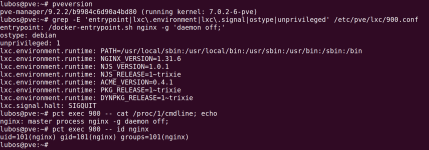
I ran this on PVE 9.2.2 rather than guess at it. Pulling docker.io/library/nginx as an example with Pull from OCI Registry and then running pct create gives you a normal container config. The image config turns into native LXC keys:

Code:
entrypoint: /docker-entrypoint.sh nginx -g 'daemon off;'
ostype: debian
unprivileged: 1
lxc.environment.runtime: PATH=...
lxc.signal.halt: SIGQUIT

1789605088820.png

Note what is missing: there is no volume key. The nginx image declares no Volumes and no WorkingDir in its config blob, and most images are the same. So storage is just an ordinary mount point:

Code:
pct set 900 -mp0 /tank/oci-test,mp=/usr/share/nginx/html

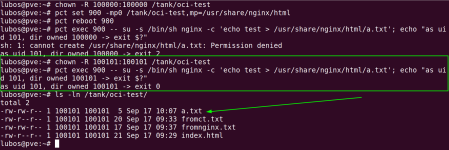
The part that will cost you time is uid mapping, not the mount. In an unprivileged container the image's process is often not root. nginx runs its master as uid 0 but its workers as uid 101, so the host path has to be owned by 100101, not 100000. Owned by 100000 the write is denied. Owned by 100101 it works:

1789605131318.png

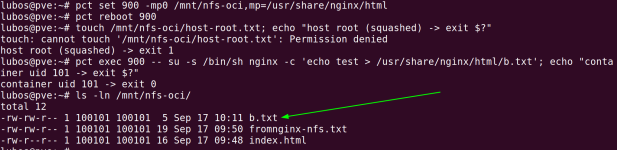
For your NFS case the fix goes on the NFS server, not on the PVE host. root_squash is not what is stopping you, because the container never writes as root. Host root gets squashed and denied, while the container's uid 101 arrives at the server as 100101 and writes fine once the exported directory is owned by 100101:

1789605153080.png

SMB behaves differently, and it is worth knowing before you start. Ownership is decided by the cifs mount options on the host, not by the server:

Code:
mount -t cifs //server/share /mnt/smb-oci -o username=x,password=y,uid=100101,gid=100101,file_mode=0664,dir_mode=0775

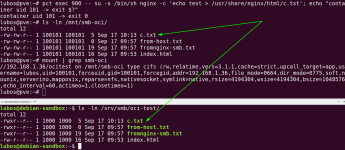
The host then shows every file as 100101 and the container can use it. On the server those same files are owned by the Samba user (uid 1000 here), and the container's uid never crosses the wire. So chown on the server does nothing for the mapping. If writes fail, it is because the Samba user has no write permission on the underlying directory. That is what caught me out:

1789605171483.png

Short version for your uptime monitor: find the uid the image's process runs as, add 100000, and make the storage owned by that. Local and NFS need a chown, SMB needs the right mount options.

Hope this helps
Lubos
 
  • Like
Reactions: SInisterPisces
Thanks. I'll have to cogitate on all that a bit more to make sure I understand it, but I really appreciate the detailed explanation.

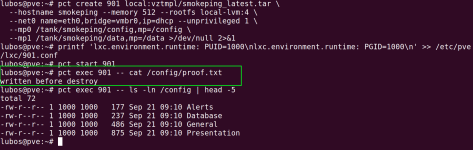
I also realize that I failed to explain my original question properly. The above isn't exactly what I was worried about. I'm actually trying to figure out how to replicate the persistent storage provided by Docker bind mounts, since the only way to update a container is to destroy it and recreate it with a new template.

So, using Smokeping as an example again, here's its Docker compose file:
YAML:
---
services:
  smokeping:
    image: lscr.io/linuxserver/smokeping:latest
    container_name: smokeping
    hostname: smokeping #optional
    environment:
      - PUID=1000
      - PGID=1000
      - TZ=Etc/UTC
      - MASTER_URL=http://<master-host-ip>:80/smokeping/ #optional
      - SHARED_SECRET=password #optional
      - CACHE_DIR=/tmp #optional
    volumes:
      - /path/to/smokeping/config:/config
      - /path/to/smokeping/data:/data
    ports:
      - 80:80
    restart: unless-stopped

Specifically, I'm looking at this part:
Code:
 volumes:
      - /path/to/smokeping/config:/config
      - /path/to/smokeping/data:/data

When I bring up the container, I want some way to tell the LXC that the internal /config and /data directories need to be mapped to specific places on my host's storage, just like I would with the above Docker compose file.

I know I can set environment variables from the PVE GUI, but unless I'm missing something, there's not a way to mimic the Docker bind mount setup before the container spins up. That complicates both initial setup and any potential upgrade when a new version of of the container drops.

EDIT: If this isn't possible yet, that's cool, too. I'm sure something like this will be possible eventually if it's not possible now.
 
Last edited: